Tools for inserting elements into the multi-line diagram
The "Buses", "Ground", "Power supply", "Switchgear", "Terminal elements" and "Measurement and control" sections of the main toolbar contain the options for inserting and positioning the various components of the multiline diagram within each of the defined views:

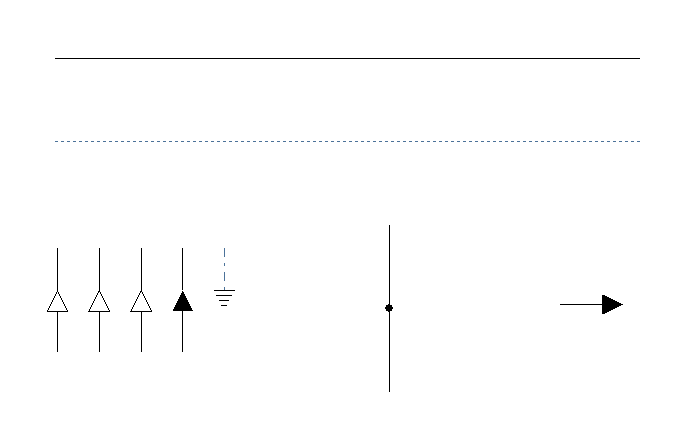
Options in the "Buses" section
This section contains the following options:
- Bus line
Draws bus lines connecting the elements in the diagram. - Interlock
Inserts an interlock line. - Continuation points
Inserts continuation points between sections of a diagram. For example, a power distribution board diagram may include a continuation point that leads to a sub-board. The sub-board diagram can then start from a continuation point. The following data must be defined:- Type (1BR / 1BR+1BTH / 2BR / 2BR+2BTH / 2BR+2BTH / 2BR+2BTH / 3BR / 3BR+3BTH / 3BR+3BTH / 3BR+3BTH / 4BR)
- Description
- Connection
Connection points to be added to a bus or interlock line. - End points
Inserts end points for the diagrams. The following information must be defined:- Description
Options in the "Earth" section
This section contains the following options:
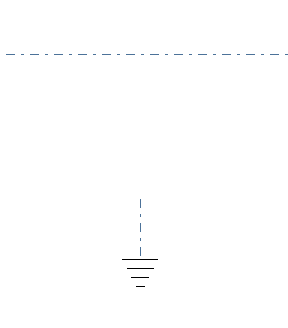
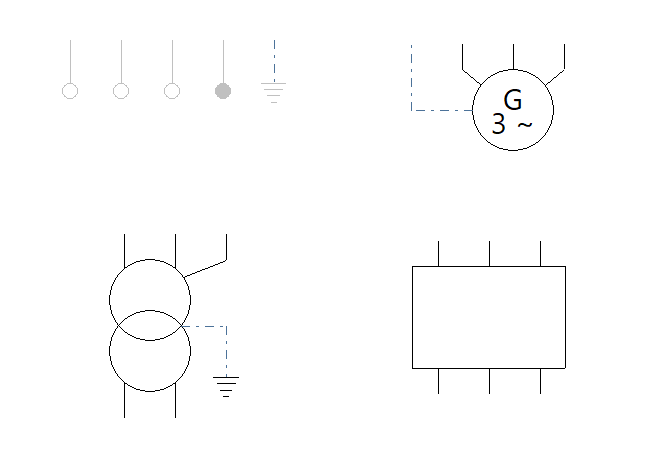
- Earthing bus
Inserts a ground bus line. - Earth
Specify a ground connection point.
Options in the "Power" section
This section contains the following options:
- Supply
Inserts a supply point. The following details must be provided:- Type (2P / 3P / 4P / 1PN / 2PN / 3PN / 2PT / 3PT / 1PNT / 2PNT / 3PNT)
- Description
- Transformer
Inserts a transformer. You must specify the following details:- Earthing diagram (TT (neutral to earth) / TN-S (neutral earthed) / IT (isolated neutral) / IT (impedance-coupled neutral))
- Input (Supply / 3-pin / 1-pin + neutral / 3-pin + neutral)
- Output (3-pin / 1-pin + N / 3-pin + N)
- Description
- Generator
Inserts a generator. You must specify the following details:- Type (2PT / 3PT / 4PT)
- Description
- Battery
Inserts a battery. You must specify the following details:- Type (1-bedroom / 2-bedroom / 3-bedroom / 3-bedroom / 4-bedroom)
- Description
Options in the "Switchgear" section
This section contains the following options:
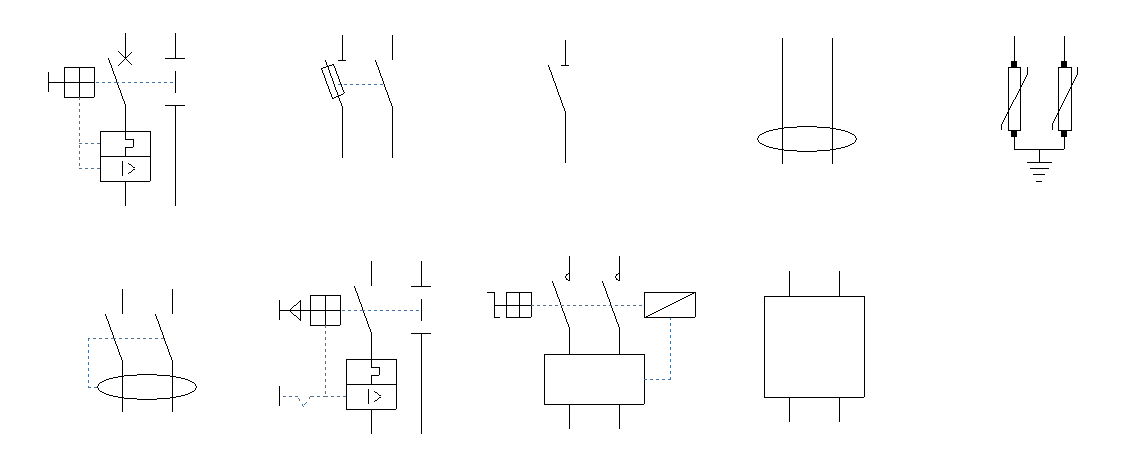
- Circuit breaker (1P / 1PN / 2P / 3P / 3PN / 4P)
Inserts a circuit breaker. The following parameter must be specified:- With surge protector for permanent overvoltages (optional)
- Residual-current device (1P / 1PN / 2P / 3P / 3PN / 4P)
Inserts a residual current circuit breaker. - Fuse (1P / 1PN / 2P / 3P / 3PN / 4P)
Inserts a fuse. - Magnetic starter (1P / 1PN / 2P / 3P / 3PN / 4P)
Inserts a magnetic starter. - Sectionaliser (1P / 1PN / 2P / 3P / 3PN / 4P)
Inserts a sectionaliser. - Starter (1-pole / 2-pole / 3-pole / 3-pole / 4-pole)
Inserts a starter. - Power control system (1P / 2P / 3P / 3PN / 4P)
Inserts a power control system. - UPS (1-phase / 2-phase / 3-phase / 3-phase / 4-phase)
Inserts an uninterruptible power supply. - Surge protector for transient overvoltages (1PN / 2P / 3P / 3PN / 4P)
Inserts a surge protector for transient overvoltages.
You can enter a "Description" for each of these items.
Options in the "Terminal elements" section
This section contains the following options:
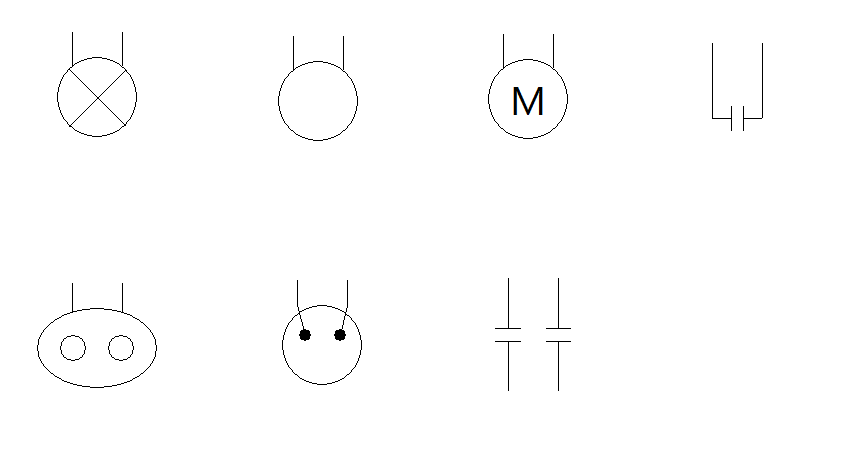
- Lighting (1-point / 2-point / 3-point / 3-point / 4-point)
Inserts a light fitting. You must specify the following parameter:- Protection (optional)
- Emergency (1-light / 2-light / 3-light / 3-light / 4-light)
Inserts an emergency light fitting. You must specify the following parameter:- Protection (optional)
- Generic (1BR / 2BR / 3BR / 3BR / 4BR)
Inserts a generic outlet. You must specify the following parameter:- Protection (optional)
- Electrical outlet (1PN / 2P / 3P / 3PN / 4P)
Inserts an electrical outlet. You must specify the following parameter:- Protection (optional)
- Motor (1PN / 2P / 3P / 3PN / 4P)
Inserts a motor. You must specify the following parameter:- Protection (optional)
- Capacitor (1P / 1PN / 2P / 3P / 3PN / 4P)
Inserts a capacitor. - Capacitor bank (1PN / 2P / 3P / 3PN / 4P)
Inserts a capacitor bank.
You can enter a "Description" for each of these elements.
Options in the "Measurement and control" section
This section contains the following options:
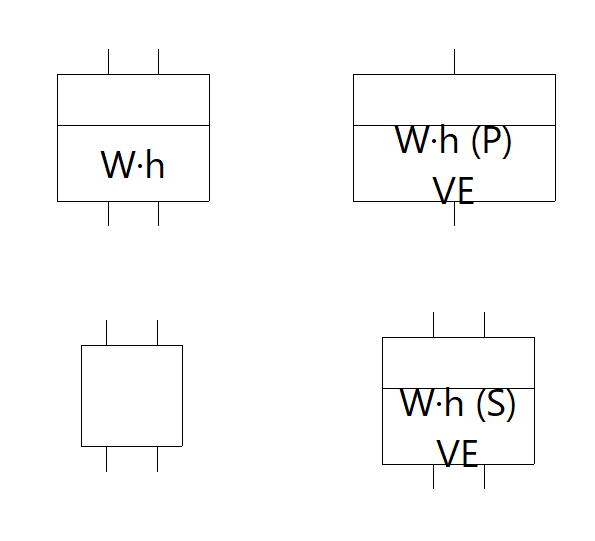
- Meter (1B / 1BR / 2B / 3B / 3BR / 4B)
Inserts a meter. - Network analyser (1-phase / 2-phase / 3-phase / 3-phase neutral / 4-phase)
Inserts a network analyser. - Main electricity meter (EV) (1P / 1PN / 2P / 3P / 3PN / 4P)
Inserts a main electricity meter in premises equipped with infrastructure for charging electric vehicles. - Secondary electricity meter (EV) (1P / 1PN / 2P / 3P / 3PN / 4P)
Inserts a secondary electricity meter in facilities equipped with infrastructure for charging electric vehicles.
You can enter a "Description" for all elements.