Setting up the working environment
When you launch the program and click on "New...", you are given the option to create a "New job", which can then be integrated into a BIMserver.center project.
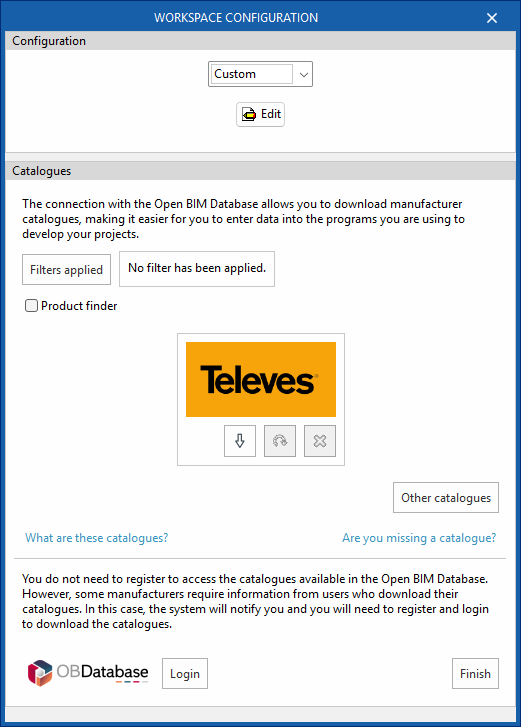
This opens the "Workspace configuration" dialogue box, which allows you to do the following:
- First, select the applicable regulations from those available in the drop-down menu. If the regulations for the desired country are not listed, you can select the "Custom" option and configure the checks to be carried out for the different networks via "Edit".
- Secondly, you can download manufacturer's catalogues, which makes data entry easier. Using the "Applied filters" and "Product search" options, you can apply filters when searching through the catalogues.
- Thirdly, at the bottom of this dialogue box, log in using your Open BIM Database username and password.
If you close or cancel this window without clicking "Finish", the program will create the project without applying any settings.
If you wish to load the settings at a later date, customise them, or manage the project catalogues, you can use the "Settings" and "Catalogues" tools respectively, located on the top toolbar of the "3D Model", "Diagrams: Analysis" and "Diagrams: Detail" tabs within the "Project" section.
| Note: |
|---|
| Please click on the following link to view the codes implemented in the program. |