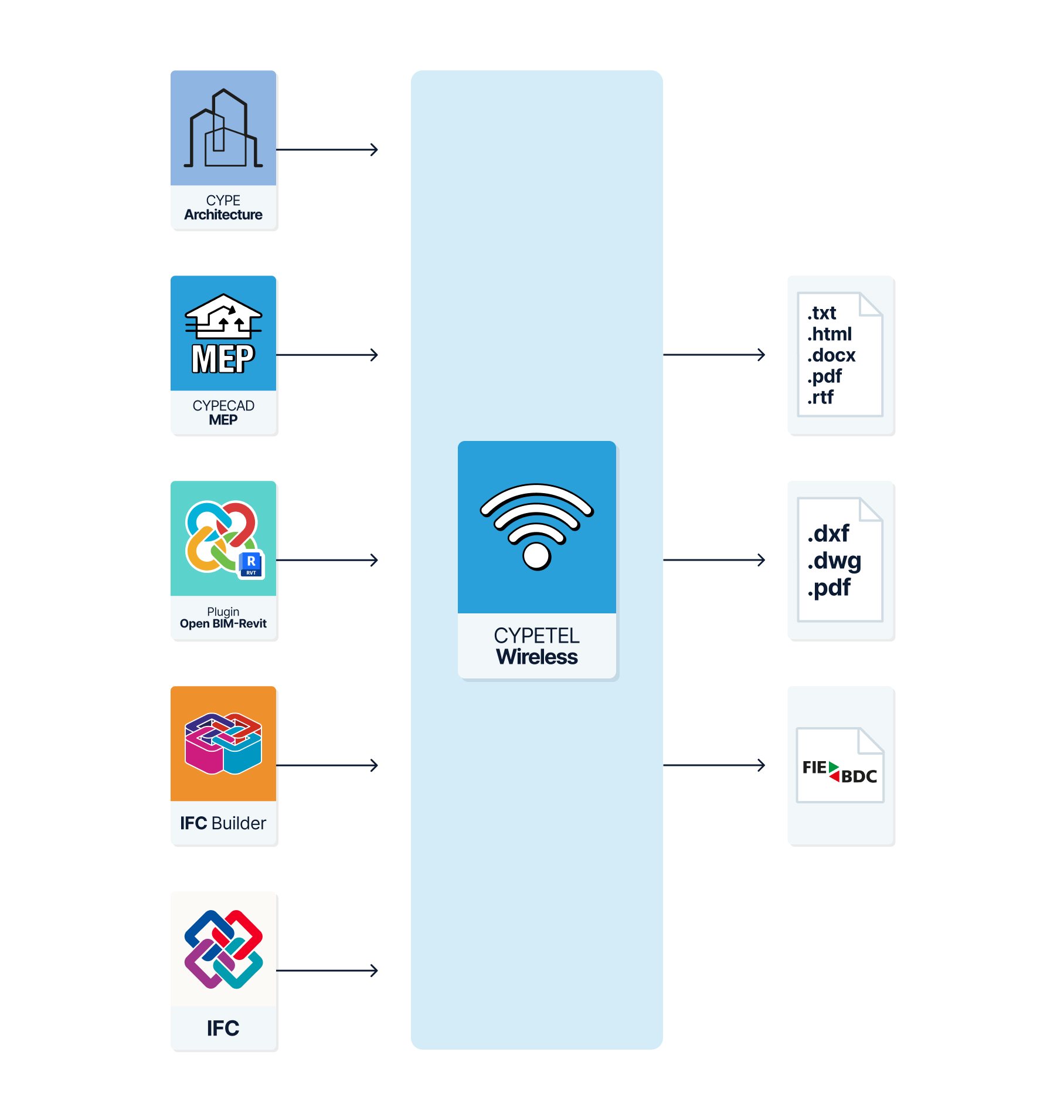
Workflows supported by the program
As CYPETEL Wireless is an Open BIM tool and is connected to the BIMserver.center platform, it offers a range of workflow options.
Data entry
Importing BIM models
By linking CYPETEL Wireless to a BIM project on the BIMserver.center platform, you can perform the following actions:
- Importing the model containing the building’s geometry. This allows you to generate the building’s floor plans and import the rooms based on those extracted from the BIM model. The available options include the following:
- Importing models designed in CYPE Architecture.
- Importing models designed in Autodesk Revit using the Open BIM - Revit plugin.
- Importing models designed in IFC Builder.
- Importing models in IFC format (generated by CAD/BIM software such as Allplan, ArchiCAD, and others) into the BIMserver.center project via the web platform.
Data output
- Exporting reports to HTML, DOCX, PDF, RTF and TXT formats.
- Exporting drawings to DXF, DWG and PDF formats.
- Exporting the bill of quantities to FIEBDC-3 format.
- Exporting data generated using CYPETEL Wireless to the BIMserver.center platform in IFC and GLTF formats. This enables authorised project stakeholders to view the data.