Work environment
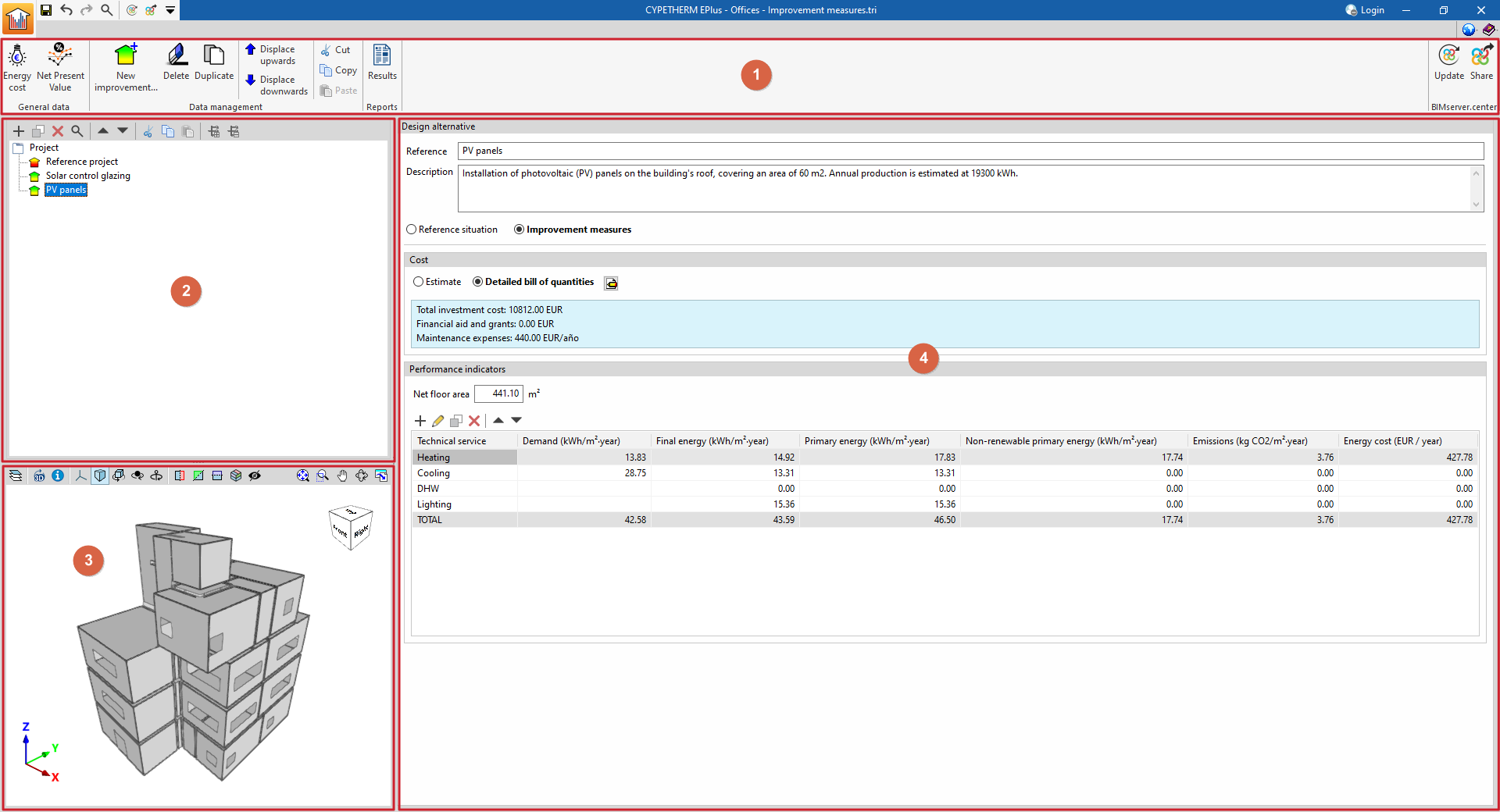
The work environment for managing improvement measures or design alternatives in CYPETHERM EPlus features a user-friendly interface comprising the following sections:
- The top toolbar (1) contains tools for defining general project data, managing data relating to the improvement measures tree, building scenarios or design alternatives, generating reports, and connecting to BIMserver.center.
- The tree-like structure (2) on the left-hand side of the screen allows you to define the various improvement measures, situations or design alternatives to be considered in the calculations, such as the following:
- The baseline condition of the building under assessment, which describes its energy performance in its initial state.
- The building improvement measures, including the energy performance achieved as a result of implementing them, together with a description of the measures and the associated costs.
- The 3D viewer (3), located at the bottom left of the interface, displays the models hosted on the BIMserver.center project to which the project has been linked.
- The data editing panel (4) on the right-hand side of the screen displays and allows you to enter the data associated with the design situation or alternatives selected in the tree.