

Selecting the project type
When opening a new project in CYPETHERM, after entering the file name and description, the program opens the "Project type" window. Here, you must select the type of project you wish to work on from the following options:
- Thermal and energy analysis
- Energy simulation
- Thermal loads
- SCE-CS Plus (available in Portuguese)
- SCE-HAB Model (available in Portuguese)
- RE2020 (available in French)
- Alternative assessment
- Improvement measures analysis
- Improvement measures analysis (SCE-HAB) (available in Portuguese)
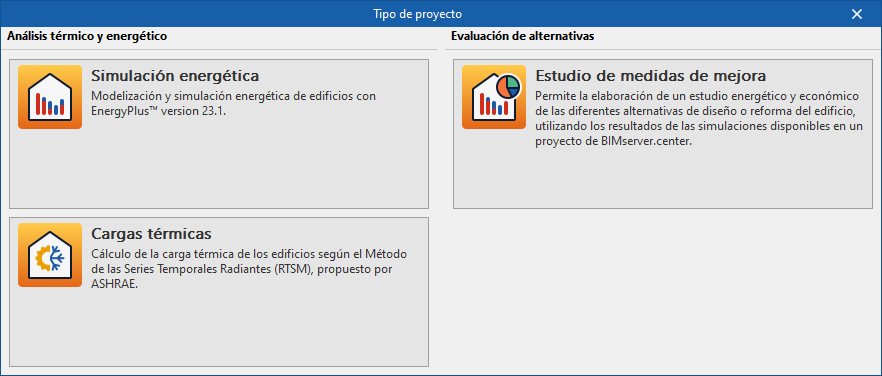
Selecting a specific project type allows you to open a CYPETHERM file that contains tabs with specific work environments for different purposes, as listed below:
| Project type | Objective | Tabs available when selecting this type of project | Equivalent discontinued program |
| Energy simulation | Modelling and carrying out energy simulations for buildings using the EnergyPlus™ calculation engine. | -3D model* -Thermal model -EPlus | CYPETHERM EPlus, "Energy Simulation" interface (More information) |
| Thermal loads | Calculating the building’s heat loads using the Radiant Time Series Method (RTSM) proposed by ASHRAE. | -3D model* -Thermal model -Loads | CYPETHERM LOADS (More information) |
| SCE-CS Plus | Carrying out the verification of the Energy Performance Certification System for Buildings (SCE) for commercial and service buildings in Portugal, by means of energy simulations of building models using the EnergyPlus™ analysis engine. | -3D model* -Thermal model -SCE-CS Plus | CYPETHERM SCE-CS Plus (More information) |
| SCE-HAB Model | Assessing the energy performance of buildings in accordance with the requirements applicable to residential buildings regulated by the Building Energy Certification System (SCE), based on Portuguese Decree-Law No. 101-D/2020. | -3D model* -Thermal model -SCE-HAB Model | CYPETHERM SCE-HAB Model (More information) |
| RE2020 | Developing and optimising new-build projects in accordance with the energy requirements of France’s 2020 Environmental Regulations (RE2020). | -3D model* -Thermal model -RE2020 | CYPETHERM RE2020 (More information) |
| Improvement measures study | Carrying out an energy and cost analysis of different design options or improvement measures for the building refurbishment, using the results of the simulations available in a BIMserver.center project. | Selecting this type of project opens a CYPETHERM file with a single work environment dedicated to managing these improvement measures or design alternatives. | "Improvement measures" interface in CYPETHERM EPlus, formerly CYPETHERM Improvements Plus (More information) |
| Improvement measures study (SCE-HAB) | Carrying out an energy audit of the building and analysing potential measures to improve it, including an energy and cost analysis of the various options. | Selecting this type of project opens a CYPETHERM file with a single work environment dedicated to managing these improvement measures or design alternatives. | CYPETHERM Improvements (More information) |
*The "3D model" tab is only available if the geometry is not imported from data extracted from a BIM model hosted on a BIMserver.center project.
| Note: |
|---|
| CYPETHERM can open files created in CYPETHERM LOADS, CYPETHERM EPlus, CYPETHERM RE2020, CYPETHERM SCE-CS Plus, CYPETHERM SCE-HAB Model or CYPETHERM Improvements. Each of these now-discontinued programs used a specific file extension that differed from the others. When you save a file opened in CYPETHERM, it will be saved with the standard .trm extension. |
