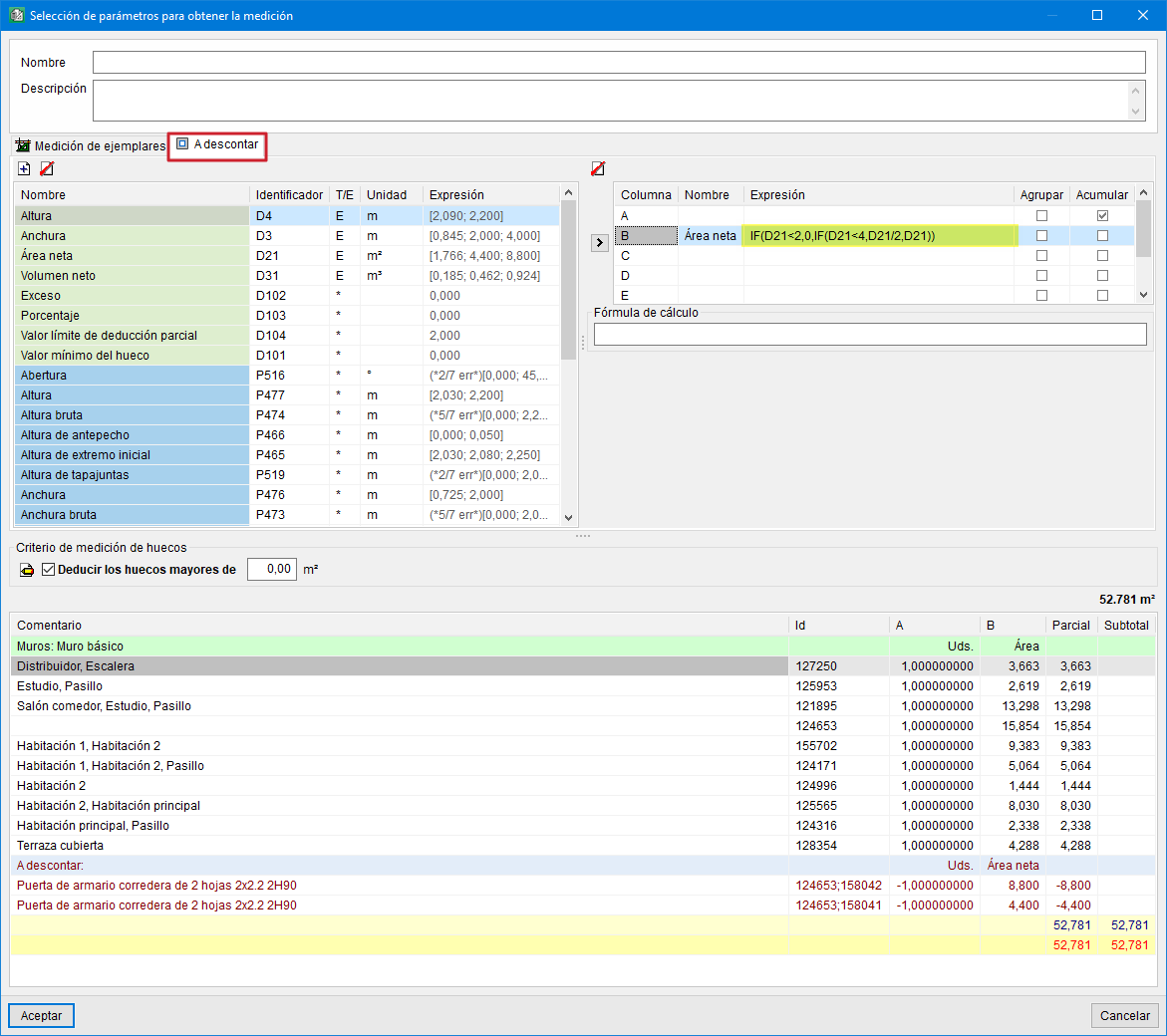
Option for defining the "To deduct" quantity in instances
In the "Selection of parameters for obtaining the quantity" dialogue, the "To deduct" tab is included. This only appears when openings to be deducted have been defined in the Revit model. Here you can define the parameters that will be used in creating the quantity table to be deducted, and it allows rules to be included by means of logical expressions.
In this way, there are more possibilities for obtaining the quantities of the instances, taking into account, for example, the quantities to be deducted for opening reductions.
Example:
With this option it is possible to deduct openings using more than one rule. Thus, openings larger than 4 m² could be deducted in façade or partition (basic wall) quantities, and if the opening is between 2 m² and 4 m², only half of the opening would be deducted. To do this, the logical function IF(logical_expression, true_value, false_value) is entered in the column containing the identifier with the opening area. For the example given, it would appear as follows:IF(D21<2,0,IF(D21<4,D21/2,D21)).