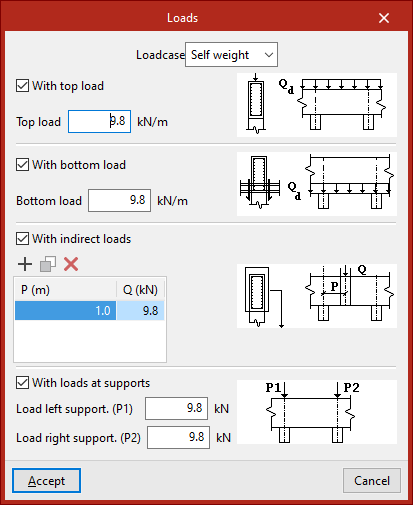
Defining loads on the beam
In the "Edit" section of the main toolbar, you will find the following option, which allows you to define the loads on each beam:

Loads
This option allows you to open a pop-up window in which you can enter the loads applied to each beam.
In the drop-down menu at the top, select the load's "Loadcase" from those previously defined in the project's general settings.
Next, for each loadcase, you can apply loads in different configurations to the beam by selecting the following options:
- With top load (optional)
Enter the value for the beam's "top load". - With bottom load (optional)
Enter the value for the beam's "bottom load". - With indirect loads (optional)
The position is defined and the value of each indirect load on the beam is entered in the list. - With loads at supports (optional)
Enter the load values for the left and right supports ("Load left support(P1)" and "Load right support (P2)")