
Files and folders generated by CYPE software
Files and folders created when downloading the program
During the software download process, a folder named C:\CYPE Ingenieros\Download version 20XX.x\ is created. This folder contains the files required to install the software at a later stage. Once the installation is complete, the folder can be deleted if it is no longer needed.
Files and folders created when installing the program
Once the installation is complete, the folder C:\CYPE Ingenieros\Version 20XX\ is created. These files must be retained to use the software. This folder must be retained if you wish to keep a specific version of the program operational so that it can be used at any time. For example, if you need to review a project in the future under the same conditions as when it was created.
User configuration files generated by default
When the programmes are opened, the user configuration folder C:\Users\Windows_user\AppData\Roaming\CYPE Ingenieros\v20XX\ is automatically created with default settings.
If this folder contains corrupted files, you can close the CYPE programs, rename this folder (for example, to v20XX.copy) and reopen the program so that it is restored to its initial state. Any content created and saved by the user will remain available in the renamed folder should this content need to be moved (by copying and pasting the files) to the newly generated folder for further work.
Files and folders generated during the work process
During the work process, CYPE programs generate files with different file extensions, which are stored in various folders. The following information is provided as a general guide, as each program may generate a specific file structure.
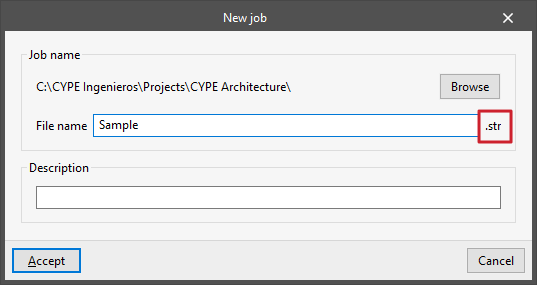
- The main file for each program has a specific file extension, which you can check next to the "File name" when creating a new project (File > New) or when saving under a different name (File > Save As). Each of CYPE’s programs uses different file extensions.
By default, you can find this file in the path C:\CYPE Ingenieros\Proyectos\program_name, although you can change the path at any time via "File > Save as". - In some cases, the file is accompanied by auxiliary files and folders with various extensions, which are located in the same directory as the main file. In some cases, the file is accompanied by auxiliary files and folders with various file extensions, which are located in the same directory as the main file. To transfer the information to another directory or from one computer to another, you must copy all the content in that directory that begins with the same name – including both files and folders – not just the main file.
- During the process, a backup file is created in the same directory as the main file. These files have an extension similar to that of the main file, with the last character replaced by the dollar sign ($). This backup can be restored at any time. To do this, take the file with the dollar sign and manually change its extension by removing the dollar sign and entering the corresponding character to obtain a file with the same extension as the main file. This restored file can be opened with the program just like any other.
- During the work process, data files with different extensions are generated in the Project_Name.EXT_dat folder, where EXT is the extension of the main file.
By default, these files and the folder are located in the same directory as the main file. - During the process of linking, importing and exporting to BIMserver.center, communication files are generated via BIMserver.center and are stored in the folder C:\Users\Windows_user\AppData\Roaming\CYPE Ingenieros\BIMserver.center\bim_projects\user_ID\proy_ID\, with various file extensions (.ifc, .gltf, .pdf, etc.).
These are not the program's native working files, but they enable communication with other programs linked to BIMserver.center. - In some cases, the program saves user configuration files in the folder C:\Users\Windows_user\AppData\Roaming\CYPE Ingenieros\v20XX, where v20XX is the program version.
This applies to material and element libraries. The file extensions for these files vary widely and can be checked during the process of importing or exporting these elements within the program. - When opening a project saved in an earlier version, the program can create a compressed backup file. This file will be saved in C:\CYPE Ingenieros\Backup or in C:\CYPE Ingenieros\Projects\programme_name\Backup and has the extension CYP.
This compressed backup file can be restored by opening the relevant programme and using the “Extract” option available in the “File” menu or “File > File Management”. - Finally, there are various folders containing result files with different file extensions in C:\CYPE Ingenieros, such as C:\CYPE Ingenieros\Export files, C:\CYPE Ingenieros\Reports and C:\CYPE Ingenieros\DWG Drawings, which you can use to store the information obtained from the program via the print and export functions.
Example
CYPE Architecture saves the information in a file with the .str extension.
In addition, CYPE Architecture generates a backup file with the extension .st$ and a .str_dat data folder.
The folder C:\CYPE Ingenieros\Proyectos\CYPE Architecture\ contains all these files.
When exporting, communication files (including an .ifc file and a file named *.bim) are generated in the folder C:\Users\Windows_user\AppData\Roaming\CYPE Ingenieros\BIMserver.center\bim_projects\user_ID\proy_ID\Architecture\ communication files (including an .ifc file and a .gltf file) are generated via BIMserver.center.
Lists of folders and files
You can view a more comprehensive list showing the folder structure and information on the files used by CYPE via the following links:
List of folders or directories used by CYPE software
The most important folders and subfolders used by CYPE programs are listed below:
| Folder location (default) | Contents of the folder |
| C:\CYPE Ingenieros\ | Content generated through the installation and use of CYPE software, including downloading, installation, and projects carried out using the software |
| C:\CYPE Ingenieros\Download version 20XX.x\ | Downloading files for the installation of software of a specific version |
| C:\CYPE Ingenieros\Download version 20XX.x\program_name\ | Downloading files to install a specific program of a particular version |
| C:\CYPE Engineers\Examples\ | Examples from all the programmes |
| C:\CYPE Ingenieros\Examples\program_name\ | Examples from a specific program |
| C:\CYPE Ingenieros\Export files\ | Export files from all programs |
| C:\CYPE Ingenieros\Export files\program_name\ | Export files from a specific program |
| C:\CYPE Ingenieros\GP\ | Details and images generated by the CYPE Cost Database in each version |
| C:\CYPE Ingenieros\Reports\ | Reports generated by all programs |
| C:\CYPE Ingenieros\Reports\program_name\ | Reports generated by a specific program |
| C:\CYPE Engineers\Projects\ | Projects from all programs |
| C:\CYPE Engineers\Projects\program_name\ | Projects under a specific program |
| C:\CYPE Ingenieros\Version 20XX\ | Installation of all programs in a specific version |
| C:\CYPE Ingenieros\Version 20XX\programme_name\ | Installing a program that has been installed separately in a specific version |
| C:\CYPE Ingenieros\Version 20XX\CYPE Menu\ | Installation of CYPE Menu and all the programs that have been installed through it in a specific version |
| C:\CYPE Ingenieros\Version 20XX\CYPE Menu\app_ID\ | Installation of a specific program that has been installed via CYPE Menu in a particular version |
| C:\Users\Windows_user\AppData\Local\Temp\cypemenu\ | Temporary files used by CYPE Menu |
| C:\Users\Windows_user\AppData\Roaming\Autodesk\Revit\Addins\20XX\ | Installation files for Revit add-ins for a specific version of the program. |
| C:\Users\Windows_user\AppData\Roaming\CYPE Ingenieros\v20XX\ | User configuration files for a specific version |
| C:\Users\Windows_user\AppData\Roaming\CYPE Ingenieros\v20XX\arquimedes\ | Arquimedes user configuration files for a specific version. Includes the template files and user template files. |
| C:\Users\Windows_user\AppData\Roaming\CYPE Ingenieros\v20XX\config\ | Other configuration files for a specific version. Includes the CYPECAD assembly table files. |
| C:\Users\Windows_user\AppData\Roaming\CYPE Ingenieros\v20XX\cypenet\ | Configuration files and read permissions. Includes settings for electronic licences. |
| C:\Users\Windows_user\AppData\Roaming\CYPE Ingenieros\v20XX\drawings\ | Drawing configuration files for a specific version. These include format and peripheral settings. |
| C:\Users\Windows_user\AppData\Roaming\CYPE Ingenieros\v20XX\temporary\ | Temporary configuration files. These include window and display environment settings. |
| C:\Users\Windows_user\AppData\Roaming\CYPE Ingenieros\BIMserver.center\bim_projects\user_ID\ | A user’s local files for all BIMserver.center projects |
| C:\Users\Windows_user\AppData\Roaming\CYPE Ingenieros\BIMserver.center\bim_projects\user_ID\proy_ID\ | A user’s local files for a specific project on BIMserver.center |
In earlier versions of CYPE software or on older operating systems, the following folders or directories were used:
| Folder location | Contents stored in the folder |
| C:\usr\ | User configuration files. Not used from version 2013.a onwards. |
| C:\bim_projects\user_ID\ | Local files for all of a user’s projects on BIMserver.center. No longer used from version 2024.a onwards. |
| C:\bim_projects\user_ID\proy_ID\ | A user’s local files for a specific BIMserver.center project. No longer used from version 2024.a onwards. |
| C:\CYPE Ingenieros\Download version 20XX.x\CYPE\x86\installation_language\ C:\CYPE Ingenieros\Download version 20XX.x\CYPE\x64\installation_language\ | Download files using the "Download manager" to install the programs in a specific language and version, in 32-bit (x86) or 64-bit (x64). Only for versions 2024.f and earlier. Includes the following executables: “Install CYPE xxx.exe” (where xxx represents the version and the language in which it is to be installed). This executable is used to install the complete package. “Install individual programs\file.exe” This folder contains the executables available for installing individual programs. "Install CAD program connections\file.exe" This folder contains the executables available for installing connections to CAD programs. "Install Arquímedes Database Server.exe" This executable is used to install the Arquímedes Database Server. "Install Network Tablet Server.exe" This executable is used to install the Network Tablet Server. |
| C:\Program Files\BIMserver.center Sync\ | Files from the previous BIMserver.center synchroniser. |
| C:\Documents and Settings\Windows_user\Application Data\CYPE Ingenieros\ | User configuration files for a specific version of Windows XP. |
Some of the folders mentioned (such as the AppData folder) are hidden Windows folders, so if you can't find them, you need to enable the option to show hidden items in the operating system.
List of CYPE file extensions
Listed below are the most common file extensions associated with the various CYPE programs.
| Extensions | Program |
|---|---|
| .acoub | AcouBAT by CYPE |
| .acubin | CYPESOUND |
| .acubpt | CYPESOUND RRAE |
| .acubsp | CYPESOUND CTE |
| .ae3 | StruBIM Analysis |
| .anc | StruBIM Anchors ACI 318 |
| .arft | Open BIM Suspended ceilings |
| .arwin | Open BIM Carpentry |
| .atel | CYPETEL Systems |
| .bc3 | *FIEBDC-3 database exchange format |
| .bsite | Open BIM Site |
| .c3e | CYPECAD |
| .C3P | CYPECAD |
| .cbim | IFC Builder |
| .cfds | CYPEFIRE FDS |
| .cfib | CYPEFIRE |
| .cfierp | CYPEFIRE Class 'ERP |
| .cfinds | CYPEFIRE Notice descriptive de Sécurité |
| .cfire | CYPEFIRE Design |
| .cgas | CYPEGAS |
| .chk | Open BIM Model Checker |
| .clx | CYPELUX (versions 2025.d and later) |
| .clux | CYPELUX CTE |
| .cluxg | CYPELUX (versions 2025.c and earlier) |
| .cluxh | CYPELUX HQE |
| .cluxi | CYPELUX EN |
| .cluxl | CYPELUX LEED |
| .cluxpo | CYPELUX SCE |
| .cnd | CYPETHERM HYGRO |
| .coest | CYPE Cost Estimator |
| .crout | Open BIM Cable Routing |
| .csi | CYPEFIRE CTE |
| .cst | CYPE Connect |
| .ctrf | CYPELEC CT |
| .ctw | Open BIM RenoZEB - Focchi Facades |
| .cvd | Open BIM COVID-19 |
| .cyd | CYPELEC Distribution (versions 2023.a and earlier) |
| .cyp | *Compressed file |
| .dat | Arquimedes |
| .DAT | CYPECAD |
| .dbd | Arquimedes |
| .dblc | CYPELEC Distribution (versions 2023.b and later) |
| .dbz | Arquimedes |
| .dstv | *Industry standard defined by the German steel construction association Deutsche Stahlbau-Verband. Export from StruBIM Steel. |
| .duct | CYPEHVAC Ductwork |
| .dxf | *CAD data exchange |
| .ebss | Pre construction phase plan |
| .ed3 | CYPE 3D |
| .edac | StruBIM Design |
| .edc | Foundation elements |
| .edci | StruBIM Foundations |
| .elc | CYPELEC Networks |
| .elclv | CYPELEC Core |
| .elece | CYPELEC REBT |
| .elecp | CYPELEC REBT |
| .elod | ELODIE by CYPE |
| .EM3 | Metal 3D Classic |
| .env | CYPELEC SWITCHBOARD |
| .epv | Continuous beams |
| .epw | *Climate data file |
| .epz | Punching shear verification |
| .ESC | Stairs |
| .esq | Cypelec. Low voltage |
| .eteb | CYPETHERM Ecobonus 110% |
| .etim | CYPETHERM Improvements |
| .etim | CYPETHERM Improvements Plus |
| .evg | Deep beams |
| .evgbs | StruBIM Deep Beams |
| .fur | Open BIM Residential Furniture |
| .furo | Open BIM Offices Furniture |
| .gltf | *3D Scene |
| .gxf | *Group of CAD templates |
| .hva | CYPETHERM LOADS |
| .hvd | CYPETHERM HVAC |
| .hvesq | CYPEHVAC Schematics |
| .hyd | CYPEHVAC Hydronics |
| .hyd3d | CYPEHVAC |
| .IAA | Water supply |
| .IAA | CYPE Water Supply |
| .IAE | Electricity infrastructures |
| .IAE | CYPE Electrification |
| .IAG | Gas supply |
| .IAG | CYPE Gas Supply |
| .IAS | Wastewater |
| .IAS | CYPE Sewerage |
| .ict | CYPETEL ICT |
| .idf | *EnergyPlus |
| .idx | Arquimedes |
| .IES | *Lighting data import file |
| .ies | CYPECAD MEP |
| .ifc | *Standard Open BIM format |
| .LDT | *Lighting data import file |
| .mcg | Open BIM Analytical Model |
| .mct | Reinforced concrete cantilever walls |
| .mdmf | *Sets of measurement rules (Open BIM Quantities) |
| .mep | CYPECAD MEP |
| .mep | Plumbing installations |
| .mpn | Embedded retaining walls |
| .mpnbs | StruBIM Embedded Walls |
| .mrc | Box culverts |
| .mtf | CYPELEC MULTILINE |
| .mtl | StruBIM Steel |
| .MUR | Basement walls |
| .nfc | CYPELEC NF |
| .nfpa | CYPEFIRE Hydraulic Systems |
| .obj | *Wavefront OBJ file. Import into CYPE Architecture as a user object. |
| .obl | Open BIM Layout |
| .obm | CYPELEC Electrical Mechanisms |
| .obsgn | Open BIM Signs |
| .pd3 | CYPE 3D |
| .phv | CYPELEC PV Systems (versions 2023.g and earlier) |
| .pl | CYPEPLUMBING Sanitary Systems |
| .plc | Supported flat slabs |
| .PLN | CYPECAD |
| .pls | CYPEPLUMBING Schematics diagrams |
| .plw | CYPEPLUMBING Water Systems |
| .pray | CYPE Lightning |
| .prds | CYPEFIRE Pressure Systems |
| .prlbim | PRL en BIM |
| .pss | CYPEPLUMBING Solar Systems |
| .ptieee | CYPELEC Grounding IEEE |
| .ptitc | CYPELEC Grounding IEC |
| .ptl | CYPETHERM BRIDGES |
| .ptunesa | CYPELEC Grounding Unesa |
| .pvsy | CYPELEC PV Systems (versions 2024.a and later) |
| .qto | Open BIM Quantities |
| .RES | CYPECAD |
| .retie | CYPELEC RETIE |
| .rglc | CYPELEC Code Compliance |
| .schn | Open BIM Sampling |
| .seq | Open BIM Water Equipment |
| .sol | CYPE Construction Systems |
| .spl | CYPEPLUMBING |
| .srb | StruBIM Rebar |
| .srgen | CYPEHVAC Radiant Floor |
| .ssw | StruBIM Shear Walls |
| .stp | *Standard for the Exchange of Product Model Data. Import into CYPE Architecture as a user object. |
| .step | *Standard for the Exchange of Product Model Data. Export from StruBIM Steel. |
| .step | *Standard for the Exchange of Product Model Data. Import into CYPE Architecture as a user object. |
| .str | CYPE Architecture |
| .sua9 | Open BIM Accesibility |
| .tel | CYPETEL Schematics |
| .telm | CYPETEL |
| .telpesp | CYPETEL Project ICT |
| .telppt | CYPETEL Project ITED-ITUR |
| .TMP | CYPECAD |
| .tre | CYPETHERM HE Plus |
| .tre20 | CYPETHERM RE2020 |
| .trf | CYPETHERM RT2012 CNOA |
| .trfex | CYPETHERM RTExistant |
| .tri | CYPETHERM EPlus |
| .trpt | CYPETHERM REH |
| .trpt | CYPETHERM SCE-HAB |
| .trs | CYPETHERM HE |
| .unm | CYPE Connect Classic |
| .urb | CYPEURBAN |
| .wless | CYPETEL Wireless |
The file extensions for each program listed correspond to those of the files generated when saving the project using the "Save" option under "File". Information cells in files related to CYPE programs that are used in various processes (for example, in data export or import processes) but which do not form part of the project information are marked with an asterisk (*).
