


In CYPETEL, the configuration made in the network generation wizard is retained in the project when the program is closed. It can also be exported to disk and reused in other projects.
Update history

CYPETEL
New saving options for the "Network generation wizard" in CYPETEL
- Published on
- 2026.c
Direct opening of projects with predetermined apps
As of version 2026.b, project files are automatically associated with the corresponding CYPE app in the Windows environment. This means that you simply double-click on the file to open it directly in the appropriate program, without having to select it manually. This improvement streamlines the workflow and provides a smoother and more efficient user experience.
- AcouBAT by CYPE, Arquimedes, Continuous beams, CYPE 3D, CYPE Architecture, CYPE Connect, CYPE Connect Classic, CYPE Construction Systems, CYPE Cost Estimator, CYPE Gas Supply, CYPE Sewerage, CYPE Water Supply, CYPECAD, CYPEFIRE, CYPEFIRE FDS, CYPEFIRE Hydraulic Systems, CYPEFIRE Pressure Systems, CYPEHVAC, CYPEHVAC Radiant Floor, CYPEHVAC Schematics, CYPELEC, CYPELEC Distribution, CYPELEC Electrical Mechanisms, CYPELEC MULTILINE, CYPELEC Networks, CYPELEC PV Systems, CYPELUX, CYPEPLUMBING, CYPESOUND, CYPETEL, CYPETEL Wireless, CYPETHERM BRIDGES, CYPETHERM EPlus, CYPETHERM HYGRO, CYPETHERM Improvements, CYPETHERM LOADS, IFC Builder, Open BIM Analytical Model, Open BIM Cable Routing, Open BIM Layout, Open BIM Model Checker, Open BIM Quantities, Open BIM Site, Open BIM Switchboard, Portal frame generator, Punching shear verification, StruBIM Box Culverts, StruBIM Cantilever Walls, StruBIM Deep Beams, StruBIM Embedded Walls, StruBIM Shear Walls, StruBIM Steel
- Published on
- 2026.b
New twisted pair cable network design in CYPETEL
CYPETEL can now design twisted pair cable networks, expanding the possibilities for designing telecommunications infrastructure.
- Published on
- 2026.b
Improvements in the editing and representation of the 3D model in CYPETEL
The "3D Model" tab in CYPETEL includes new tools for editing, double outlets, cabinets and junction boxes, as well as improvements in representation and labelling.
- Published on
- 2026.b
Correlation between 3D model and diagrams in CYPETEL
The improvements in the "Diagrams: Analysis" tab facilitate their correlation with the 3D model, thus ensuring consistency between the design and the documents.
- Published on
- 2026.b
Exporting telecommunications projects to IFC from CYPETEL
CYPETEL can directly export models to IFC format, promoting interoperability with other programs.
- Published on
- 2026.b
New options for searching for products and distributors in CYPETEL using Open BIM Database
CYPETEL now includes new options for searching for products in Open BIM Database. It also includes the possibility of generating items for delivery personnel in the bill of quantities.
- Published on
- 2026.b
Improved correlation between "3D Model" and "Diagrams" and new checks in CYPETEL
As of version 2026.a, CYPETEL detects duplicate ID references and disconnected elements in the "3D model" tab, ensuring consistency in the design. Plus, improvements have been added to its tool for checking and correlating the infrastructure network diagram and the 3D model, including the automatic updating of conduit lengths.
- Published on
- 2026.a
Implementing codes and improving their enforcement
In version 2026.a the following codes have been implemented in the CYPE programs:
- Concrete structures: BRITISH STANDARD BS 8110-1:1997 for Malaysia and Singapore in CYPECAD, CYPE 3D and Foundation elements.
- Rolled and reinforced steel structures: ABNT NBR 8800:2024 for Brazil in CYPECAD, CYPE 3D and Portal frame generator.
- Loads on structures. Wind loads: DPT 1311-50 for Thailand in CYPECAD.
- Loads on structures. Seismic loads: DPT 1301/1302-61 for Thailand in CYPECAD and CYPE 3D.
- Published on
- 2026.a
Rotating elements during insertion using the space bar
As of version 2025.d, the interaction during the insertion of elements in the app's workspace has been improved. For those elements that the app allows to be rotated once inserted (Rotate element tool), it is now possible to rotate them in 90-degree intervals on the Z-axis by simply pressing the space bar on the keyboard before inserting them.
This feature allows for greater accuracy and speed when positioning components within the model, avoiding the need for subsequent adjustments.
- CYPE Architecture, CYPEFIRE, CYPEFIRE FDS, CYPEFIRE Hydraulic Systems, CYPEFIRE Pressure Systems, CYPEHVAC, CYPEHVAC Radiant Floor, CYPEHVAC Schematics, CYPELEC, CYPELEC Distribution, CYPELEC Electrical Mechanisms, CYPELEC MULTILINE, CYPELEC Networks, CYPELEC PV Systems, CYPELUX, CYPEPLUMBING, CYPESOUND, CYPETEL, CYPETEL Wireless, CYPETHERM EPlus, CYPETHERM LOADS, IFC Builder, Open BIM Cable Routing, Open BIM Switchboard
- Published on
- 2025.d
Modification of schematic design tab names
The name of the "Calculations and schematics" tab has been changed to "Schematics: Calculation" and the name of the "Schematic drawing" tab has been changed to "Schematics: Detail".
- Published on
- 2025.d
"Check correlation" tool
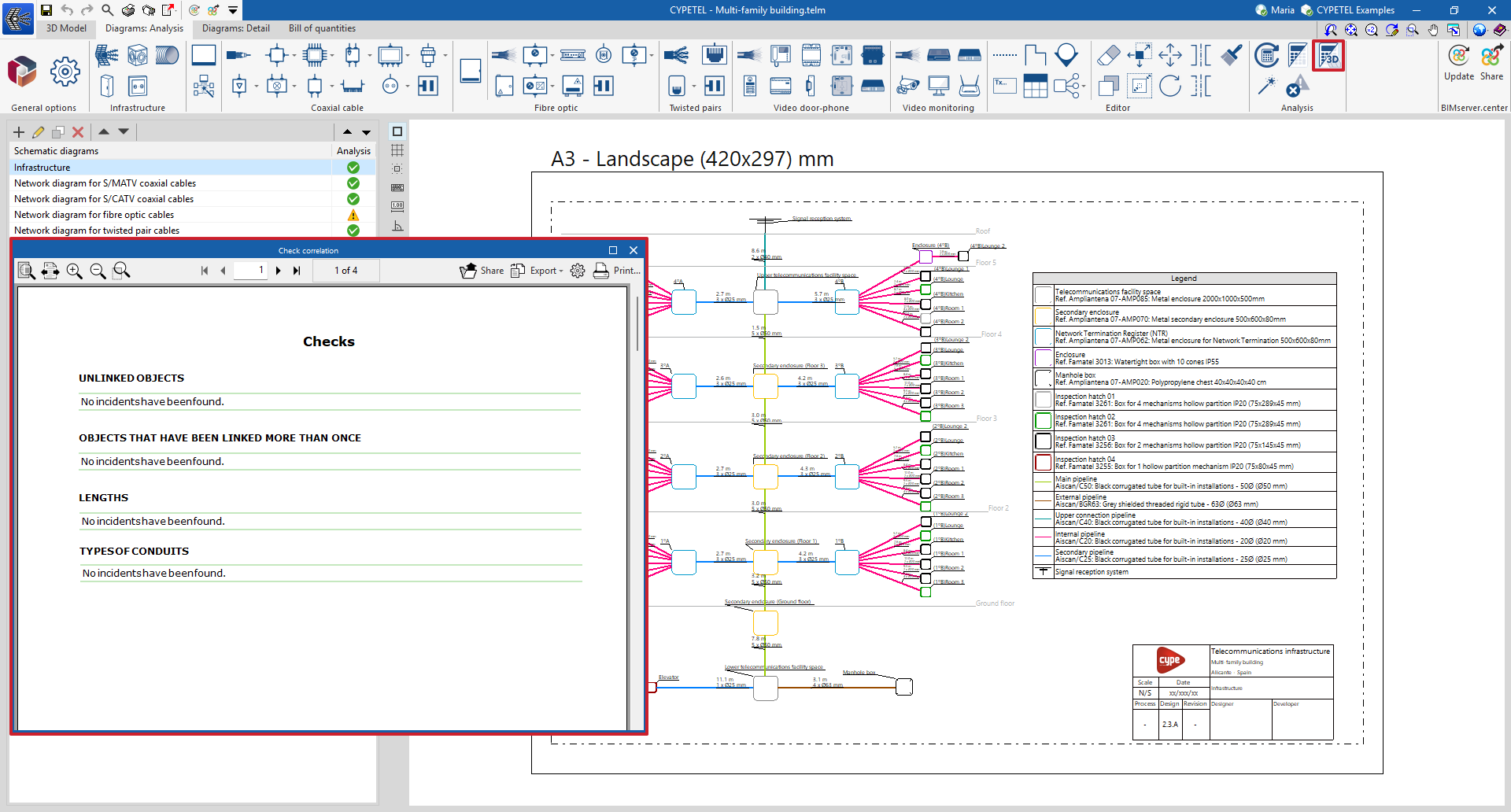
The "Check correlation" option can be used to detect issues related to the consistency between the design made in the "3D Model" tab and the elements entered in the diagram. This tool makes it easier to detect incidents in objects that have not been linked or that have been linked more than once, lengths, and types of conduits. This feature helps to complete the system diagram, detect duplicates and update conduit lengths to ensure correlation with the 3D model.
This feature is an adaptation of the "Check correlation" tool in the "BIM model" group, existing in previous versions, which was based on the contribution from the CYPETEL Systems program.
- Published on
- 2025.d
