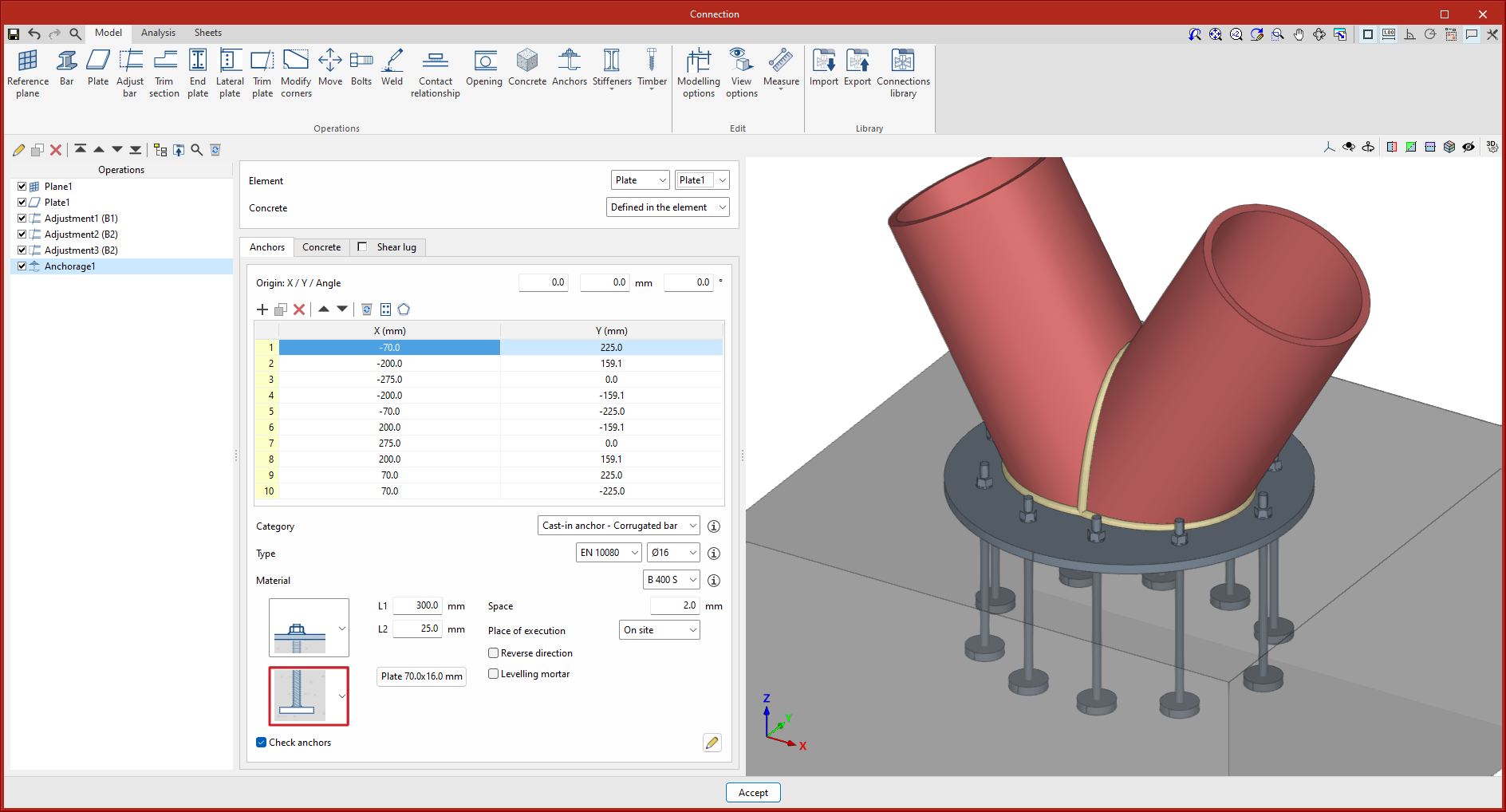
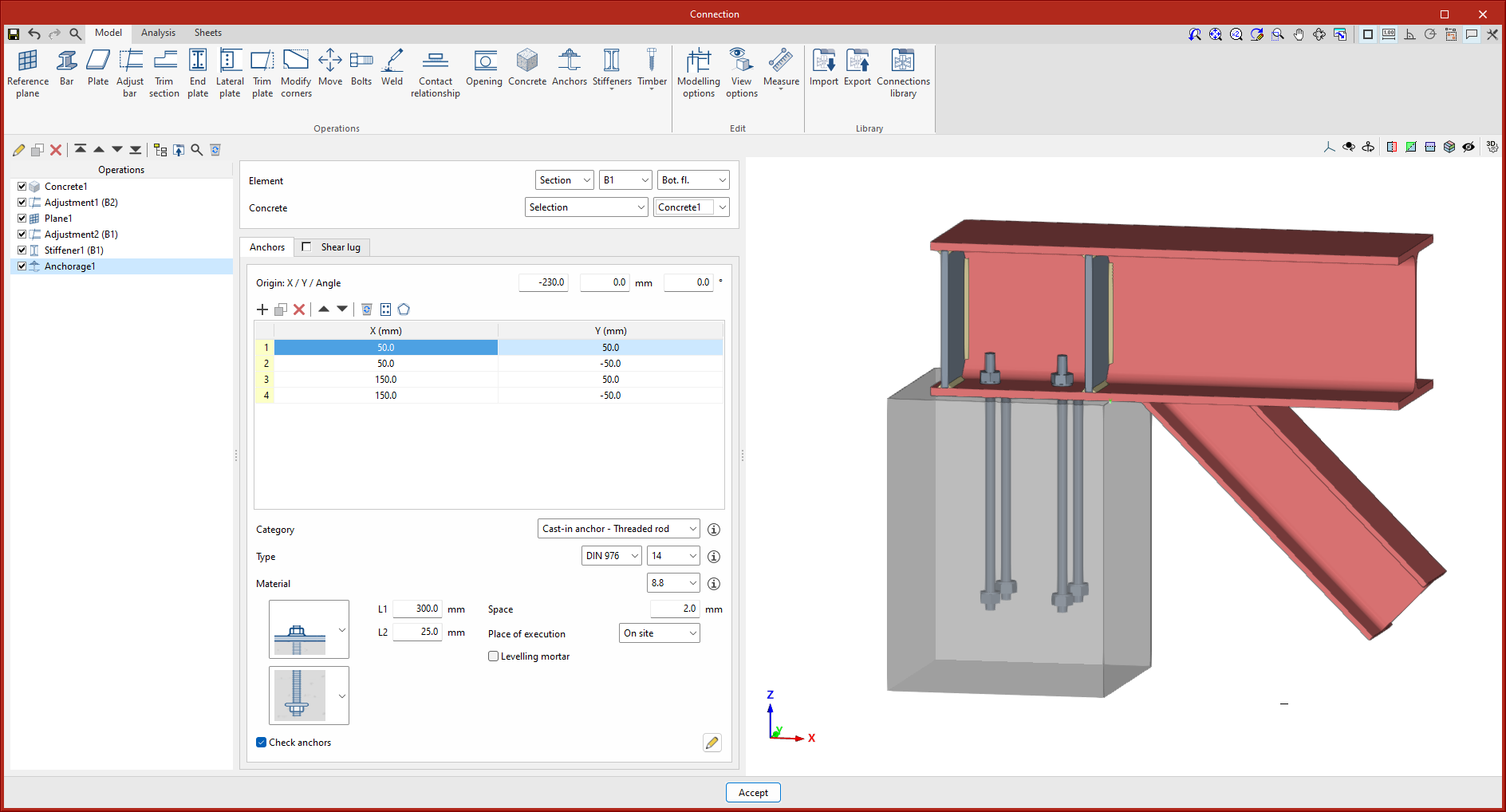
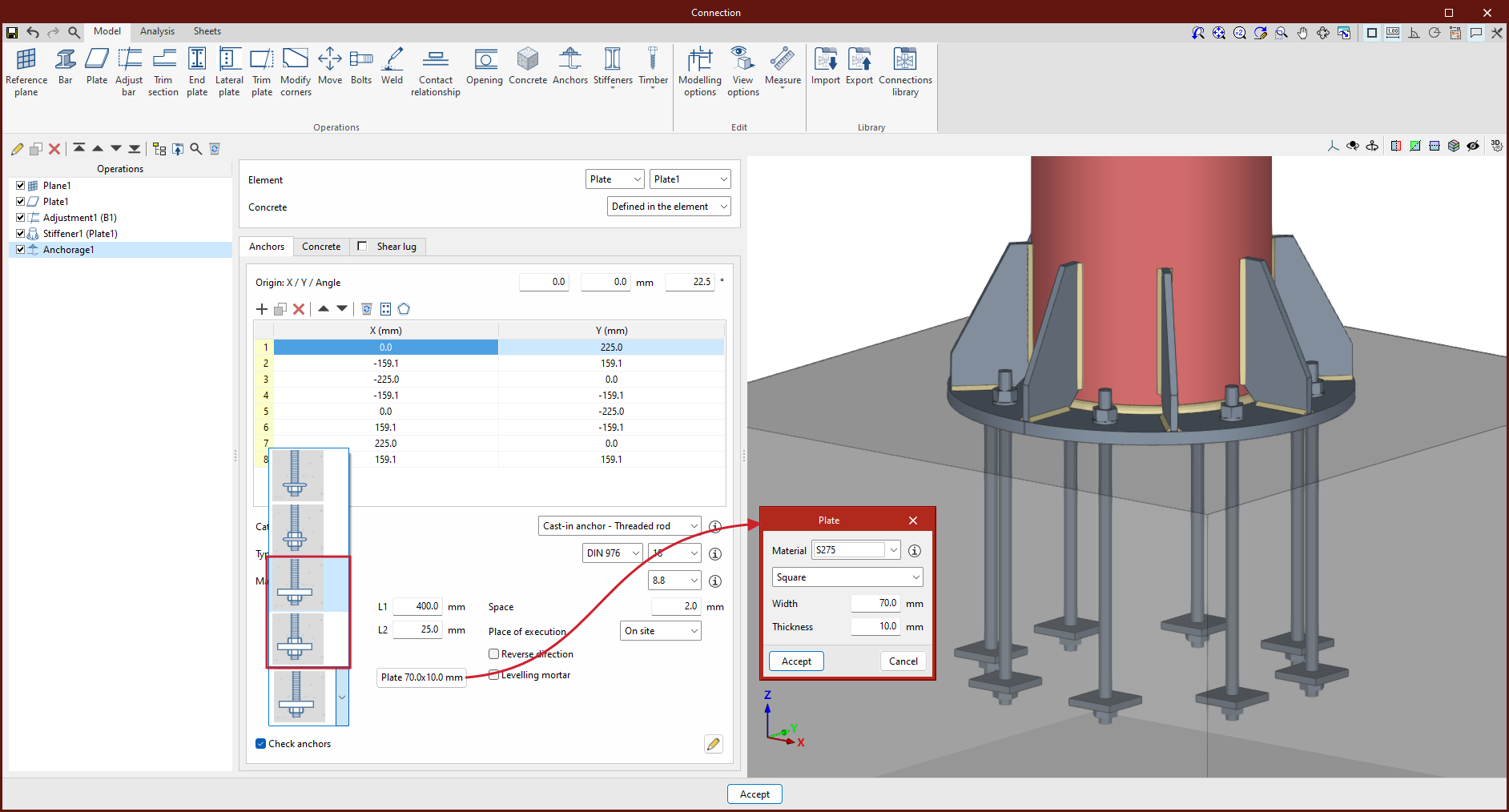
New types of headed anchors have been implemented. Corrugated bars and smooth bars can be finished with a square or circular plate welded on the end. For threaded rods, ends with a stop nut and plate, with or without a locknut, have been implemented.
Update history
StruBIM Steel
New types of headed anchors
- Published on
- 2025.b
Update notification available
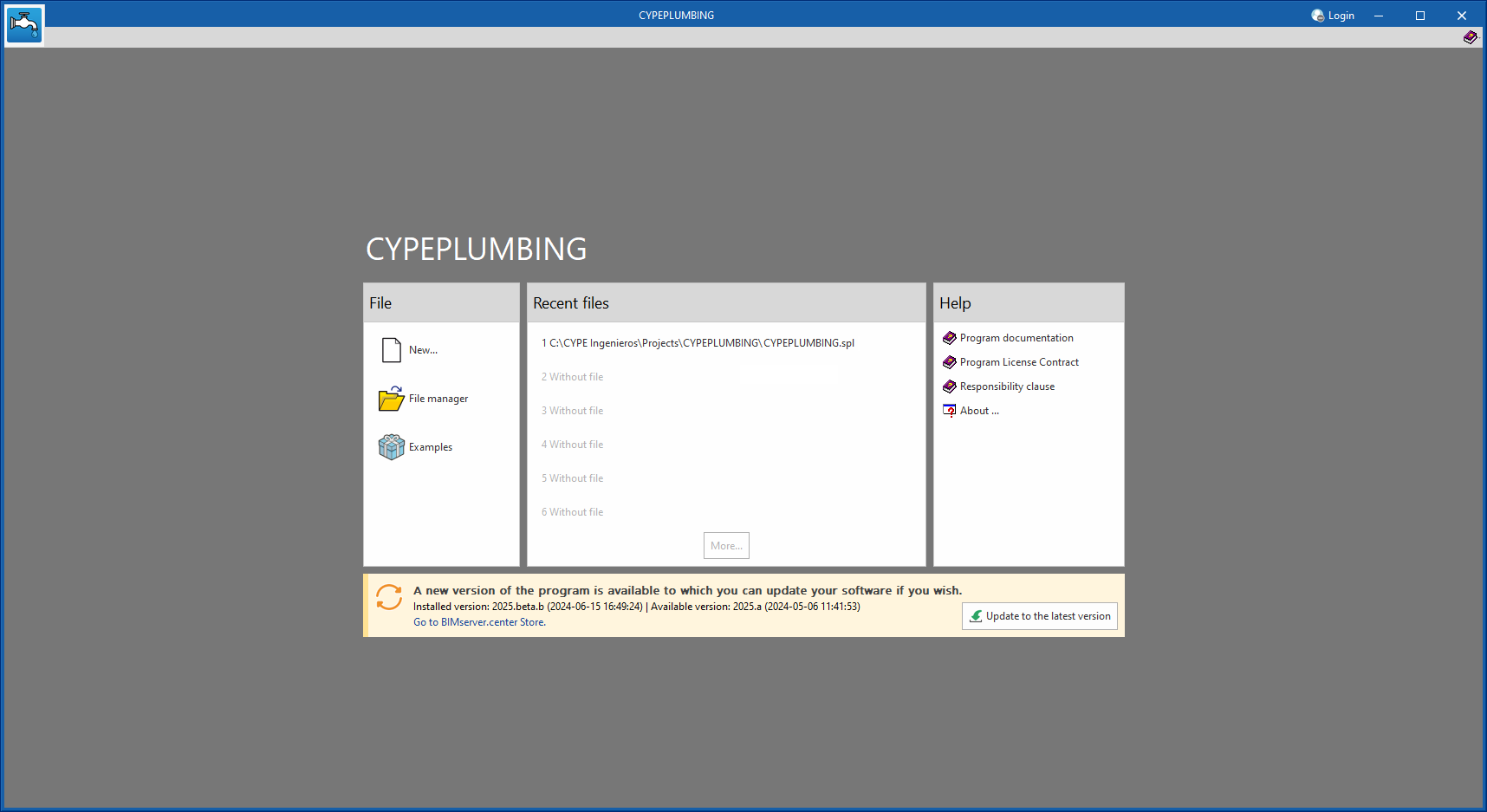
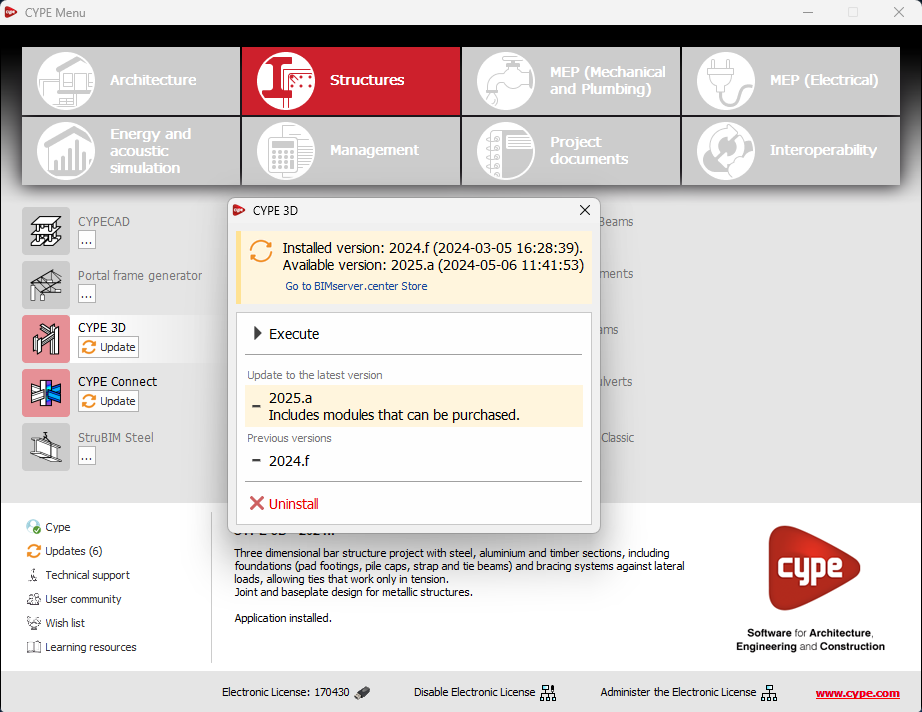
As of version 2025.b, applications now display a warning message in their initial window when a new update is available. This message provides information about the "installed version" and the "available version", together with a direct link to the Store page of the BIMserver.center web platform.
Clicking on the “Upgrade to the latest version” button automatically starts the download and installation process of the application. This feature ensures that the most current version of the program is always being used, thus benefiting from the latest improvements.
This method replaces the automatic notification and update process of a new version in the BIMserver.center programs available in previous versions.
- AcouBAT by CYPE, Arquimedes, Construction details library for structures, Continuous beams, CYPE 3D, CYPE Architecture, CYPE Connect, CYPE Connect Classic, CYPE Construction Systems, CYPE Cost Estimator, CYPE Gas Supply, CYPE Sewerage, CYPE Water Supply, CYPECAD, CYPEFIRE, CYPEFIRE FDS, CYPEFIRE Hydraulic Systems, CYPEFIRE Pressure Systems, CYPEHVAC, CYPEHVAC Radiant Floor, CYPELEC, CYPELEC Distribution, CYPELEC Electrical Mechanisms, CYPELEC MULTILINE, CYPELEC Networks, CYPELEC PV Systems, CYPEPLUMBING, CYPESOUND, CYPETEL Wireless, CYPETHERM BRIDGES, CYPETHERM EPlus, CYPETHERM HYGRO, CYPETHERM LOADS, IFC Builder, Open BIM Analytical Model, Open BIM Cable Routing, Open BIM Layout, Open BIM Model Checker, Open BIM Quantities, Open BIM Site, Open BIM Switchboard, Plugin Open BIM - Revit, Portal frame generator, Punching shear verification, StruBIM Box Culverts, StruBIM Cantilever Walls, StruBIM Embedded Walls, StruBIM Shear Walls, StruBIM Steel
- Published on
- 2025.b
Link to the BIMserver.center Store
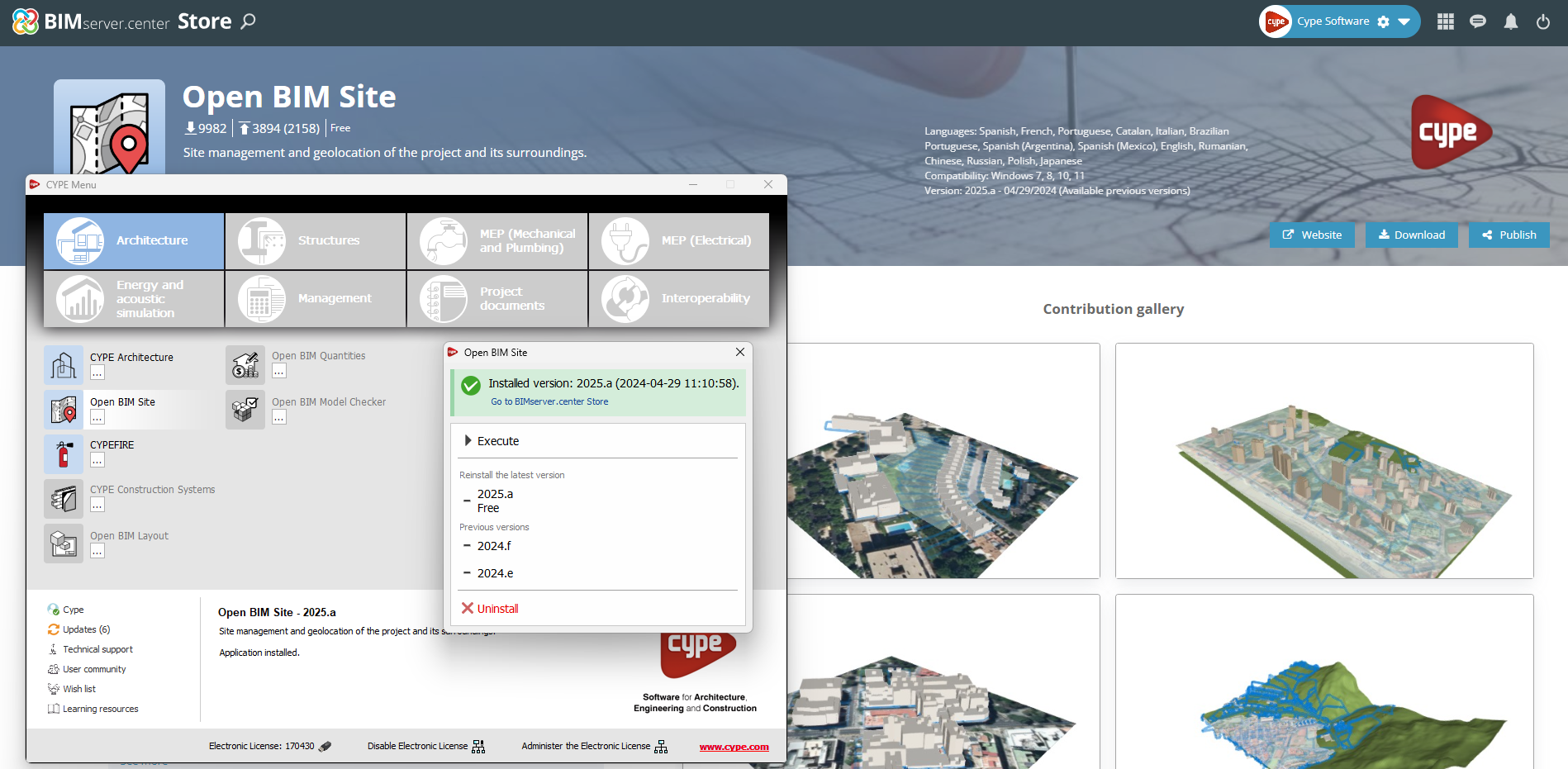
In the configuration panel for each application, a direct link to its page in the BIMserver.center web store has been included.
By clicking on the “Go to BIMserver.center Store” button, users are redirected directly to the corresponding page in the Store, where they can learn more about the application, view its features, read reviews from other users and see examples of real contributions.
This feature provides easy access to additional resources and support, enhancing the user experience by providing quick and easy access to all relevant information about the applications.
- AcouBAT by CYPE, Arquimedes, Construction details library for structures, Continuous beams, CYPE 3D, CYPE Architecture, CYPE Connect, CYPE Connect Classic, CYPE Construction Systems, CYPE Cost Estimator, CYPE Gas Supply, CYPE Sewerage, CYPE Water Supply, CYPECAD, CYPEFIRE, CYPEFIRE FDS, CYPEFIRE Hydraulic Systems, CYPEFIRE Pressure Systems, CYPEHVAC, CYPEHVAC Radiant Floor, CYPEHVAC Schematics, CYPELEC, CYPELEC Distribution, CYPELEC Electrical Mechanisms, CYPELEC MULTILINE, CYPELEC Networks, CYPELEC PV Systems, CYPEPLUMBING, CYPESOUND, CYPETEL Wireless, CYPETHERM BRIDGES, CYPETHERM EPlus, CYPETHERM HYGRO, CYPETHERM LOADS, Foundation elements, IFC Builder, Open BIM Analytical Model, Open BIM Cable Routing, Open BIM Layout, Open BIM Model Checker, Open BIM Quantities, Open BIM Site, Open BIM Switchboard, Plugin Open BIM - Revit, Portal frame generator, Punching shear verification, StruBIM Box Culverts, StruBIM Cantilever Walls, StruBIM Deep Beams, StruBIM Embedded Walls, StruBIM Shear Walls, StruBIM Steel
- Published on
- 2025.b
Information about the license model
An information message has been incorporated into the installation button of the applications so that, before proceeding with the installation, users can identify which applications are free to use (free of charge) and which require licensing permissions (including paid modules).
This enhancement improves the user experience by providing clarity and transparency on the options available to the user based on their license model.
- AcouBAT by CYPE, Arquimedes, Construction details library for structures, Continuous beams, CYPE 3D, CYPE Architecture, CYPE Connect, CYPE Connect Classic, CYPE Construction Systems, CYPE Cost Estimator, CYPE Gas Supply, CYPE Sewerage, CYPE Water Supply, CYPECAD, CYPEFIRE, CYPEFIRE FDS, CYPEFIRE Hydraulic Systems, CYPEFIRE Pressure Systems, CYPEHVAC, CYPEHVAC Radiant Floor, CYPEHVAC Schematics, CYPELEC, CYPELEC Distribution, CYPELEC Electrical Mechanisms, CYPELEC MULTILINE, CYPELEC Networks, CYPELEC PV Systems, CYPEPLUMBING, CYPESOUND, CYPETEL Wireless, CYPETHERM BRIDGES, CYPETHERM EPlus, CYPETHERM HYGRO, CYPETHERM LOADS, Foundation elements, IFC Builder, Open BIM Analytical Model, Open BIM Cable Routing, Open BIM Layout, Open BIM Model Checker, Open BIM Quantities, Open BIM Site, Open BIM Switchboard, Plugin Open BIM - Revit, Portal frame generator, Punching shear verification, StruBIM Box Culverts, StruBIM Cantilever Walls, StruBIM Deep Beams, StruBIM Embedded Walls, StruBIM Shear Walls, StruBIM Steel
- Published on
- 2025.b
Installing background apps
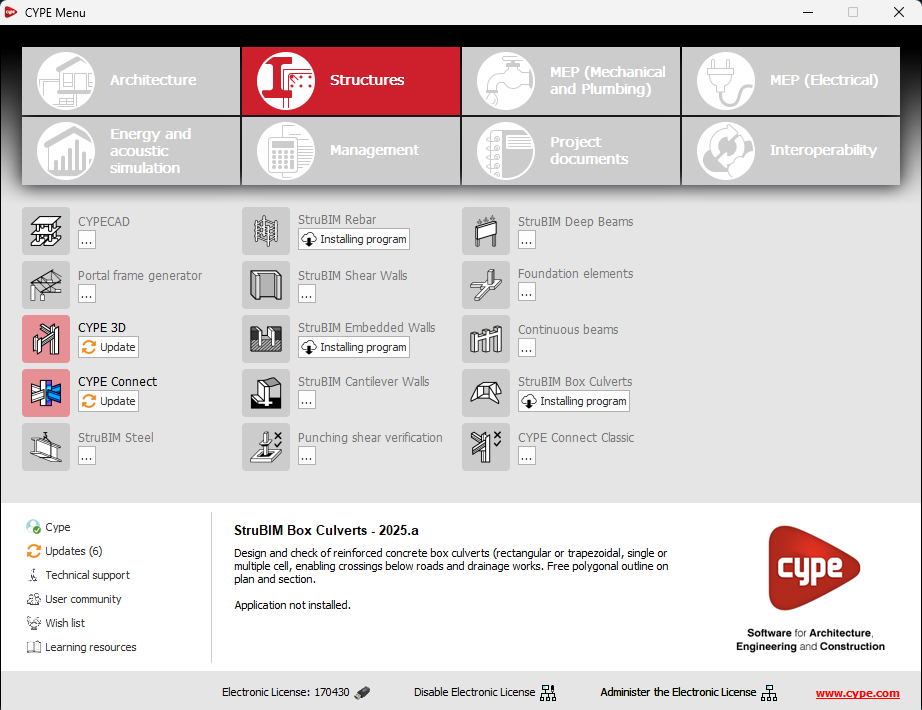
In the new 2025.b version of CYPE Menu, the background installation feature has been added. Users can now continue working on other tasks while applications are automatically installed in the background.
During the background installation process, the “Installing program” message is displayed next to the applications button in the main CYPE Menu window. Once completed, the message disappears and the application can be run.
This feature is designed to make applications easier to use and manage, improving productivity and the overall experience by minimising waiting time and interruptions during the installation of new applications or upgrades.
- AcouBAT by CYPE, Arquimedes, Construction details library for structures, Continuous beams, CYPE 3D, CYPE Architecture, CYPE Connect, CYPE Connect Classic, CYPE Construction Systems, CYPE Cost Estimator, CYPE Gas Supply, CYPE Sewerage, CYPE Water Supply, CYPECAD, CYPEFIRE, CYPEFIRE FDS, CYPEFIRE Hydraulic Systems, CYPEFIRE Pressure Systems, CYPEHVAC, CYPEHVAC Radiant Floor, CYPEHVAC Schematics, CYPELEC, CYPELEC Distribution, CYPELEC Electrical Mechanisms, CYPELEC MULTILINE, CYPELEC Networks, CYPELEC PV Systems, CYPEPLUMBING, CYPESOUND, CYPETEL Wireless, CYPETHERM BRIDGES, CYPETHERM EPlus, CYPETHERM HYGRO, CYPETHERM LOADS, Foundation elements, IFC Builder, Open BIM Analytical Model, Open BIM Cable Routing, Open BIM Layout, Open BIM Model Checker, Open BIM Quantities, Open BIM Site, Open BIM Switchboard, Plugin Open BIM - Revit, Portal frame generator, Punching shear verification, StruBIM Box Culverts, StruBIM Cantilever Walls, StruBIM Deep Beams, StruBIM Embedded Walls, StruBIM Shear Walls, StruBIM Steel
- Published on
- 2025.b
Partial support of baseplates
- Published on
- 2025.b
Direct access to library elements and materials
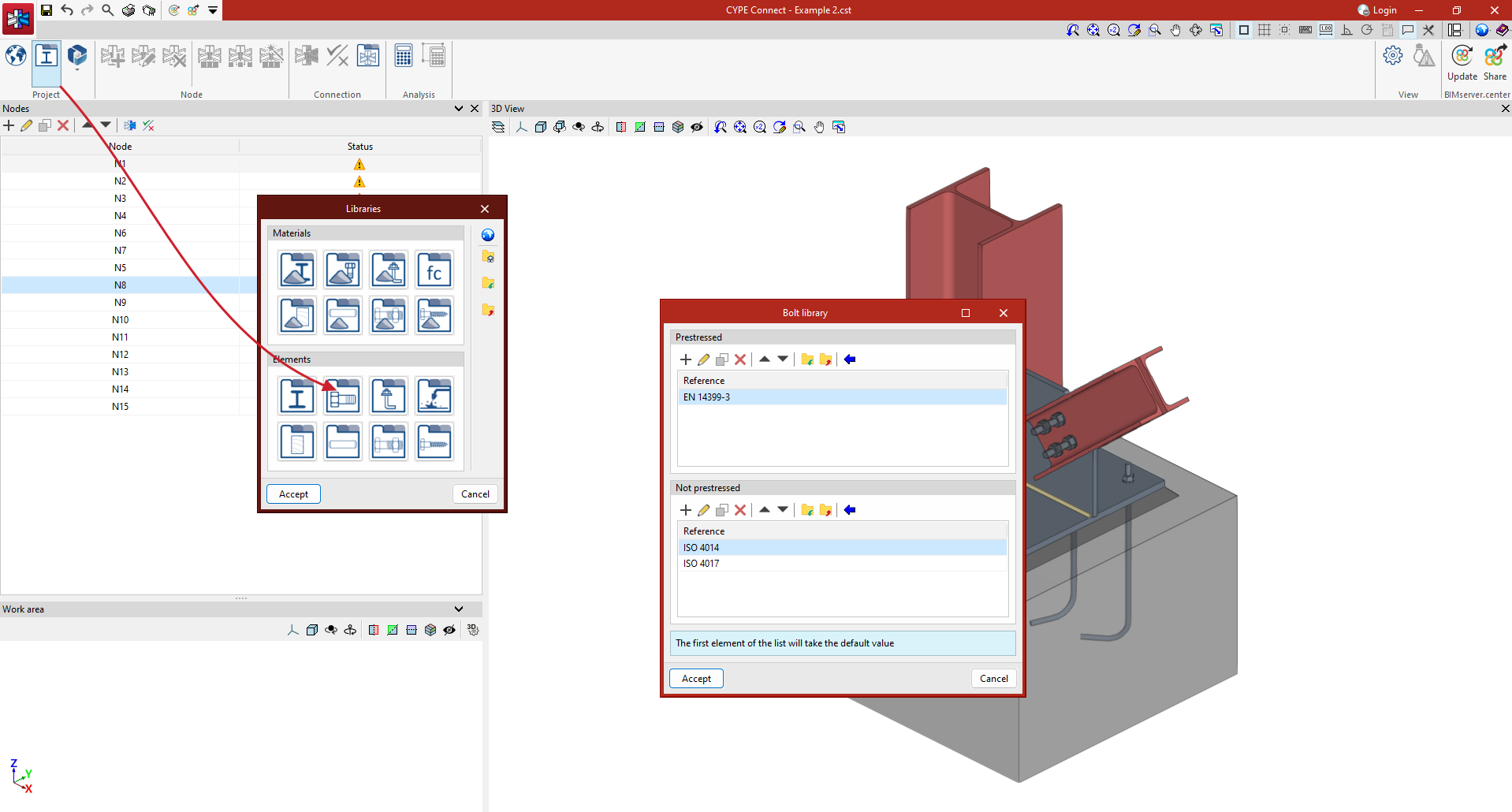
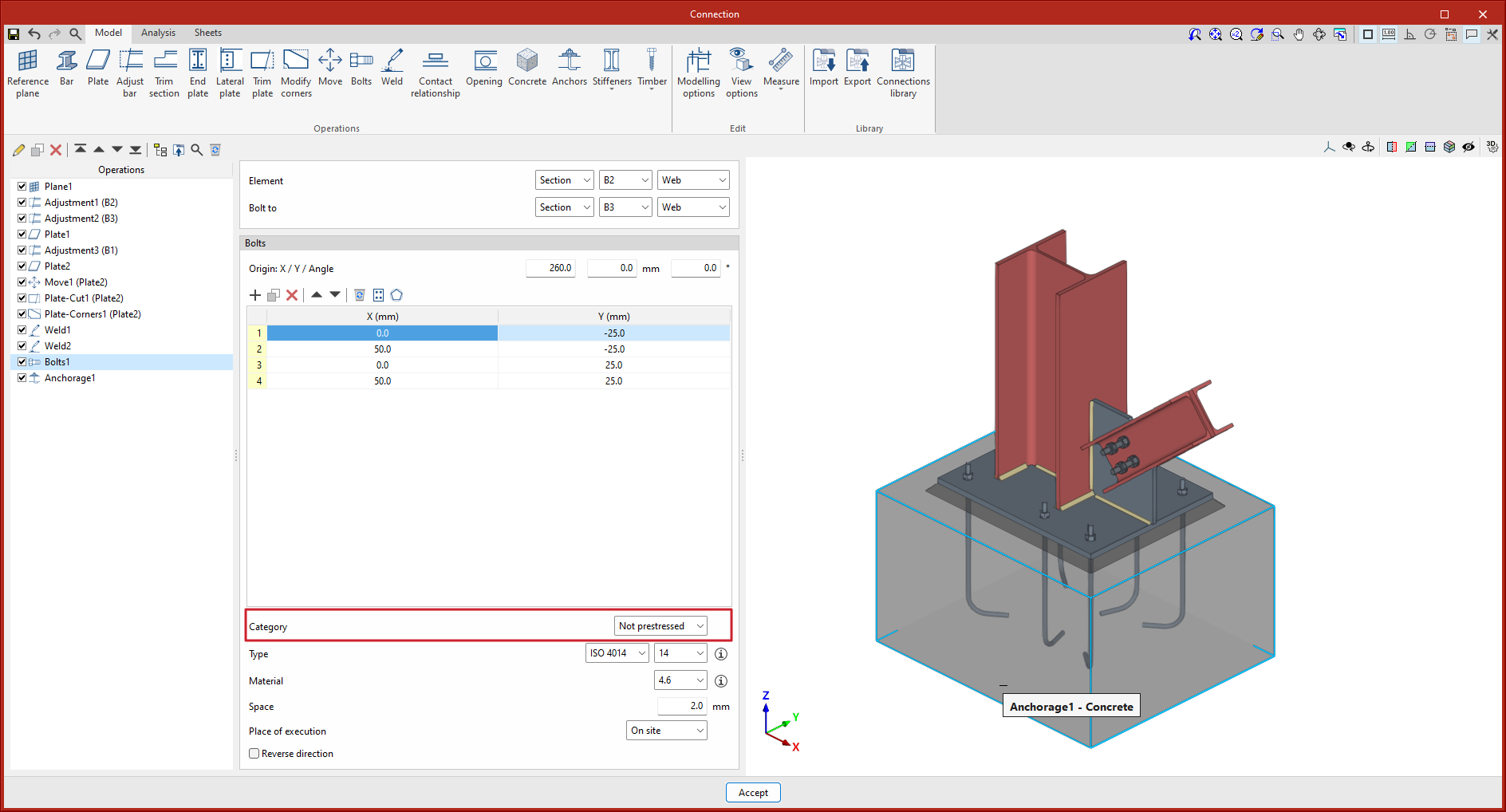
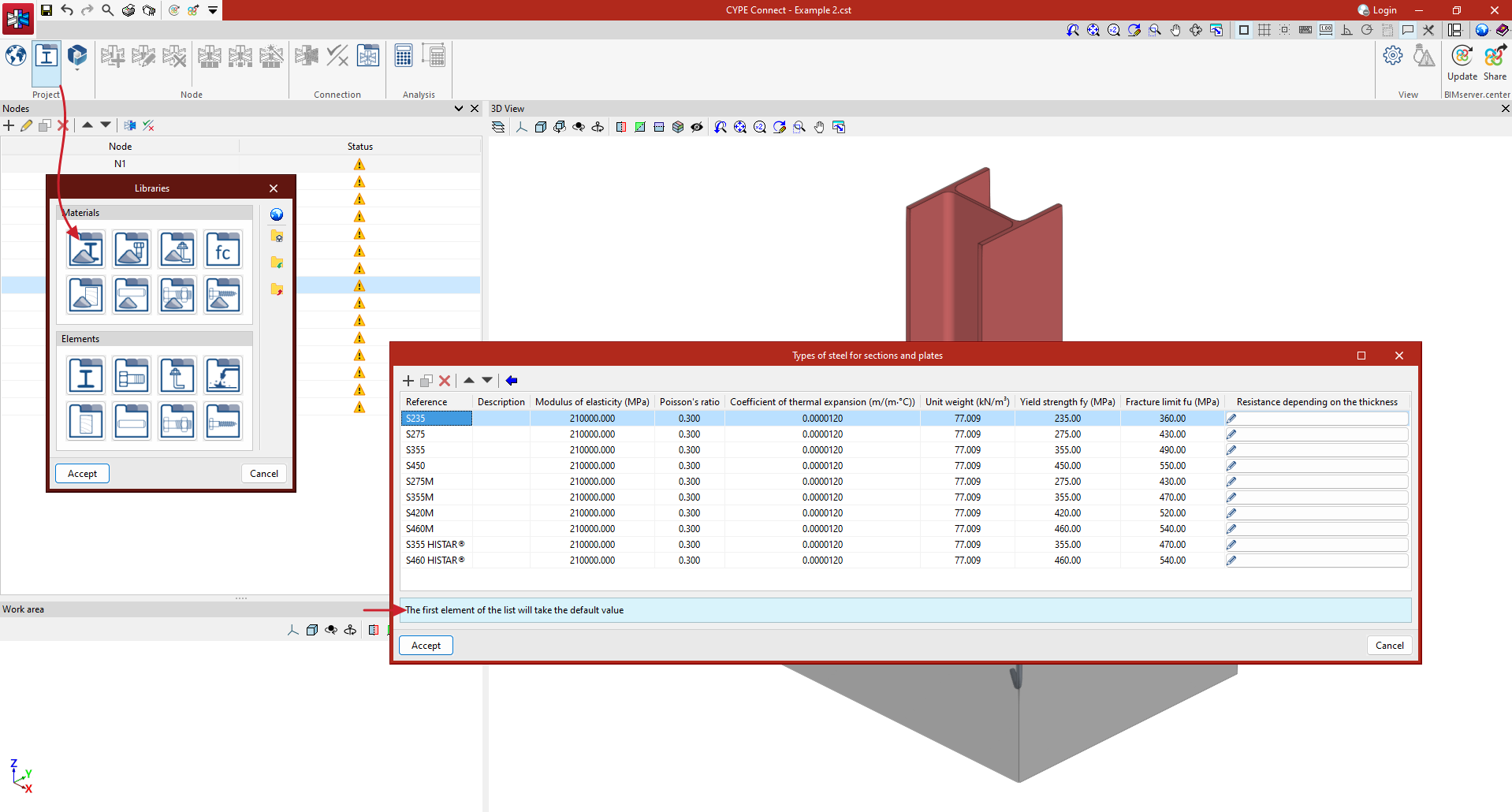
In versions before 2025.b of CYPE Connect and StruBIM Steel, the selection of library elements (sections, materials, bolts, anchors, etc.) worked with two buttons. One contained the data to be used and could be modified; the other (represented by three dots) was used to obtain the library data. This method made it possible to modify or edit the data directly, but once defined or imported, they were not related to the library, so if changes were made in the library, they were not reflected in these elements. Furthermore, the library selection was not direct, a new panel was opened, forcing the user to click the mouse several times to select an element.
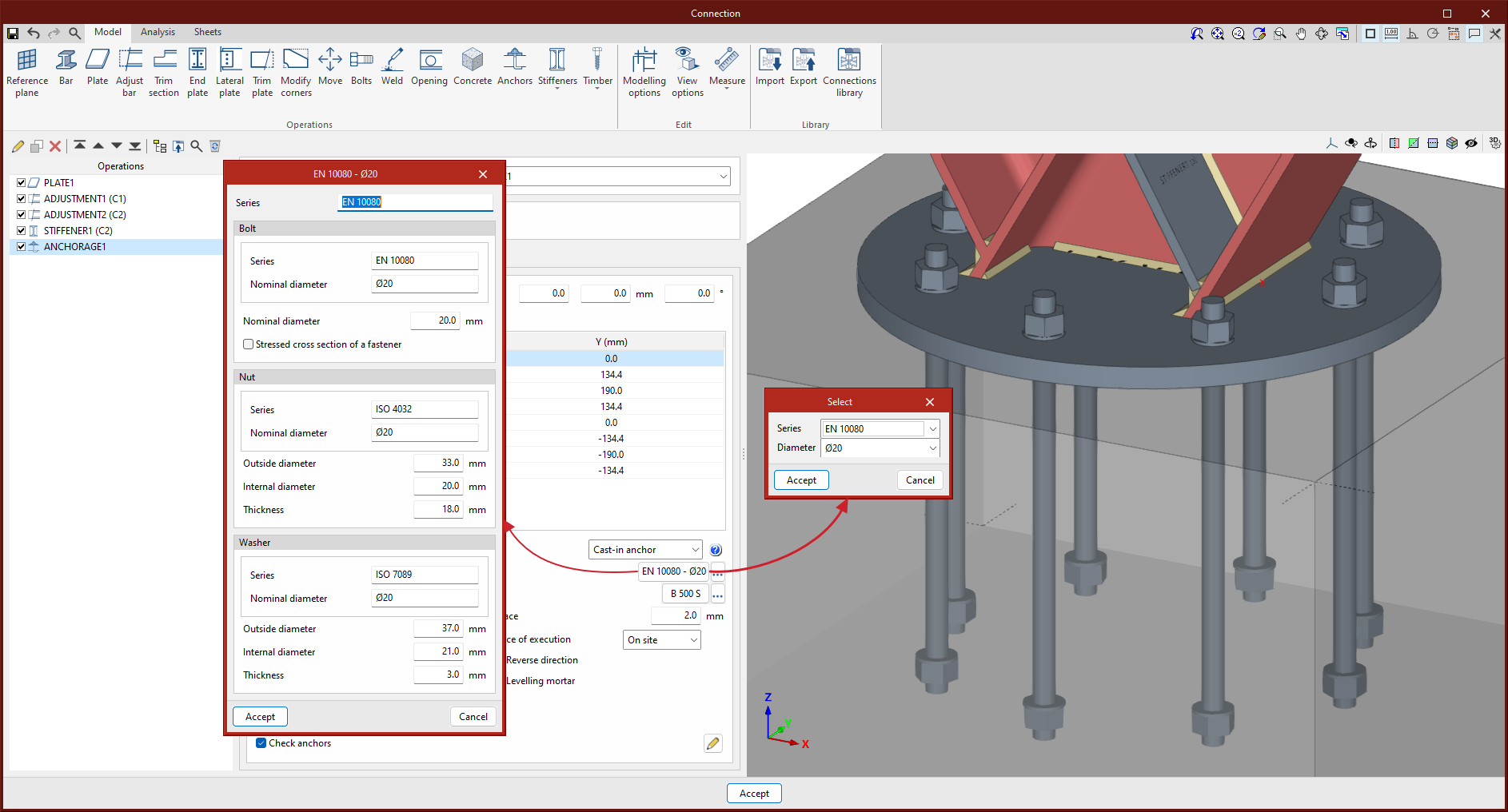
As of version 2025.b, the selection of library elements or materials is simpler and faster, as it is done directly from a drop-down button. An information button showing the selection data is also included. If data is modified in the library, it is also modified in all the elements that have that selection.
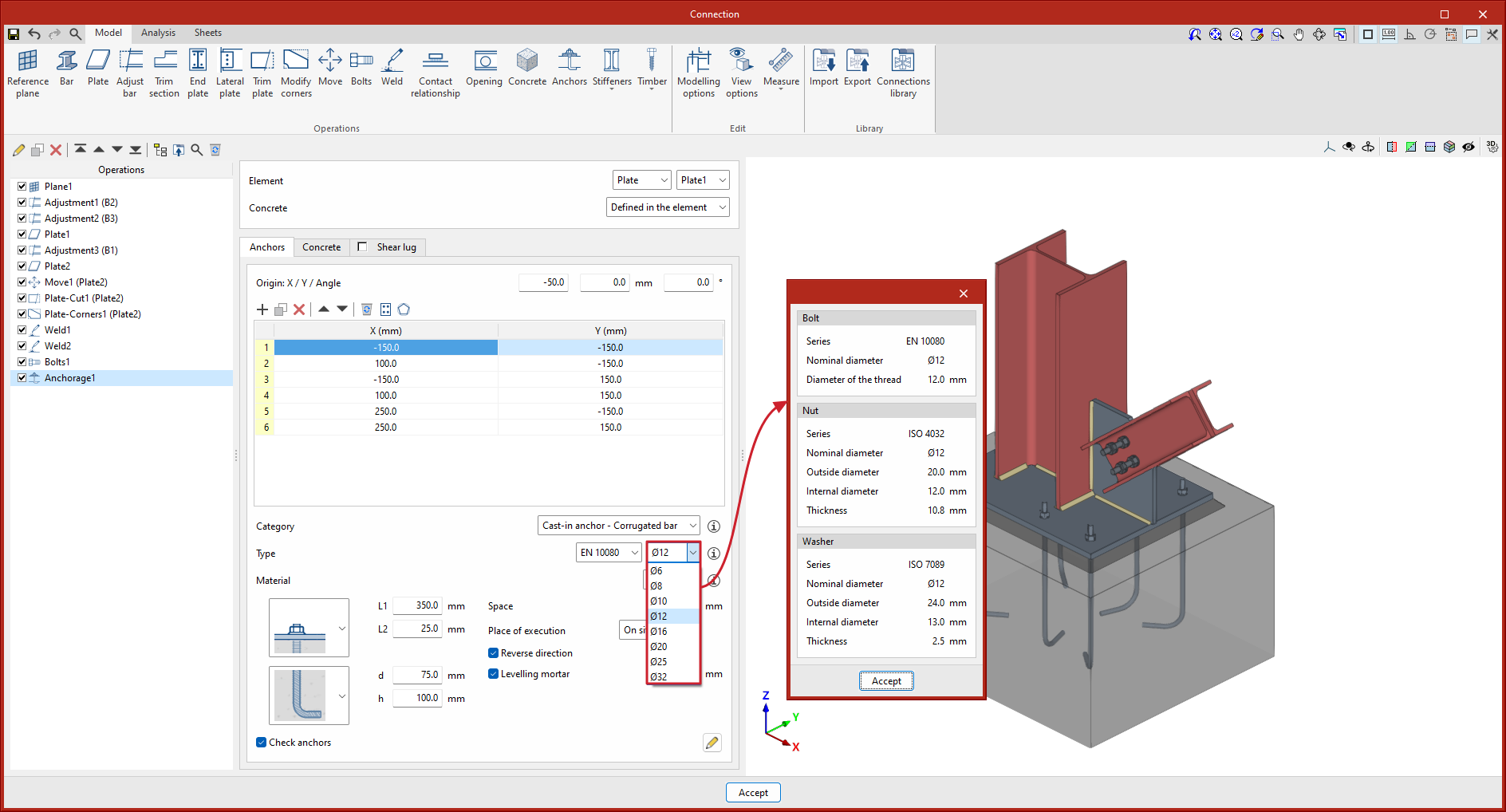
The default value of each drop-down button will correspond to the first element in the library lists. For example, if users want material S275 to be the default value in the "Types of steel for sections and plates" panel in the material library, it must be placed in the first position of the table.
- Published on
- 2025.b
Reference plane defined by two bars
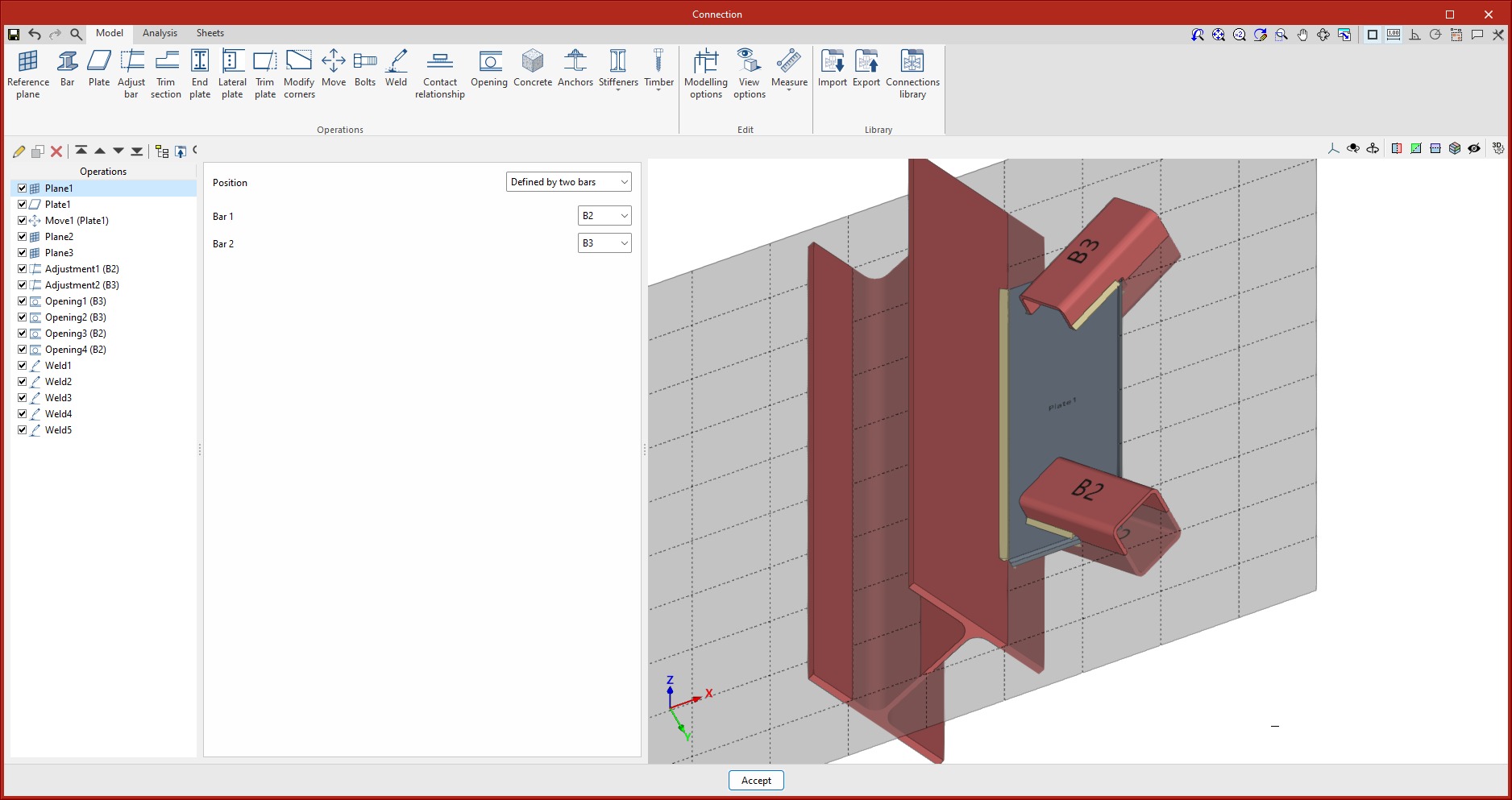
In version 2025.b, a new reference plane positioning option has been implemented: "Defined by two bars".
With this option, if the two selected bars are contained in the same plane, the reference plane will be created in the plane formed by the two local 'x' axes. When the bars are not contained in the same plane, the reference plane will be created at the midpoint of the origin of both bars.
- Published on
- 2025.b
Shear lugs
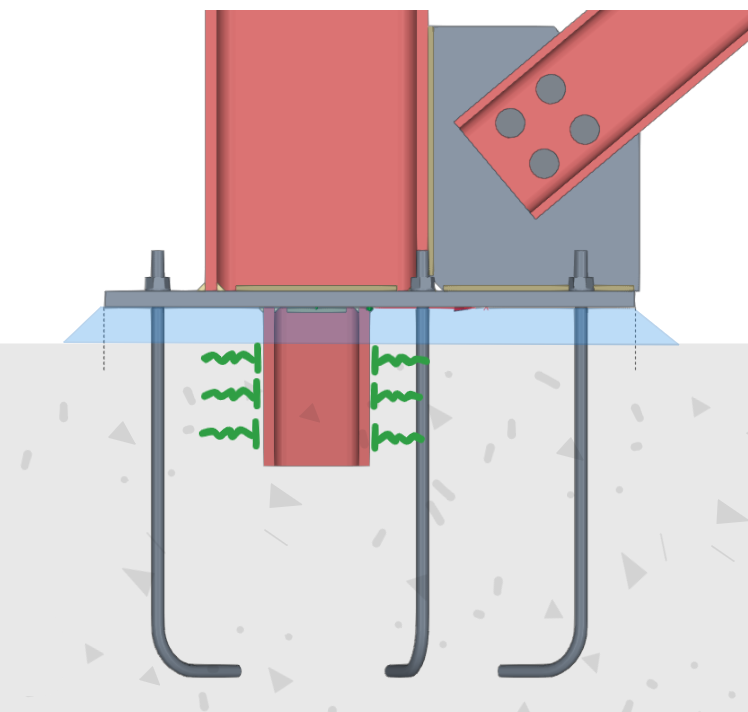
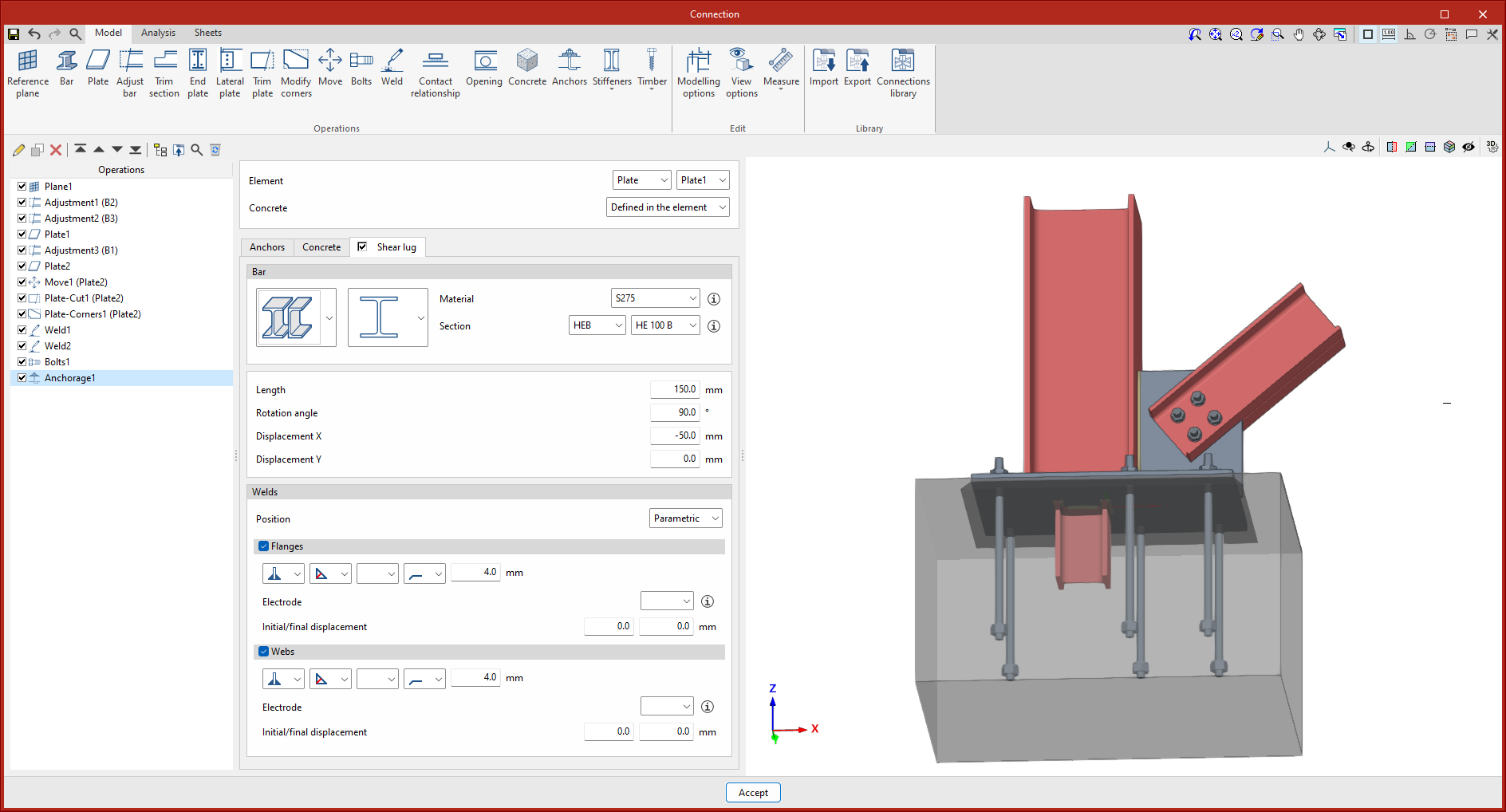
In version 2025.b, an option to include shear lugs to baseplates has been implemented in the "Anchors" operation.
In baseplates, particularly when shear forces are considerable and users prefer not to transfer them to the foundation via the bolts, a shear lug is often installed. This element consists of a steel section, welded to the bottom of the plate, embedded in the foundation, the purpose of which is to transmit shear forces directly to the foundation element and thus free the bolts from transmitting this force and working exclusively in tension.
- Published on
- 2025.b
New operation. Contact relationship
In version 2025.b the new "Contact relationship" operation has been implemented. This operation defines contact relationships between steel surfaces or between steel surfaces and concrete elements.
When bolting plates together, the program already establishes these contact relationships automatically, as when anchoring a plate to a concrete element. This new operation can also be carried out without the need to add bolts or anchors. In the design model, non-linear relationships are established between the nodes of the mesh of the plates, which only work in compression.
- Published on
- 2025.b
Code implementation
Version 2025.b of CYPE Connect and StruBIM Steel includes the implementation of many new codes. In the “Implementing codes and improving their enforcement” section of the new features in version 2025.b, you can consult the standards included in all CYPE programs in this version.
In CYPE Connect and StruBIM Steel, the following have been included:
- Concrete structures (for checking anchorages in concrete)
- CSA A23.3-14 (Canada)
- Rolled and reinforced steel structures (for checking bolted and welded steel connections)
- National annexes for Eurocode 3 (EN 1993)
- SLS EN 1993-1-8:2017/NA (Slovakia)
- MSZ EN 1993-1-8:2012/NA:2019 (Hungary)
- ECS-ASD:2001 (Egypt)
- NSR-10 (Colombia)
- NTC-2018 (Italy)
- NTC-2023 (Mexico CDMX)
- SNI 1729:2020 (Indonesia)
- National annexes for Eurocode 3 (EN 1993)
- Published on
- 2025.b
Connection to BIMserver.center
- AcouBAT by CYPE, Arquimedes, Construction details library for structures, Continuous beams, CYPE 3D, CYPE Architecture, CYPE Connect, CYPE Connect Classic, CYPE Construction Systems, CYPE Cost Estimator, CYPE Gas Supply, CYPE Sewerage, CYPE Water Supply, CYPECAD, CYPEFIRE, CYPEFIRE FDS, CYPEFIRE Hydraulic Systems, CYPEFIRE Pressure Systems, CYPEHVAC, CYPEHVAC Radiant Floor, CYPEHVAC Schematics, CYPELEC, CYPELEC Distribution, CYPELEC Electrical Mechanisms, CYPELEC MULTILINE, CYPELEC Networks, CYPELEC PV Systems, CYPEPLUMBING, CYPESOUND, CYPETEL Wireless, CYPETHERM BRIDGES, CYPETHERM EPlus, CYPETHERM HYGRO, CYPETHERM LOADS, Foundation elements, IFC Builder, Open BIM Analytical Model, Open BIM Cable Routing, Open BIM Layout, Open BIM Model Checker, Open BIM Quantities, Open BIM Site, Open BIM Switchboard, Plugin Open BIM - Revit, Portal frame generator, Punching shear verification, StruBIM Box Culverts, StruBIM Cantilever Walls, StruBIM Deep Beams, StruBIM Embedded Walls, StruBIM Shear Walls, StruBIM Steel
- Published on
- 2025.b