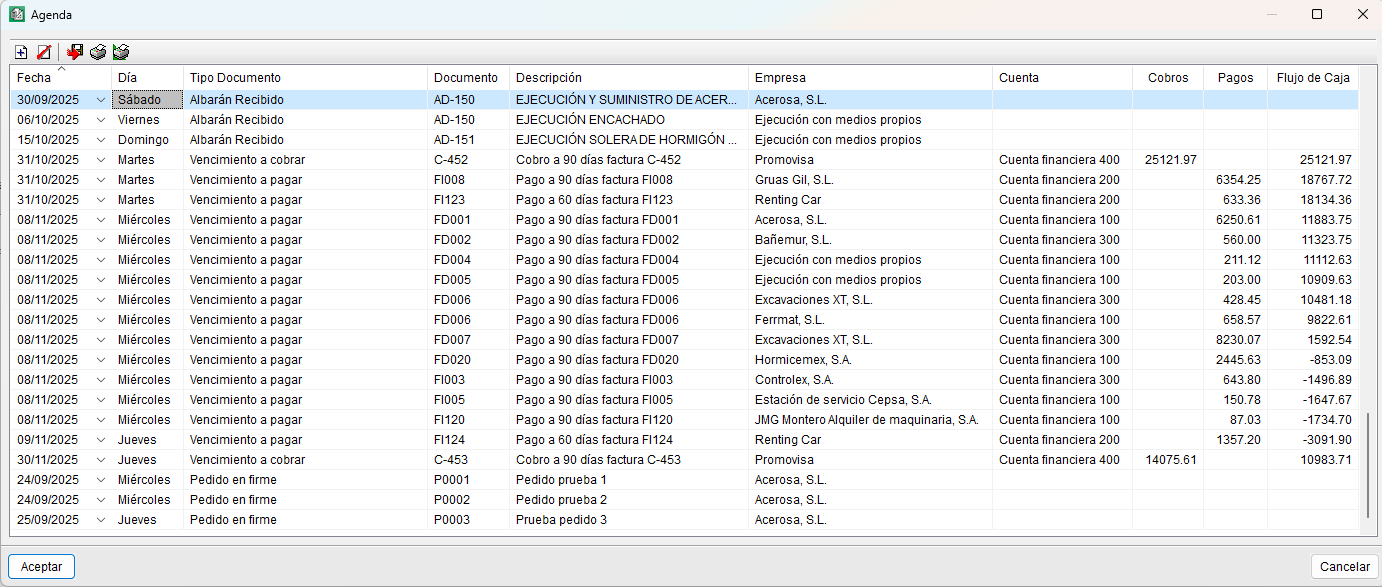
Agenda
From the "Agenda" section of the "Job control" menu, you can view, sorted by date, the issuing of orders, the receipt of delivery notes and invoices, and the due dates of issued and received invoices (paid or pro forma). The calendar always displays forecast information (unpaid due dates). It also allows you to insert notes wherever you wish to reflect other details, although these are for information purposes only (the "Description" field). Furthermore, it enables you to calculate the cash flow for the project.
The information displayed in the agenda depends on the options selected under "Settings" in the "Job control" menu: "Show orders in agenda", "Show delivery notes in agenda" and "Show invoices in agenda". See the "Job control options and settings".
The fields displayed in the agenda are as follows:
- Date. This can be edited by the user, in which case the events or lines in the calendar are reordered.
- Day of the week. Corresponds to the date. Cannot be edited directly.
- Document type. Whether it is an order, delivery note, invoice or due date.
- Document. Document code.
- Description. Summary of the document.
- Company. Name of the supplier or customer associated with the document.
- Account. Description or title of the financial account.
- Receipts. Incoming amounts.
- Payments. Outgoing amounts.
- Cash flow. Cash position. A positive sign indicates a positive cash balance.