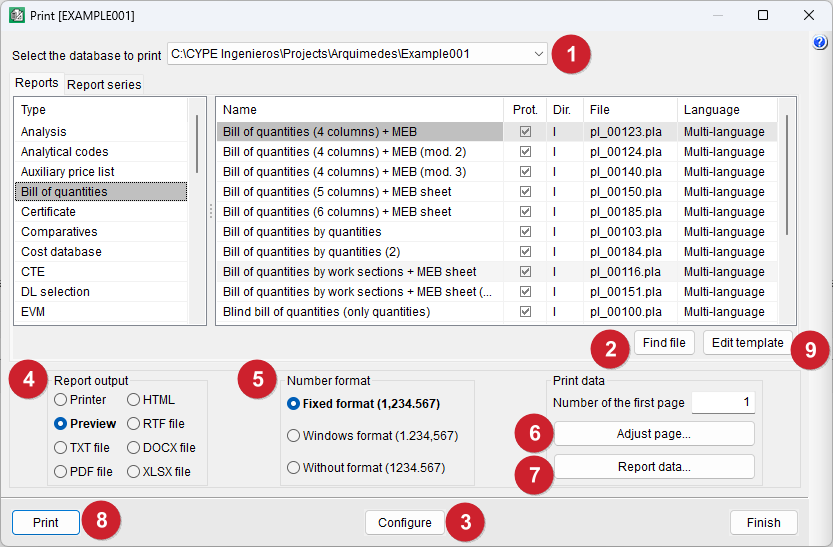
Steps for printing or exporting a specific report or series of reports
- Firstly, in the "Print" dialog box, you can select the database to be printed from those currently open.
- Secondly, you need to locate the desired report or set of reports. You can use the "Find file" button to search by the name of the report template file.
- (Optional) Using the "Configure" button at the bottom of the dialog box, or via "Select report template directory" in the "Print" section of the "File" menu, you can change the location where the program searches for report templates and report series, including both those installed by the program and those created by the user. It also allows you to display only the installation templates, only the user templates, or both at the same time.
- Once the report or series of reports has been located and selected, you must specify the output type. By default, a preview is selected. You can also print directly to a printer or export to PDF, DOCX, HTML, RTF, XLSX and TXT formats.
- Next, when selecting the number format, it is best to use "Fixed format", so that the numbers are printed with the same presentation format as used in the program windows.
- The "Page setup" button allows you to select and configure the printer to be used, as well as specify the margins, scale and page divisions. This tool is also found in the "Print" section of the "File" menu and is equivalent to the "Printer" option available in other CYPE programs, sharing the same feature.
- The "Report data" button allows you to access the pre-signature data, company details, client details, project details and the user logo settings. It also allows you to configure the options for reports of the "Price list nº 2" type.
- Finally, click the "Print" button in the dialog box.
- (Optional) Templates can be configured via the "Edit template’ button.
- (Optional) To create a new template, select the "Edit report templates" option from the "Print" section of the "File" menu. The "Open report template" dialog box will appear, showing all available report templates; then, click the "New template" button.