Editing documents
In the "Edit documents" section of the "Job control" menu, you can manage the various documents relating to budget control:
- Incoming documents (linked to a supplier or, in the case of issued invoices, to a client)
- Contracts
- Orders
- Delivery notes
- Delivery notes against orders
- Invoices received
- Invoices issued
- Outgoing documents (always linked to a cost centre):
- Charges
- Charges with supplier
The program allows you to work in "Multi-project" mode, selecting whether documents relate to a specific project or to several projects simultaneously.
Editing documents requires you to first select the relevant supplier (except for charges), which facilitates the chained generation of related documents. In addition, quick search tools by code or supplier name are included, along with configurable filters (by supplier, cost centre or price type) via the "Settings" option in the "Job control" menu.
When editing a document, there are options to import documents or supplies from others belonging to the same supplier, which streamlines the management of orders, delivery notes or invoices.
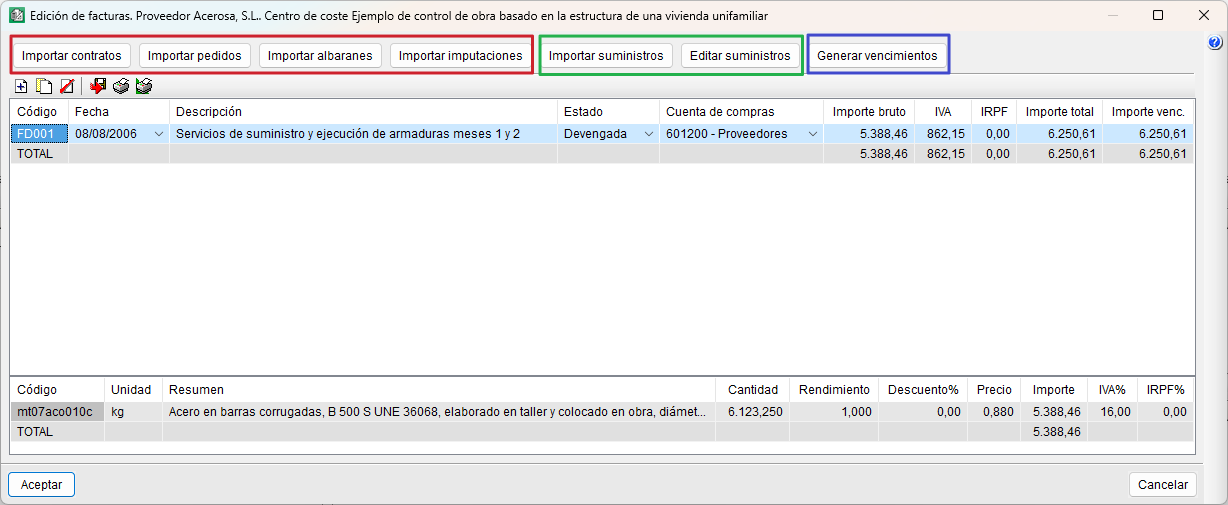
With the exception of contracts and issued invoices, the following options will be available for all other documents: "Import contracts", "Import delivery notes", "Import invoices", "Import charges", "Import supplies" and "Edit supplies". The buttons available vary depending on the type of document being edited. For these buttons to be active, you must first have created a document using the "Add new item to list" option on the bar.
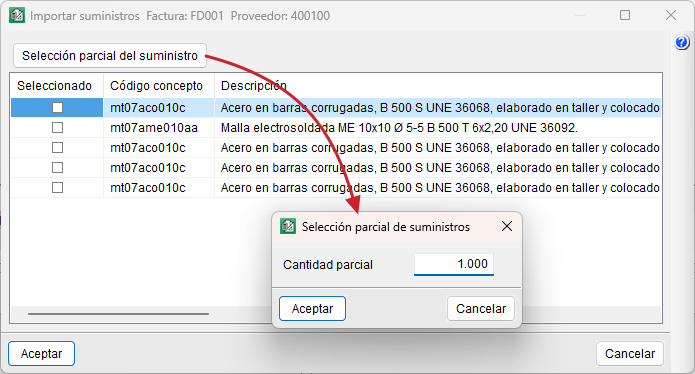
From "Import supplies" and "Edit supplies", you can perform a "Partial supply selection", which allows you to split the quantity of the selected supply into two different quantities, leaving a portion to be used in another document.
The "Generate due dates" button only appears in the invoices received document type and allows you to generate due dates to calculate cash flow, export to accounting, or view the status of accounts with suppliers or customers.