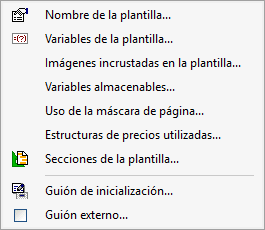
"Data" menu
The "Data" menu is located in the top-left corner of the Report Template Editor.
The following options are available:
- Template name
Edit the type (short name) and the name (full name) of the template.
- Template variables
Create and manage the template’s own variables. These can be used to store data, perform analyses, control actions using scripts, or display results. For further information, please see "Variables".
- Images embedded in the template
Manage the images stored within the template itself so that you can use them in your graphic objects.
- Storable variables
Define and manage variables whose values can be stored in the database used to generate the report. They are organised into sets that can be used in different templates. For further information, please see "Variables".
- Using the page mask
Configure where the outer and inner parts of the page mask are applied, as well as specify whether the cover page is included in the page numbering.
- Price structures used
Select the price structures supported by the template and specify whether null values are treated as disabled.
- Template sections
View and modify the sequence of record templates that defines the structure of the template’s record sections.
- Initialisation script
Open the editor for the script that runs before printing the list begins. For further information, please see "Template scripts".
- External script
Link an external script to the template, either by selecting one from those available or by creating a new one. For further information, please see "Template scripts".