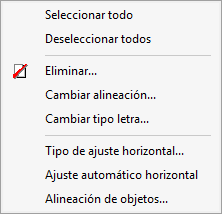
"Edit" menu
The "Edit" menu is located in the top-left corner of the Report Template Editor.
The following options are available:
- Select all
Select all objects – alphanumeric and graphical – in the current section. The selected objects are highlighted with a distinctive border in light magenta.
- Deselect all
Deselect all objects, alphanumeric characters and graphics in the current section.
- Delete
Delete all or some of the selected objects from the current section. In the dialog box that opens when you select this option, you can specify which types of objects, out of the selected ones, you wish to delete.
- Change alignment
Change the text alignment of all selected alphanumeric objects in the current section.
- Change font
Change the font of all selected alphanumeric objects in the current section.
- Horizontal alignment type
Open a window which in turn contains the following alignment options for the objects in the template:- Non-adjustable
Objects in the template retain their defined position and size throughout the design process. - Proportional adjustment
The difference in space between the template’s design width and the width available for printing is distributed proportionally amongst all the objects in the template. - Individual adjustment
The difference in space between the template’s design width and the width available for printing is applied individually to each object in the template.
- Non-adjustable
- Automatic horizontal adjustment
Easily assign position and horizontal size attributes to objects in the template so that they fit the available print width. For further information, please refer to the "Automatic horizontal adjustment" section under "Section options".
- Object alignment
Provides information on how to align selected objects using another object as a reference. For further information, please refer to the section "Vertical alignment relative to this object" in "Object options".