
Registration models
Registration models represent the information stored in the databases managed by Arquimedes. Each model contains fields that can subsequently be used in the objects of the report template.
Models can be linked together to form a register sequence, which determines the order, hierarchy and relationship between the data to be printed. Some templates can start the sequence, others must be linked to a preceding template, and some are recursive, allowing structures with a variable number of levels to be represented.
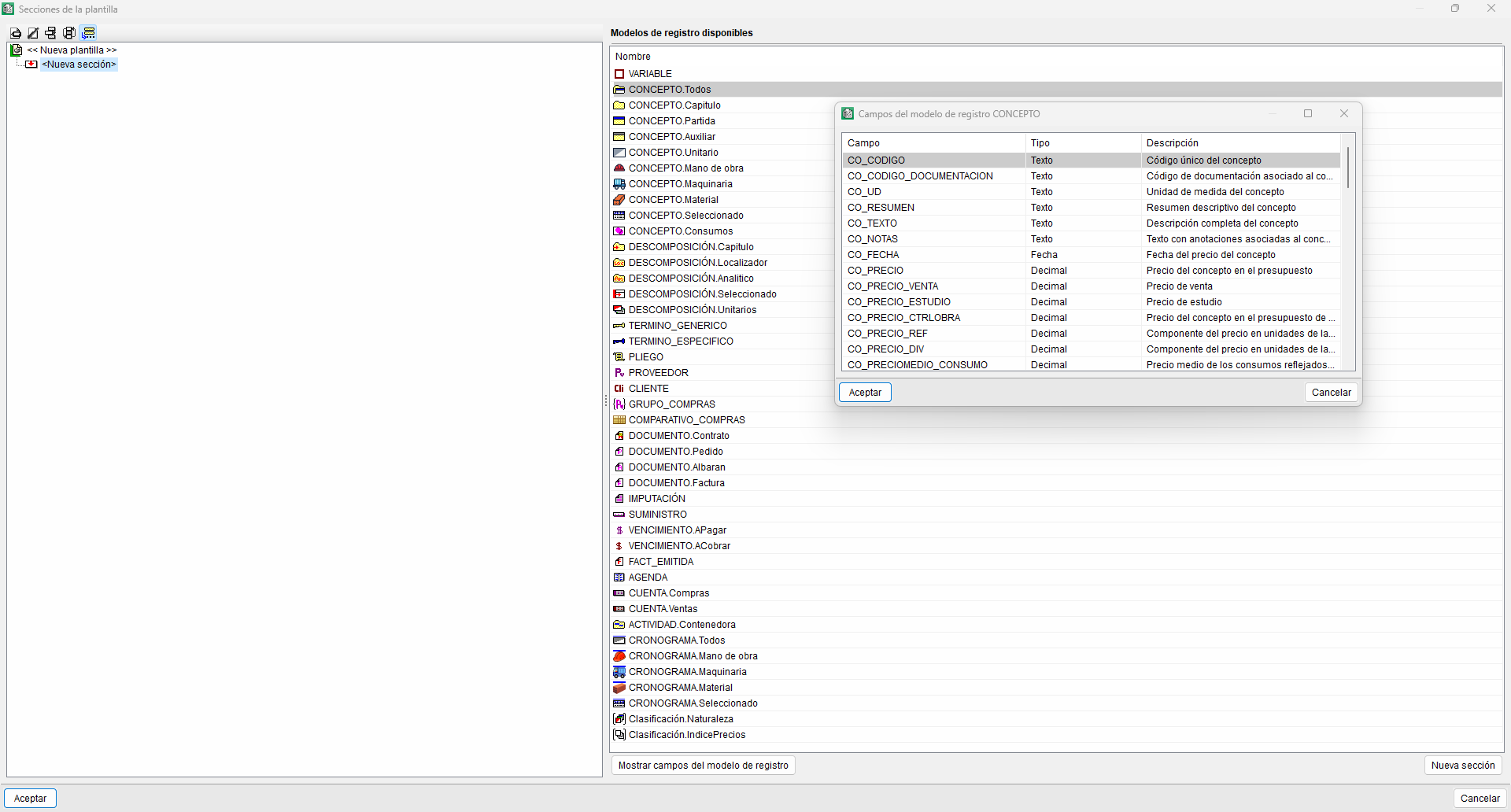
Of the registration models listed below, all except the first (General) are available for inclusion in the sequence.
- GENERAL
Contains general information about the database, such as its name, the number of decimal places used, etc. It serves as a basis for cover pages and page headers; for performing analyses with rounding in template scripts; and provides total amounts for the direct construction costs (DCCs), certificates, etc. - VARIABLE
This special record template, which contains no project data, lets you perform operations on variables in the template and display the results. It is the only template that allows for multiple print-outs at section level through the combined use of two variables. - CONCEPT
Contains all the fields that define a concept. It comprises the following sub-models:- CONCEPT.All. Lists all the concepts in the database (except the root chapter).
- CONCEPT.Work section. Lists only the work sections (excluding the root work section).
- CONCEPT.Item. Lists only the items, that is, the sub-headings that fall under chapters and are not chapters themselves.
- CONCEPT.Auxiliary item. Lists all concepts with breakdowns that are neither work sections nor items.
- CONCEPT.Resource. Lists all concepts without further breakdown that are not chapters.
- CONCEPT.Labour. Lists all resources of the ‘labour’ type.
- CONCEPT.Machinery. Lists all resources of the ‘machinery’ type.
- CONCEPT.Material. Lists all resources of the ‘material’ type.
- CONCEPT.Selected. Lists all the concepts that appear in the "Concept list" window.
- CONCEPT.Consumption. Lists all the fields that define a concept which has been entered in a direct allocation to a cost centre. This is the template to select under the "Breakdown.Item" sub-template.
- CONCEPT.Consumption. In this case, all concepts are processed.
- CONCEPT.Consumption2. In this case, all concepts are processed, and the cost centre items are grouped with the allocated items. This is the model to select under the "Breakdown.Item" sub-model.
- BREAKDOWN
Contains all the fields that define a breakdown line for any broken-down concept. It allows the contents of the database to be represented hierarchically. It comprises the following sub-models:- BREAKDOWN.Work section. Lists all the breakdown lines that refer to chapter-type concepts. It is required as the starting point for a hierarchical list and is recursive.
- BREAKDOWN.Item. Can only be applied if it is linked to a "BREAKDOWN.Work section" record sub-model, thereby generating a breakdown of the work section into line items.
- BREAKDOWN.Auxiliary item. This allows you to obtain the top-level breakdown lines for a line item, provided it is linked to one of the following sub-models: "BREAKDOWN.Line Item" or "ITEM.Line Item".
- BREAKDOWN.Breakdown. This recursive model is provided to enable the design of reports in which it is necessary to view all levels of breakdown for the concepts involved. It therefore includes auxiliary concepts and their breakdown. It must be linked to one of the following sub-models: "BREAKDOWN.Item" or "CONCEPT.Item".
- BREAKDOWN. Partial allocation. This special model allows you to obtain the breakdown lines for an item in price table no. 2, provided it is linked to one of the following sub-models: "BREAKDOWN. Item" or "CONCEPT. Item".
- BREAKDOWN.Location code. The locators defined in the quantity tables can be used to create a hierarchy of special work sections, constructed temporarily on the basis of these. It can only be used as the start of a sequence and is recursive so that it can be adapted to the different levels of locators present in your databases.
- BREAKDOWN. Analytical. This model allows you to create database reports by adopting the structure or work section organisation of a different database.
- BREAKDOWN. Selected. This template has been designed to enable the creation of partial reports, based on a pre-selected breakdown of lines from the "Tree" window. It can only be used as the start of a sequence.
- BREAKDOWN. Unitary concepts. This recursive model is provided so that reports can be designed in which it is desirable to view all levels of breakdown of the concepts involved; however, in this case, the breakdown of the auxiliary concepts is included, rather than the auxiliary concepts themselves.
- BREAKDOWN.CostCentre. Represents the cost centres to which the consumption of the supply has been allocated, provided that it is linked to "CONCEPT.Consumption".
- BREAKDOWN.PriceJustification. Summarises the auxiliary items on a single line at the end of the item’s price justification, provided that it is linked to one of the following sub-models: "BREAKDOWN.Item" or "CONCEPT.Item".
- GENERIC_TERM and SPECIFIC_TERM
These two models form the structure of each database’s dictionary and provide access to the thesaurus, which links specific terms to concepts and vice versa. - TABLE, SUBTABLE and ROW
Each table consists of one or more subtables plus a total row; in turn, each subtable includes a header row, data rows and a subtotal row. Normally, the three templates are used consecutively in the sequence of records within the templates designed to generate measurement lists, and they comprise the following sub-templates:- TABLE.Quantities. View the details of a measurement for an item.
- TABLE.Sales quantity. View the sales quantity details for an item.
- TABLE. Study quantity. View the detailed study quantity for an item.
- TABLE.Certificate to origin. Provides access to the details of a consignment’s origin certification.
- TABLE.Certificate to origin with partial closure. View the details of a consignment’s certification. Each "partial" certificate is displayed in a separate table.
- TABLE. Partial certification. View the details of a specific partial certificate for an item. This template can be used whether the project uses the "partial" closure type or the "at source" closure type.
- TABLE.Execution. View the details of the actual quantity executed for an item.
- REFERENCE
Locate concepts that use another concept in their breakdown. It contains the following submodels, which are only available as submodels of "CONCEPT" and "BREAKDOWN":- REFERENCE.Immediate. This model enables you to obtain a set of references for a concept.
- REFERENCE.Item. This recursive model generates a tree of references for the concept in question, down to the item level.
- REFERENCE.Work section. This recursive model generates a tree of references for the concept in question, down to the work section level.
- SPECIFICATIONS
Retrieve the items associated with specifications. It can only appear at the start of the sequence of record templates. It includes the sub-template "SPECIFICATIONS_SECTION", which represents the sections of the specification. - SUPPLIER
Contains fields containing information about the supplier, such as code, name, address, etc. - CLIENT
Contains fields containing customer information, such as reference number, name, address, etc. - PURCHASING_GROUP
Represents each of the purchasing groups defined in the project. - PURCHASE_COMPARATIVE
Represents all the purchasing comparisons defined in the project. - DOCUMENT
Access the construction management documents via the following sub-models: "DOCUMENT.Contract", "DOCUMENT.Purchase Order", "DOCUMENT.Delivery note" and "DOCUMENT.Invoice". - CHARGE
Provides information about this document, such as the code, name, associated cost centre, etc. - SUPPLY
Provides information on the amounts, documents, cost centres, etc., to which the items are linked. - SUPPLY_CONTRACT
Represents all supplies under the contract, with additional information on certified quantities. It must be added as a sub-model of "DOCUMENT.Contract". - SUPPLIES_PURCHASES
Represents all the supplies included in a purchase comparison. It must be added as a sub-model of "PURCHASE_COMPARISON". - DUE PAYMENT
Contains information on due dates, such as amounts and dates. It includes the sub-models "DUE PAYMENT.ToPay" for incoming invoices and "DUE PAYMENT.ToCollect" for outgoing invoices. - EMITTED_INV
Provides information on issued invoices, such as the document code, name or date. - SCHEDULE
Access all the information displayed in the program’s schedule. - ACCOUNT
View account codes and names. It includes the sub-models "ACCOUNT.Purchases" and "ACCOUNT.Sales", for invoices received and invoices issued, respectively. - ACTIVITY.Container
A recursive model representing the first level of container activities in the time-activity diagram. It includes the "ACTIVITY.Task" sub-model, which represents the tasks contained within each activity. - CHRONOGRAM
View the prices used in the cost centres associated with the tasks in the Gantt chart. It includes the following sub-models:- CHRONOGRAM.All. Represents each of the unit prices used in the cost centres associated with the tasks.
- CHRONOGRAM.Labour. This represents each of the labour rates used in the cost centres associated with the tasks.
- CHRONOGRAM.Machinery. Shows the individual prices of the machinery used in the cost centres associated with the tasks.
- CHRONOGRAM.Materials. Shows each of the prices of the materials used in the cost centres associated with the tasks.
- CHRONOGRAM.Selected. Represents each of the unit prices shown in the "List" window, which are used in the cost centres associated with the tasks.
- Classification.Nature
This represents the classification of all the individual concepts used in the work. - Classification.PrixIndex
This sets out the classification of all unit items used in the project. - Classification.Resource
Represents the classes into which the parent class is subdivided; this may be "Classification.Nature" or "Classification.PriceIndex".
When defining the template structure, registration models determine which data from the database will be available for generating the list. This information can be supplemented using variables, which are used to store and modify values whilst the list is being generated, and using scripts, which enable analyses to be carried out, actions to be controlled, and customised behaviour to be defined.
