


Drawings
Configures the formats and peripherals for printing drawings.
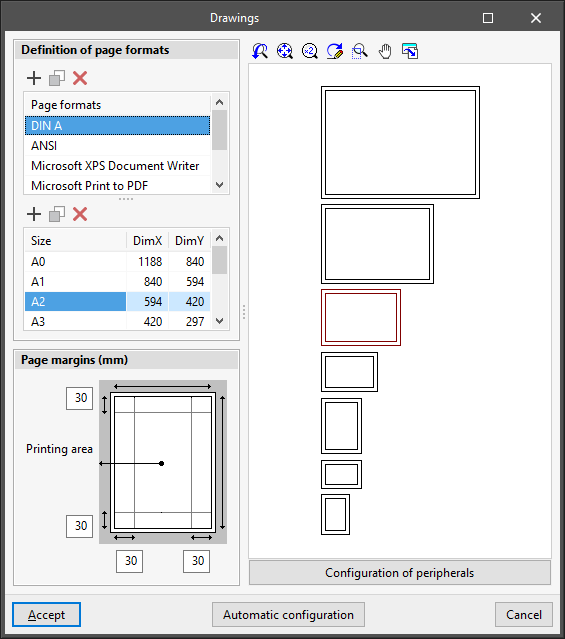
- Definition of page formats
Configures the page formats and sizes available when printing drawings. Users can edit, add, copy or delete entries in two tables:- Format table
The first table defines the series of available formats. - Table of page sizes
When selecting a format in the first table, the second table defines the page sizes available in the format and their dimensions:
- Format table
- Page margins
Configures the print margins of drawings (top, bottom, left and right) around the "Print area". - Format viewer
In this display area, the selected format series and the selected page size are shown schematically. - Configuration of peripherals
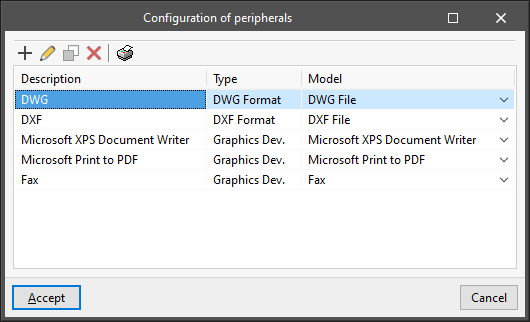
Accesses to the printing peripherals configuration table. By default, the program includes the "DWG" and "DXF" peripherals, which allow printing on these files, together with the graphic devices registered in the operating system control panel. The configuration options available when editing each peripheral vary according to its type:- Configure drawing program
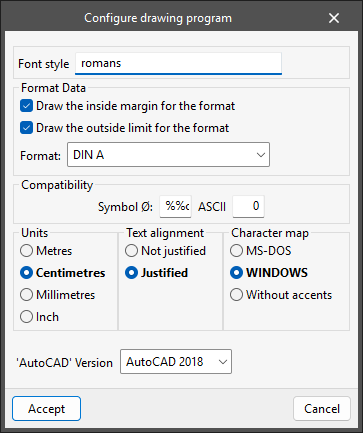
This panel appears when editing the "DXF" and "DWG" peripherals and allows users to configure the printing on these files:- Font style
- Format Data
- Draw the inside margin for the format (optional)
- Draw the outside limit for the format (optional)
- Format
- Compatibility
- Symbol Ø
- ASCII
- Unit display (Metres / Centimetres / Millimetres / Inch)
- Text alignment (Not justified / Justified)
- Character map (MS-DOS / Windows / Without accents)
- 'AutoCAD' version (AutoCAD 2004 / AutoCAD 2000 / AutoCAD R14 / AutoCAD R13 / AutoCAD R11)
- Configure printer
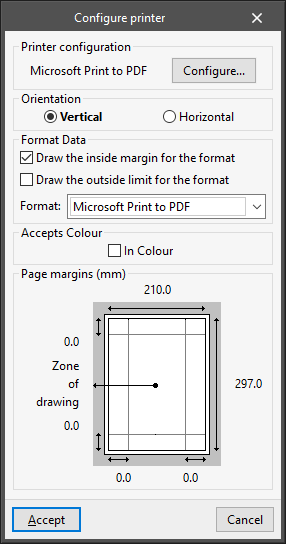
This panel appears when configuring a printer type peripheral:- Printer configuration
- Orientation (Vertical / Horizontal)
- Format Data
- Draw the inside margin for the format (optional)
- Draw the outside limit for the format (optional)
- Format
- Accepts Colour
- In Colour (optional)
- Page margins
- Configure drawing program