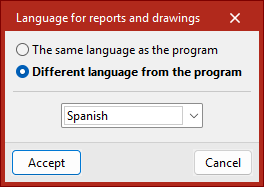
Language for reports and drawings
Permite seleccionar un idioma distinto al del programa para obtener los listados y planos.
- The same language as the program
Uses the default language in which the program was installed. - Different language from the program
Selects a different language from those available in the drop-down menu.
The "Language for reports and drawings" option is also accessible from the "File" menu, under "Reports" or "Drawings".
| Best practice: |
|---|
| It should be noted that the references of certain elements in the job, such as the names of groups and floors, will be displayed in the language in which they were entered. The same applies to certain general settings of the program, such as the names of the "Floor plans" or the chapters of the "Customised reports". The names of the operations are not translated when generating a report in CYPE Connect or StruBIM Steel; they are a reference defined by the user or the default reference. |