


Description of the bar sections
The following tool, available in the "Bars" group of the top toolbar, under the "Geometry" tab (in the "Structure" tab), allows you to modify the section description of the bars:

Section
This option allows you to modify the structural element type, material, and section geometry for a group of bars. To do this, after clicking the option, bars are selected individually using the left mouse button or by drawing a selection area.
Right-clicking opens the "Describe" window. This window can also be accessed when inserting a new bar, by clicking the edit button in the "Properties – New bar" window.
This window allows you to edit the following information:
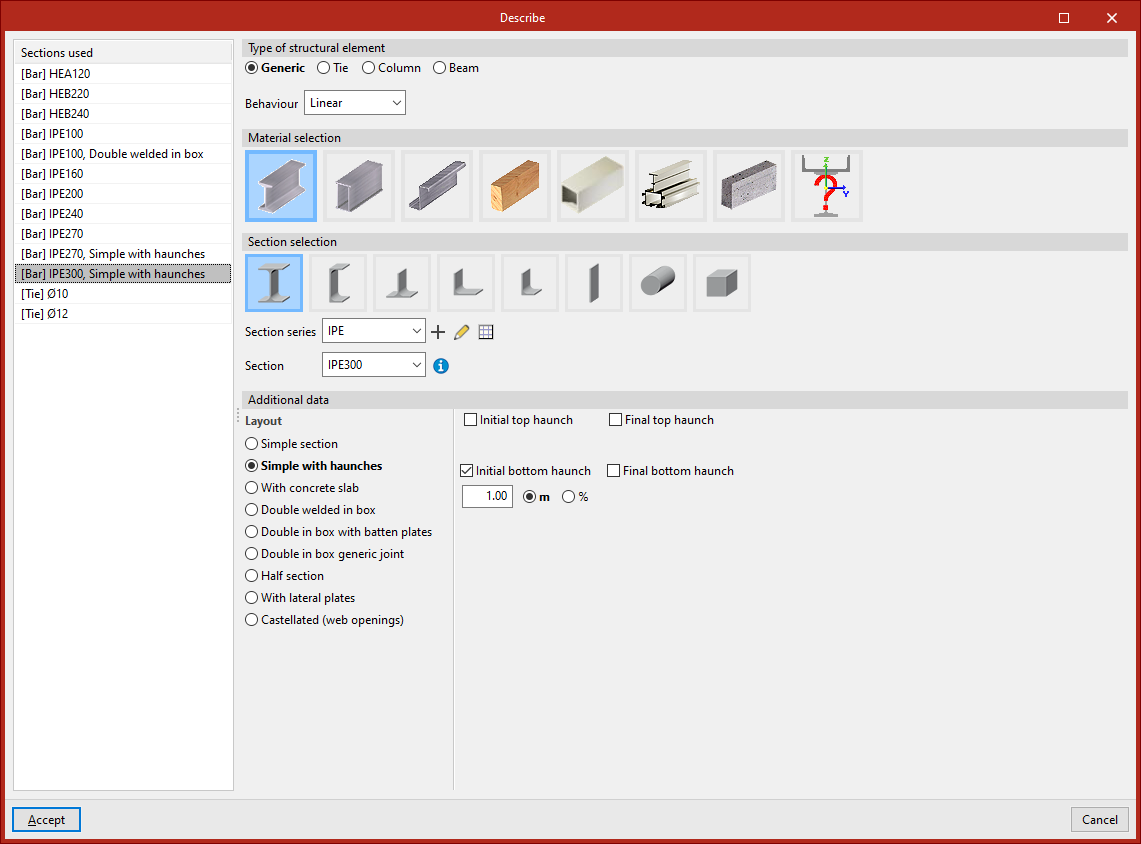
Sections used
On the left-hand side, the program displays the "Sections used" from other bars in the model, so they can be selected directly.
Type of structural element
On the right-hand side, in the "Type of structural element" section, you define whether the element is "Generic", a "Tie", a "Column", or a "Beam".If the element is "Generic", you can choose from the dropdown whether its "Behaviour" is "Linear" or "Only tension", and in this case you can define and insert a "Prestressing stress" by ticking the corresponding checkbox.
Material selection
In the case of a "Generic" element, under the "Material selection" section, you specify the material of the bar from the following options:
- Rolled steel section
- Welded steel plate section
- Cold-formed steel section
- Timber section
- Extruded aluminium section
- Special aluminium section
- Concrete bar
- Generic section
The last option is used to define a material that is not included in the above options.
Section selection
Next, the "Section selection" is carried out within the categories offered by the program for each material.
For example, within rolled steel sections, the following options are available:
- Rolled I
- C
- T
- Symmetrical angle
- Angle
- Plate
- Round bar
- Square bar
Clicking on the desired option allows the rest of the section parameters to be defined.From the dropdowns, the program allows you to select a "Section series" and a "Section" within that series.
Additional data
In the "Additional data" section at the bottom, the "Section arrangement" is specified from the possibilities offered by the program for the selected section type.
For example, in the case of double T sections, the following options are available:
- Simple section
- Single with haunches
- With concrete slab
- Double in box with batten plates
- Double in box generic joint
- Half section
- With lateral plates
- Castellated (web openings)
When any of these options is selected, you must enter the required data and parameters, such as the dimensions of the stiffeners or the spacing between sections.
When clicking "Accept" in the "Describe" window, the program applies the chosen configuration to the selected bars.
