Pushover analysis: "Analyse" option
The following option is available in the "Pushover" section of the top toolbar, within the "Analysis" tab (under the "Structure" tab):

Analyse
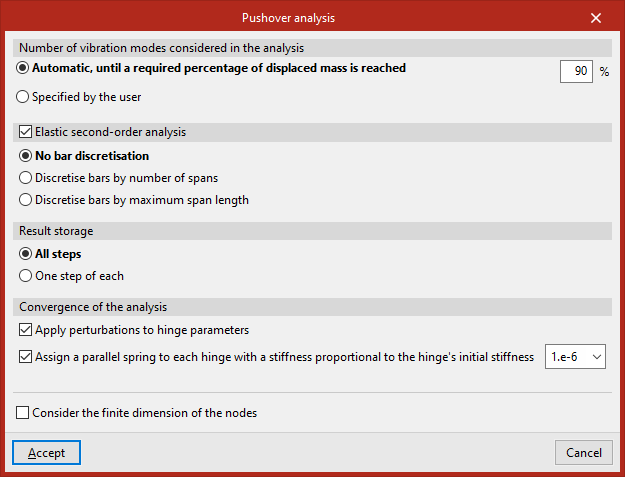
This option can be used to configure and run the pushover analysis.
The "Number of vibration modes included in the analysis" can be:
- "Automatic, until a required percentage of the mass has been displaced", which must be entered.
- "User-defined", in which case the number of modes is entered.
You can then enable "Second-order elastic analysis".
"Result storage" can be carried out:
- For "All loads".
- For"One load in every…", enter a specific number in the box that appears on the right.
Among the options for achieving the "Convergence of the analysis", the program offers the following options:
- Apply perturbations to hinge parameters (optional)
This option can be enabled if the model exhibits convergence issues that prevent the target displacement from being reached. If enabled, the program randomly modifies the yield moment of the hinges by a factor of around 1 in 1000 to try to prevent several hinges from yielding simultaneously, which would trigger a mechanism. - Assign a parallel spring to each ball joint with a stiffness proportional to the ball joint’s initial stiffness (optional)
If the analysis stops because the hinges have collapsed prematurely or the minimum desired displacement has not been reached, this option can be activated to enter springs in parallel with the hinges with very low stiffness in an attempt to ensure that, when they collapse, the system matrix remains invertible.
Finally, you can "Consider the finite dimension of the nodes" by ticking the relevant box.