Setting up the work environment
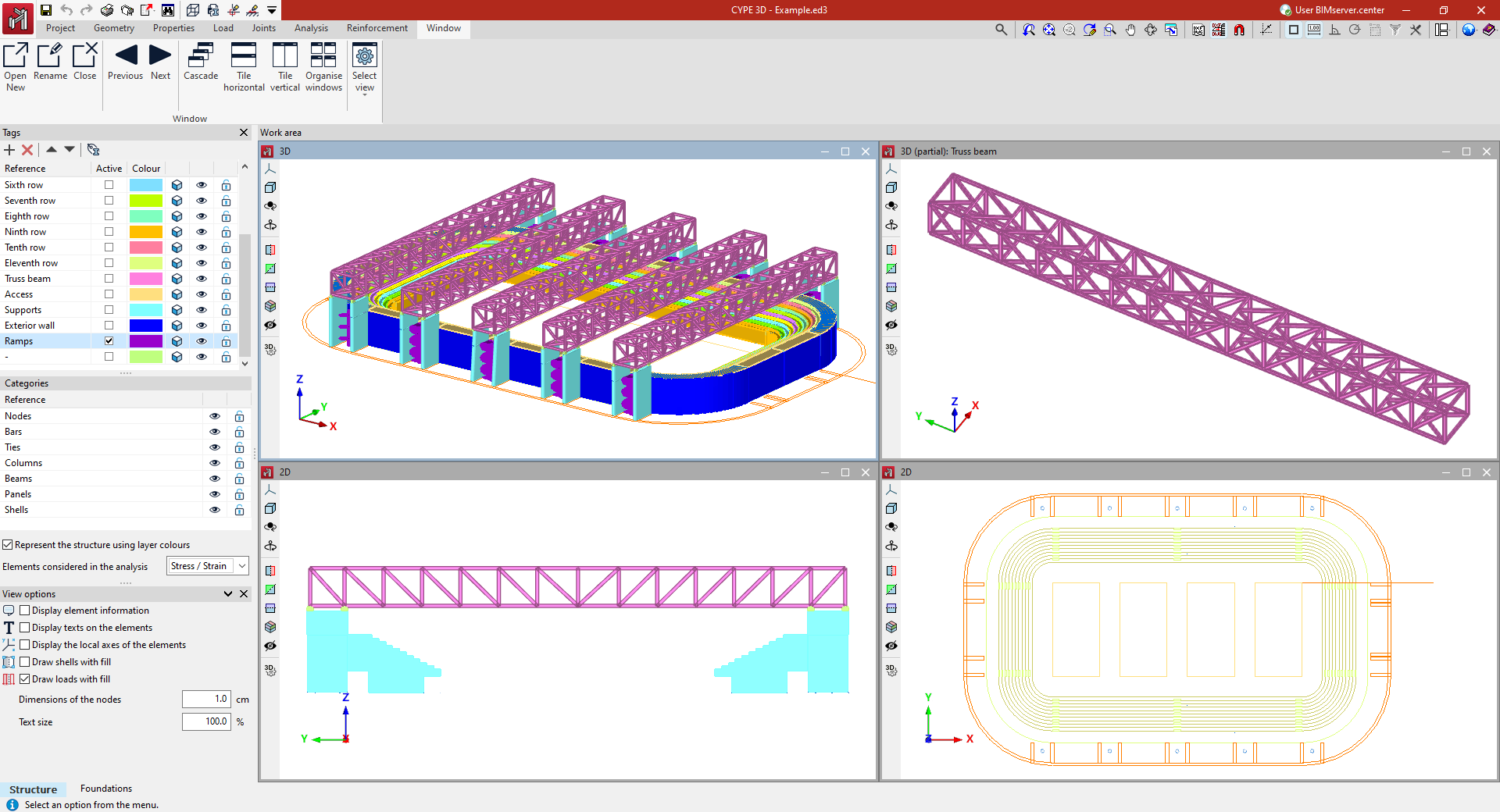
The program's working environment has two separate tabs: "Structure" and "Foundation", accessible from the bottom left of the screen.
In turn, within the "Structure" tab there are different tabs at the top ("Job", "Geometry", "Properties", "Load", "Connections", "Analysis", "Reinforcement" and "Windows"), which follow the sequential order of entry, definition and analysis of a structural model.
The interface consists of the following parts:
- The top of the main toolbar contains different features depending on which tab is open.
- Further down, in the work area, all project elements are entered, edited, and viewed. You can choose how elements are drawn: schematically or in three dimensions. The program allows you to define different display windows (3D or 2D), which facilitates work on the structure. To do this, use the tools in the "Window" tab.
- On the left side of the "Structure" tab are the main tools for defining project tags and managing the visibility of categories, as well as other display options.
These panels act as dockable windows that can be customised to adapt the workspace to the needs of the project.
The following link provides detailed information about the program's working environment and the options available in the "Window" tab.