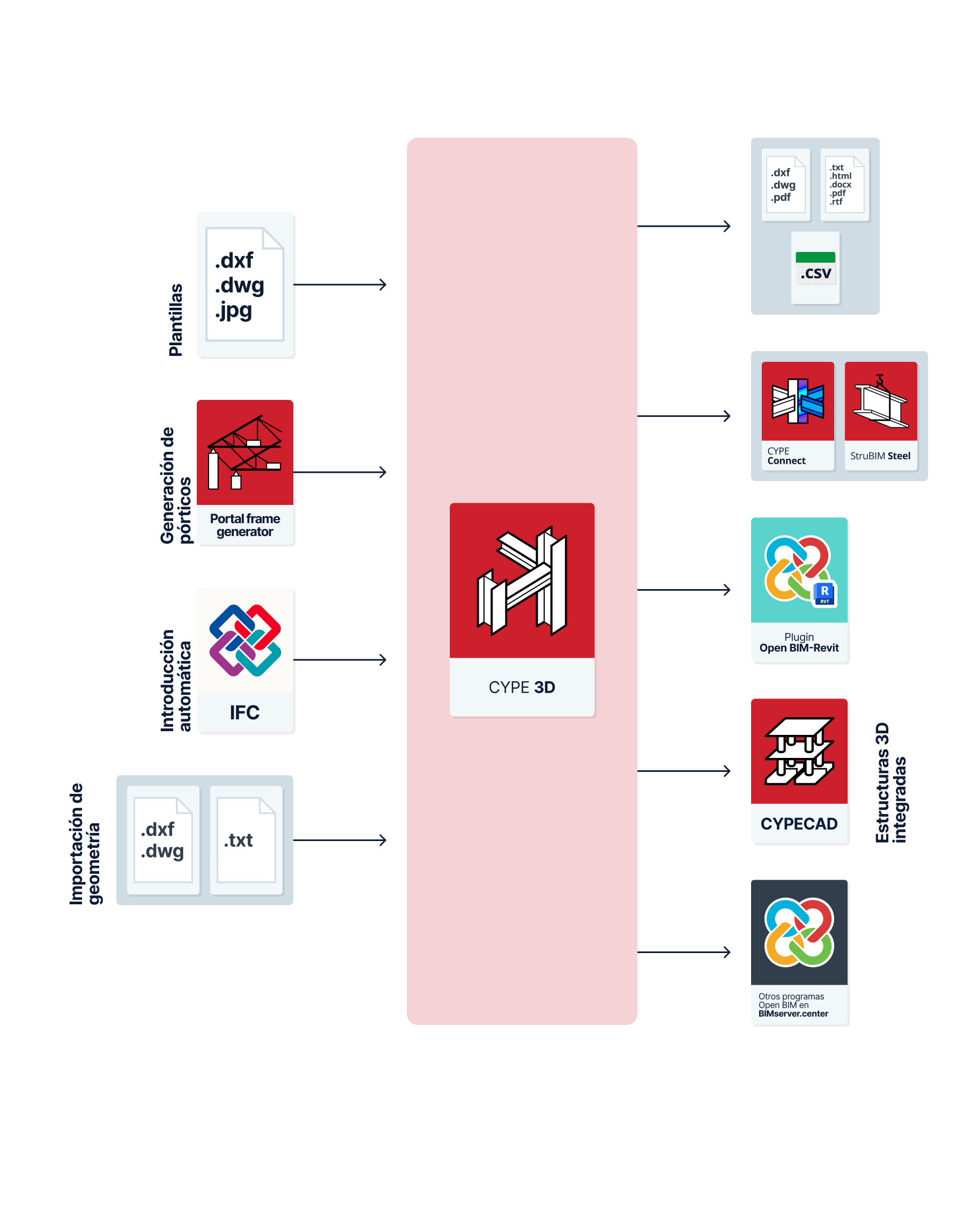
Workflows supported by the program
CYPE 3D is a tool that offers different workflow options:
Data entry
Free modelling/modelling with templates
CYPE 3D can be used for either free or template modelling of the structure, either from scratch (as an "Empty job") or to complete the definition of imported data in other workflows:
- Modelling of the structure by free entry into CYPE 3D.
- Modelling of the structure in CYPECAD based on DXF-DWG, DWF, PDF templates or images (.jpeg, .jpg, .bmp, .wmf, .emf, .pcx).g, .jpg, .bmp, .wmf, .emf, .pcx).
Importing models with Portal frame generator
Portal frame generator can be used to automatically generate the geometry and loads of a parallel portal frame structure and export the data to CYPE 3D, where the complete model analysis will be carried out.
When starting the work with Portal frame generator, the following actions can be carried out:
- Generating the CYPE 3D model from the data entered in the Portal frame generator. The information generated includes the following:
- the bar geometry of the indicated portal frame or the complete portal frame system;
- the necessary load cases;
- if applicable, the necessary load panels that carry out the distribution of surface loads and that incorporate the information of the self-weight of the envelopes and purlins, and/or of the live load on the roof;
- the wind and snow surface loads;
- the grouping of frames;
- the lengths or buckling coefficients of the portal frame bars;
- and the supports or external connections of the columns.
Automatic entry from IFC files
When starting a new job, CYPE 3D offers a specific option for automatic data entry and generation of data contained in IFC files:
- Automatic data entry from the import of structural analysis models from IFC files. The entities that CYPE 3D is capable of importing from IFC files are the following:
- Node import (IFCStructuralPointConnection), with their external connection conditions.
- Bar import (IFCStructuralCurveMember), with their end fixity conditions and descriptions.
Other automatic generation options
As well as those mentioned above, CYPE 3D can automatically generate the geometry of the structure by importing data from the following files:
- Automatic geometry generation from DXF or DWG files. The lines represented in these files will be transformed into bars in CYPE 3D.
- Automatic geometry generation from text files with a given format.
Data output
Data export from CYPE 3D
- Exporting reports to HTML, DOCX, PDF, RTF and TXT formats.
- Exporting drawings to DXF, DWG and PDF formats.
- Export to CSV format files with data such as the geometry of nodes or forces by loadcase, combinations and envelopes of the bars.
- Export of the information contained in CYPE 3D to the BIMserver.center platform using IFC and GLTF formats, ensuring interoperability and the efficient exchange of information between different programs. This is so that it can be viewed by authorised project participants. The information generated by CYPE 3D can be used by the following programs:
- CYPE Connect / StruBIM Steel
Import CYPE 3D steel structure sections and forces to carry out the detailed analysis of connections. - Autodesk Revit (via the Open BIM - Revit Plugin)
- Imports the information generated by CYPE 3D for visualisation and management in Revit. This includes elements such as bolts, welds, gussets and other connection components. Optionally, it is possible to generate native Revit elements from some elements of the structural IFC (such as bars, columns, beams and braces).
- CYPE Connect / StruBIM Steel
Integrated 3D structures
Models developed in CYPE 3D and saved in .ed3 files can be incorporated into CYPECAD as integrated 3D structures.
This is used to carry out the analysis together with the rest of the elements entered in CYPECAD and, from this program, to export the data to Arquimedes. CYPECAD can export the bill of quantities to Arquimedes or to a file in FIEBDC-3 format so that it can be processed by other quantity surveying programs. This can include CYPE 3D model data after incorporation as integrated 3D structures.