Tools for managing manufacturers' catalogues
Within the "Installation" tab, in the "Project" group of the main toolbar, there is an option for managing the manufacturer's product catalogues to incorporate them into the project:

Catalogue management
Manufacturer's catalogues can be downloaded using the Open BIM Database connection, making it easier to enter data into the program for project development.
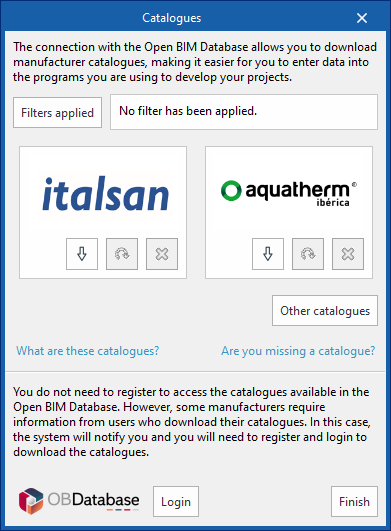
Clicking on this option opens a window with the available manufacturer catalogues.
Using the "Filters applied" option, it is possible to apply filters by element "Category", "Language" and "Country", in order to display only manufacturers offering product catalogues with these characteristics.
Catalogue download
For each manufacturer, the following options are shown:
- Download
Download the manufacturer's catalogue. The products in the catalogue will be available in the project. - Update
Updates the selected manufacturer's catalogue to the latest version, deleting the version downloaded in the project. - Delete
Deletes the catalogue of the selected manufacturer. The products in the catalogue will no longer be available in the project.
Connection to the Open BIM Database
At the bottom of this dialogue box, the program allows users to log in with their Open BIM Database account and password.
| Note: |
|---|
| The products from the downloaded catalogues can be selected when entering the elements of the system. |