Polygonal distribution
The "Polygonal distribution" option allows you to enter a grid-based luminaire layout covering a polygonal area.
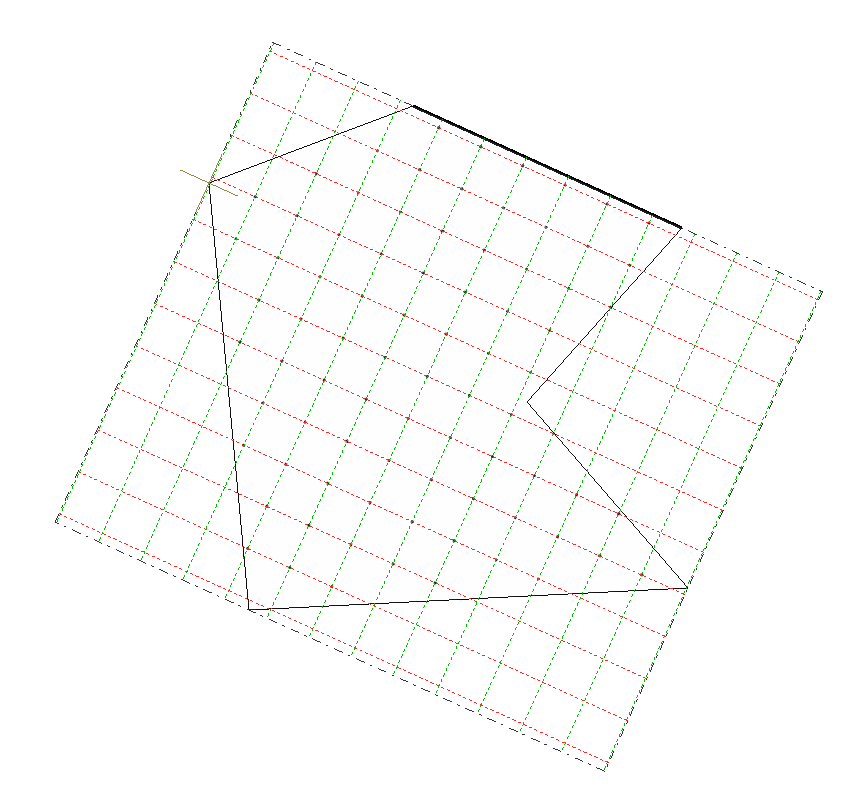
To do this, mark two points in the work area to define one of the sides of the polygon, and then enter the remaining points to complete it. The program displays the luminaire alignments in the X direction in red, and those in the Y direction in green.
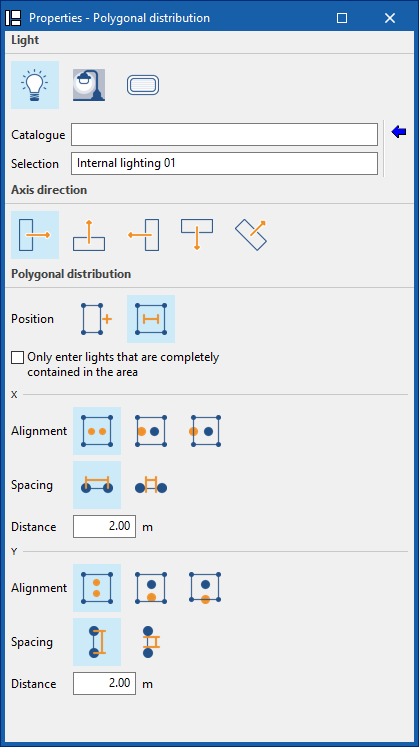
During the process, the program displays the following dockable window for defining the distribution parameters:
- Lighting type
- Interior
- Exterior
- Emergency
- Luminaire
- Catalogue / Selection
Reference to the manufacturer’s catalogue and luminaire model selection. Using the “Select a luminaire from the library” wizard, available on the right, the program allows you to select luminaires from “Manufacturer catalogues” or the “Generic elements library”. These types of elements can be created and edited via the “Catalogues” and “Indoor luminaire types”, “Outdoor luminaire types” or “Emergency luminaire types” options, respectively, available within the “Project” section of the main toolbar on the main interface.
- Catalogue / Selection
- Axis orientation
Defines the orientation of the luminaires by applying an individual rotation about their Z-axis. To do this, you specify whether the horizontal plane of origin of the photometric curve is aligned with, or oriented at a specific angle to, the reference line:- Aligned
- Rotated by 90°
- Rotated 180°
- Facing 270 degrees
- With user-defined orientation
- Polygonal distribution
Adjusts the parameters of the luminaire distribution.- Position
Indicates whether the distribution of luminaires is defined by entering their number or a specific distance between luminaires. The program allows you to "Enter only luminaires that are completely within the area" by ticking the relevant option. This option automatically excludes any luminaires whose geometry lies partially outside the distribution polygon.- By quantity
The luminaires will be distributed evenly according to the specified number.
For each direction (X / Y), the following is specified:- Alignment
Allows you to specify whether the luminaires are arranged "Symmetrically", aligned along their "Outer edges", or with their centres aligned with the sides of the rectangle ("Centre-to-centre"). - Number of luminaires
Enter the number of luminaires per row.
- Alignment
- By distance
A fixed spacing is set between luminaires, measured between centres or between edges.
For each direction (X / Y), the following is specified:- Alignment
Defines how the luminaires are positioned in relation to the boundaries of the distribution. The luminaires can be arranged "Symmetrically", aligned along their "Outer edges", or with their centres coinciding with the sides of the rectangle ("Centre-to-centre"). - Spacing
Indicates whether the distance measures the spacing "between centres" or "between edges" of luminaires. - Distance
Enter the distance between luminaires.
- Alignment
- By quantity
- Position
Once you have confirmed, the program generates and positions the luminaires according to the defined settings. If necessary, the position or properties of the luminaires can be edited individually at a later stage.