Update history​​

CYPECAD

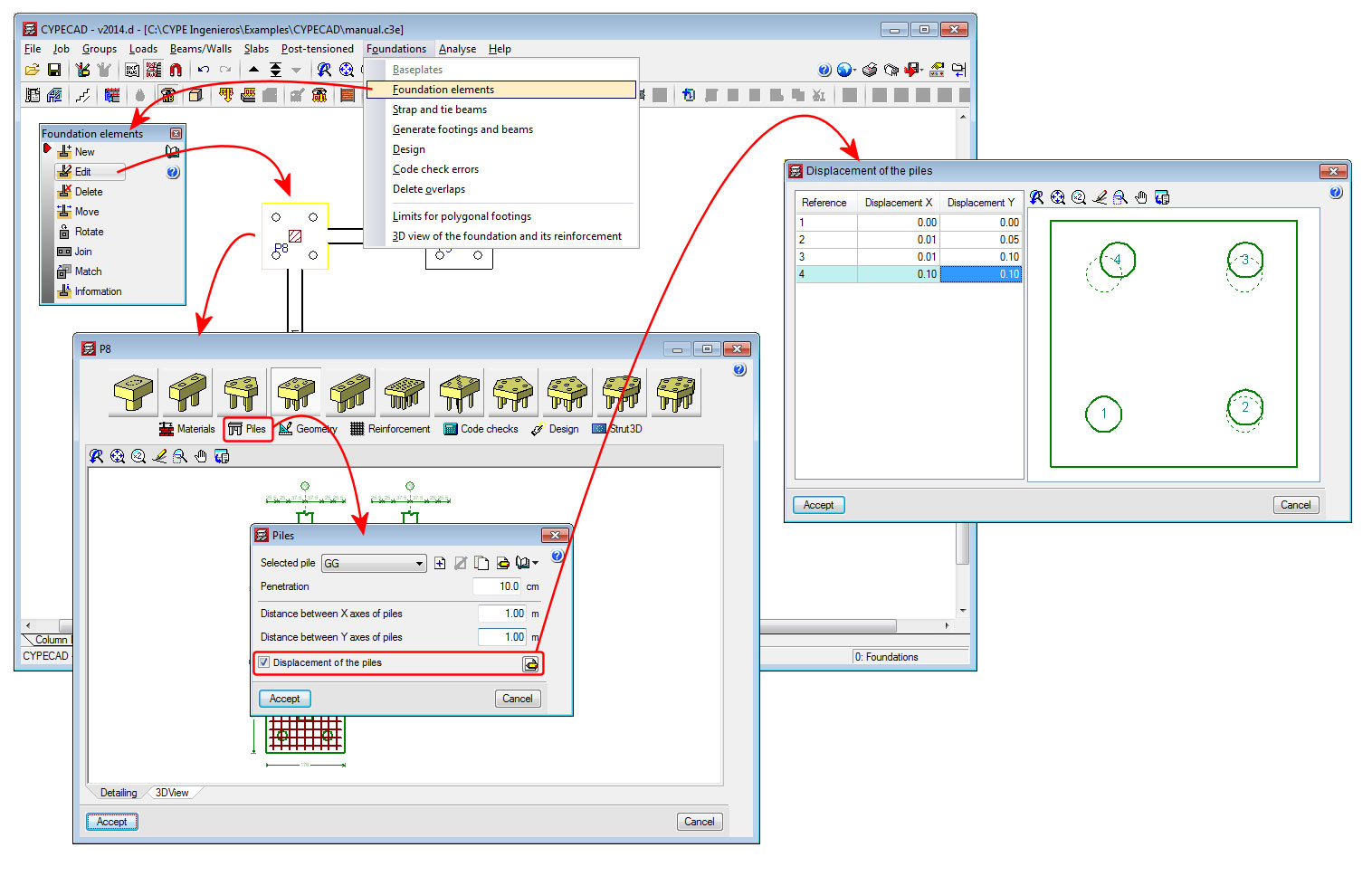
A new option, “Displacement of the piles” has been implemented in the “Piles” dialogue box (see image). This option allows users to introduce a displacement value for each pile of the pile cap with respect to its original position. The displacement is introduced using the X and Y components of the local axes of the pile cap.

This option has been implemented so a change in the position of the piles during the execution phase of the job can be contemplated. If this occurs, the designer can introduce the displacement the piles have undergone with respect to those of the project, and by selecting the check option, can check whether or not the pile cap continues to meet its requirements.

Therefore, the effect of the displacements of the piles that are introduced using this option, are only used to check the pile cap. The design and drawings that are generated are all carried out bearing in mind the original position of the piles.

The tool, Strut3D, was implemented in the 2013.e version. This tool allows users (in CYPECAD and Metal 3D – using the Pile caps module – and in Foundation elements) to check pile caps using a general analysis methodology whereby the D regions of the reinforced concrete are analysed using a strut and tie method. This tool was only available for use with the Spanish EHE-08 concrete code.

In the 2014.b version, more codes could be used with Strut3D: ACI 318M-08 (USA), Nch430.Of2008 (Chile), NTE E.060:2009 (Peru) and NSR-10 (Columbia).

With the 2014.d version, Stut3D has been implemented to be used with more concrete codes:

  • ABNT NBR 6118 2007 (Brazil)

Projeto de estruturas de concreto – Procedimento

  • ABNT NBR 6118 Projeto Junho

Projeto de estructuras de concreto – Procedimento (project code that will substitute the code that is currently in force; ABNT NBR 6118 2007)

  • Eurocode 2 (EU)

Design of concrete structures. EN 1992-1-1:2004/AC 2008

  • Eurocode 2 (France)

Calcul des structures en béton. NF EN 1992-1-1:2005/NA: Mars 2007

  • Eurocode 2 (Portugal)

Projecto de estruturas de betão. NP EN 1992-1-1:2010/NA

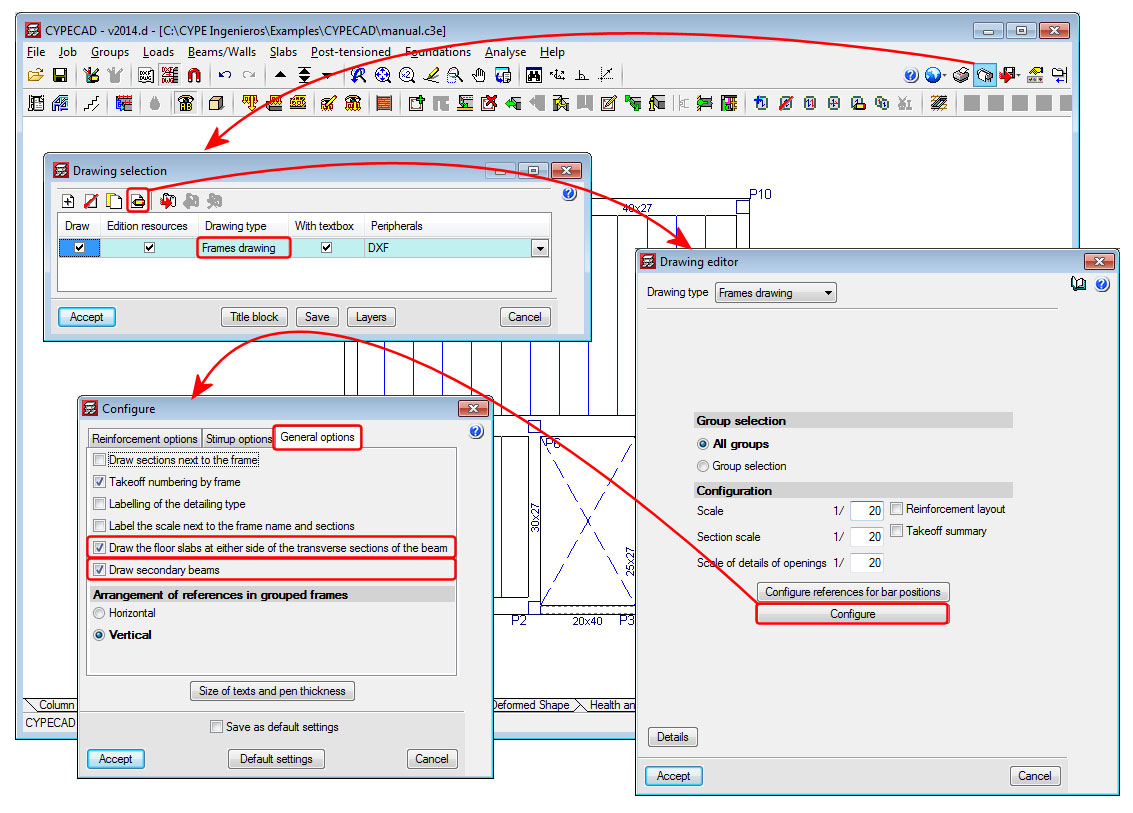
The 2014.d version of CYPECAP includes the option to “Draw secondary beams” in the configuration dialogue box for the frames drawing (see image). This option draws secondary beams (or not draw them if left inactivated) in the longitudinal section of the frames represented in the frames drawings. For CYPECAD, a secondary beam is that which divides which the longitudinal reinforcement of the beam.

This option will only be available with jobs analysed in accordance with a concrete code or seismic code (if a seismic analysis is being carried out) available for use with the advanced beam editor.

A new option has been included in the 2014.d version of CYPECAD: “Draw the floor slabs at either side of the transverse sections of the beam”. This option is located in the configuration dialogue box for the frames drawing (see image). By activating this option, the floor slab will be displayed in the transverse sections of the frames in the frames drawing.

This option is only available with jobs analysed in accordance with a concrete code or seismic code (if a seismic analysis is being carried out) available for use with the advanced beam editor.

A new option has been implemented: “Consult the required and effective areas” ( button) in the advanced beam editor of CYPECAD. When this option is selected, the program displays the required and effective areas of the reinforcement of the frame at the point of the longitudinal section where the cursor is positioned.
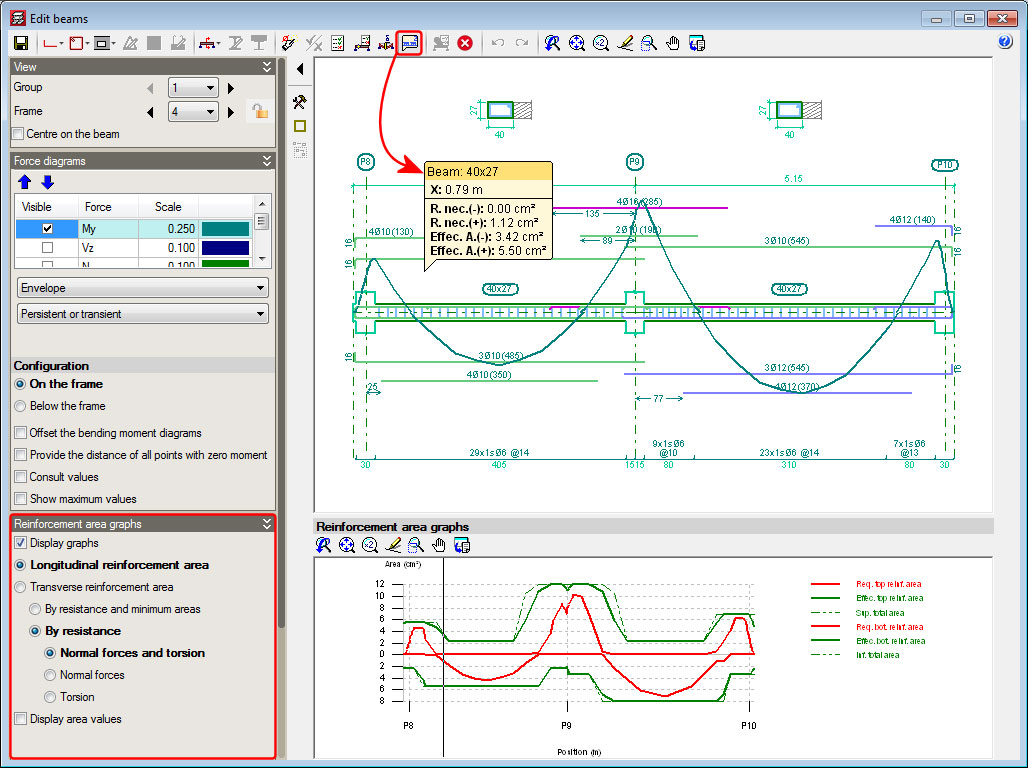
The information displayed moves with the cursor along the frame and displays the corresponding areas at the point where the cursor is positioned.

The data that is visualised on-screen corresponds to the type of reinforcement selected in the “Reinforcement area graphs” section in the left lateral menu of the advanced beam editor (longitudinal reinforcement area, transverse reinforcement area, resistance reinforcement and minimum steel areas...).

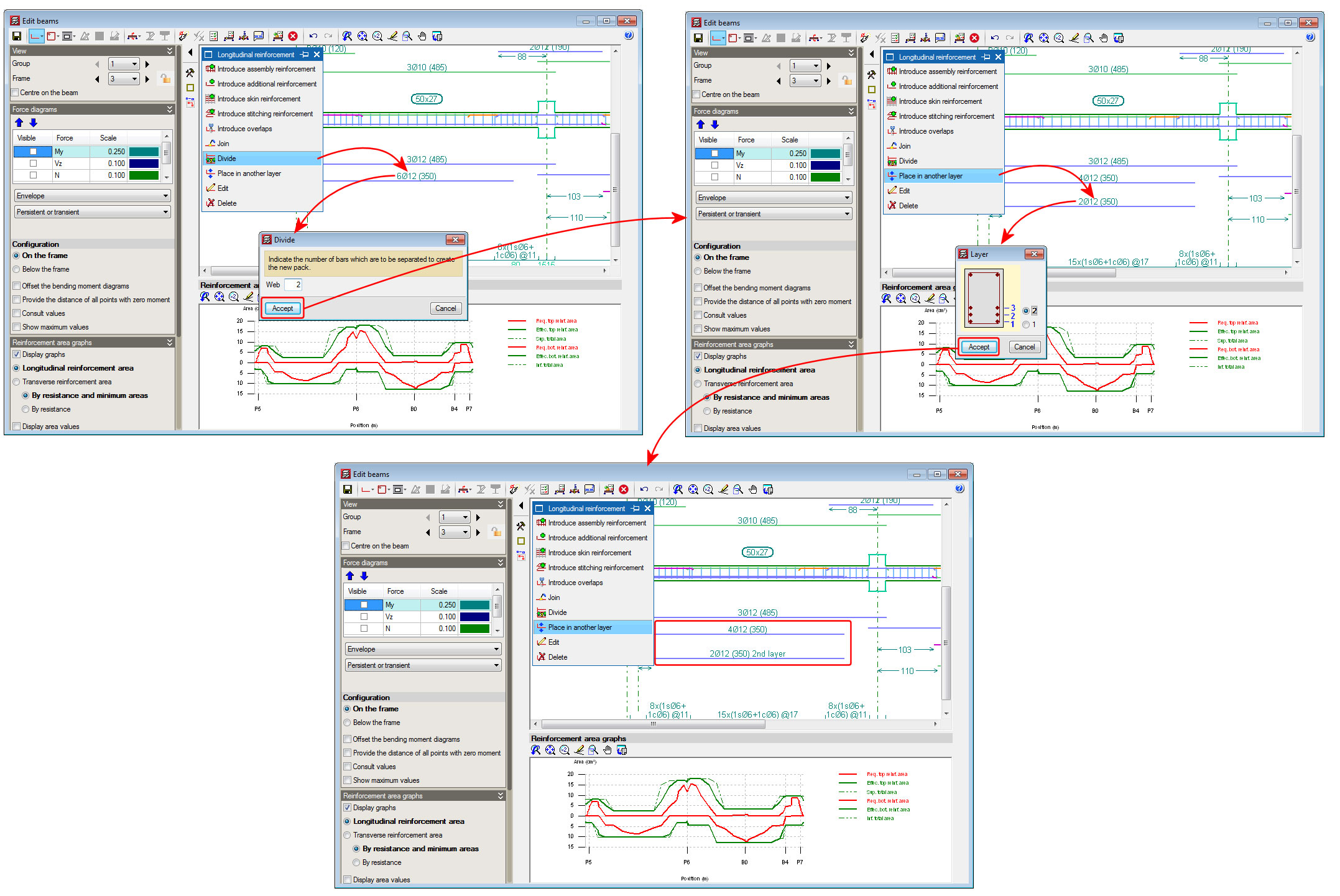
A new option; Divide, has been implemented in the longitudinal reinforcement edition box of CYPECAD’s advanced beam editor. This option allows users to divide a pack of bars, in such a way that the number of bars indicated by users then becomes part of the other pack. By implementing this option, the one or two packs remaining after the division can be changed to other reinforcement layers.

In previous versions, to change bars belonging to a bar pack from one layer to another, user had to carry out two steps: reduce the number of bars of the packet and create another packet with the same number of bars that were removed (as well as having to indicate the same diameter, position and bar length). This procedure was not only a longer process but also increased the possibility of there being errors in the modifications.

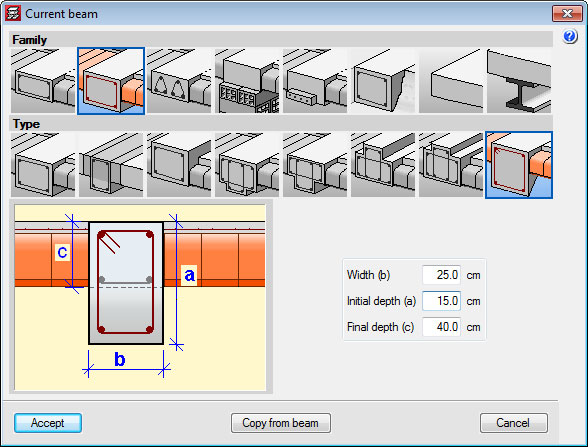
Dropped rectangular beams with variable sections can now be introduced in jobs analysed in accordance with a concrete code or seismic code (if a seismic analysis is being carried out) available for use with the advanced beam editor .

This possibility was already available with Continuous beams program. Now in CYPECAD, within the beam introduction dialogue box, a new type of beam has been added for which the program requests the width, initial depth and final depth.

Some of the buttons of the toolbar situated at the top of CYPECAD’s advanced beam editor (reinforcement edition, introduce openings, transverse sections), open floating windows that also contain other tools to edit the frames. As of the 2014.d version, these floating windows can be configured, offering the following options:

  • Appearance of the floating windows
  • Visibility of the floating windows (remain visible or hide automatically)
  • Distribution of the tools of the floating windows around the work area
  • Memorisation of the position, aspect and visibility of the floating windows

These improvements are the same as those that have been implemented for CYPECAD MEP and are explained in more detail on this webpage.

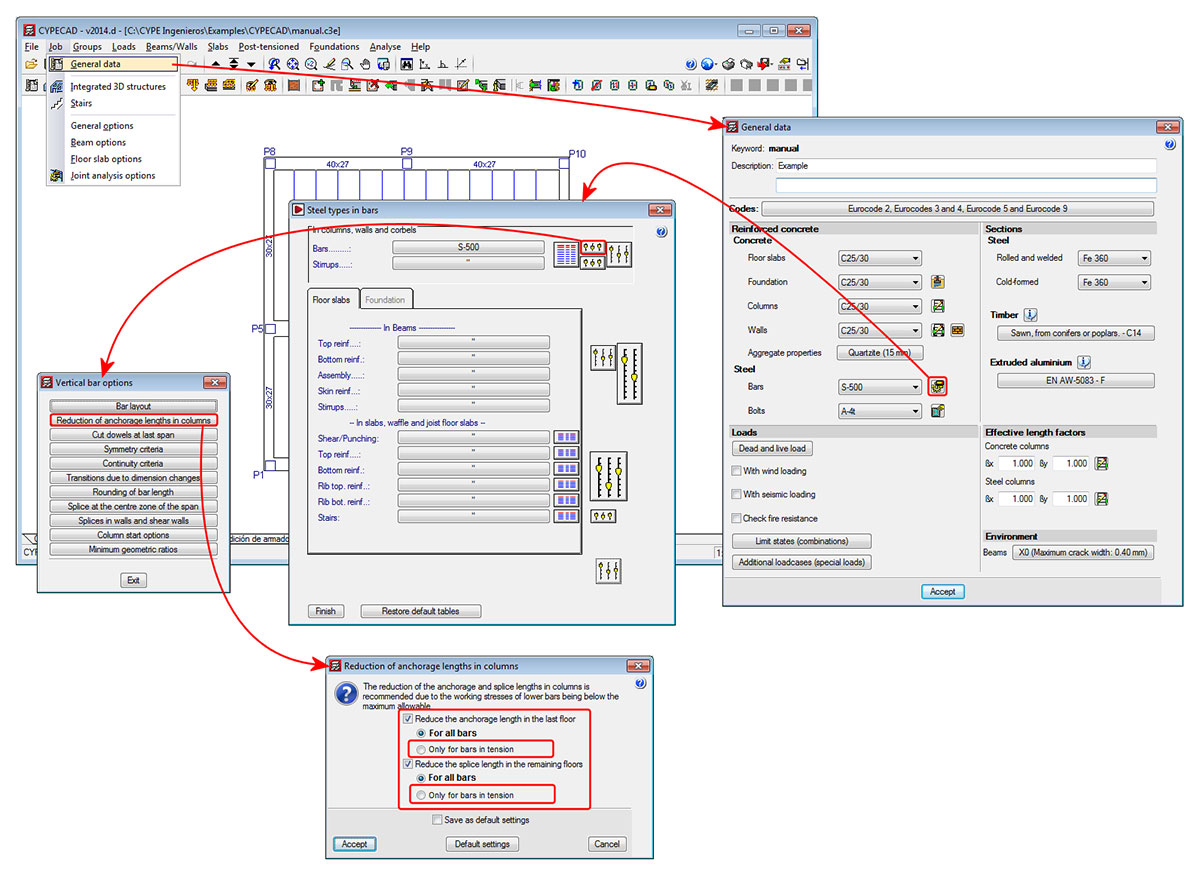
As of previous version, the anchorage length of the columns at the last floor and the splice length at other floors could be reduced. Now, with the 2014.d version, users can reduce the length of only bars that are in tension, in which case, a minimum resultant length for bars in tension has been established as Lb (basic anchorage length). This way, the anchorage lengths and splice lengths (if the reduction is also applied to floors below the last floor) will be more uniform.

To implement this new option, the “Reduction of anchorage lengths in columns” dialogue box now contains a new option: “Only for bars in tension”. This option can be activated separately for the last floor and for floors below the last floor.

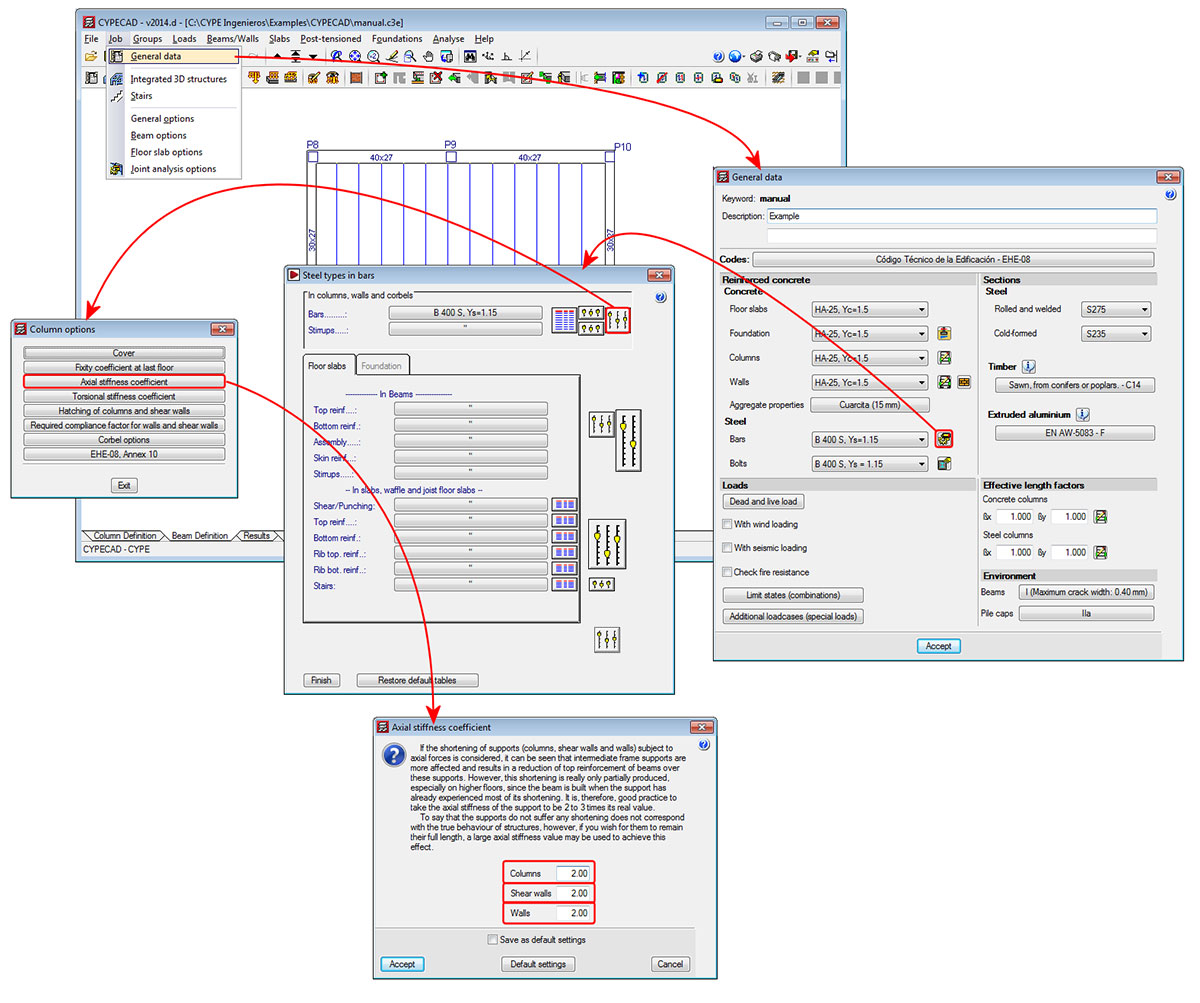
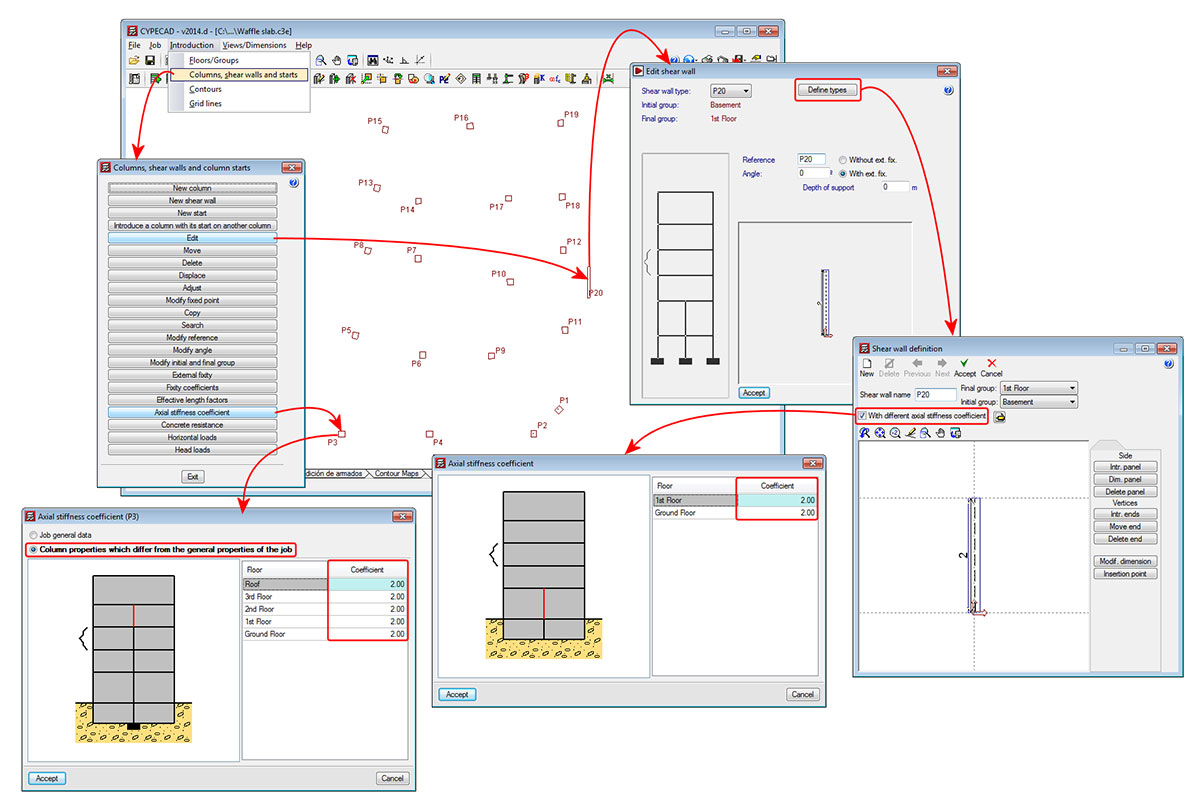
In previous versions, users could only introduce one axial stiffness coefficient for all the reinforced concrete columns, shear walls and walls of the job. As of the 2014.d version, three generic axial stiffness coefficients exist which can have different values:

  • Axial stiffness coefficient for columns
  • Axial stiffness coefficient for shear walls
  • Axial stiffness coefficient for walls (reinforced concrete walls and plane stress walls )

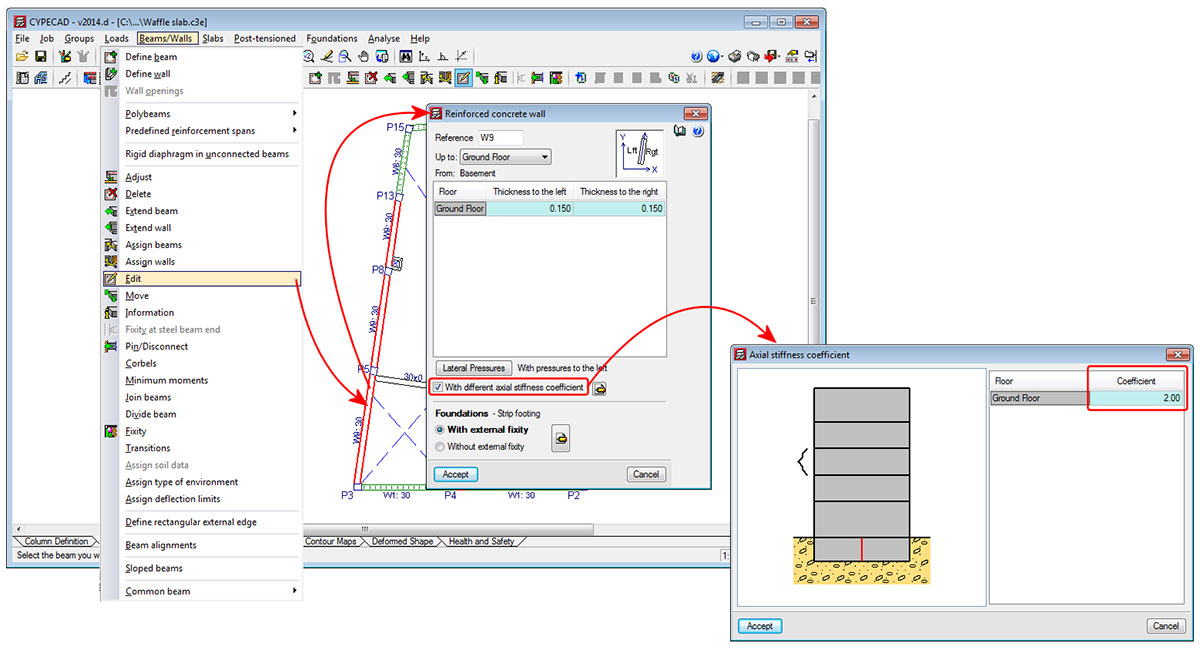
As well as the three generic axial stiffness coefficients, the 2014.d version of CYPECAD also allows for specific axial stiffness coefficients to be assigned to each column, shear wall, reinforced concrete wall or plane stress wall of the job.

An axial stiffness coefficient can be assigned to these elements with a different value at each span, following the process detailed below:

  • For columns
    The individual axial stiffness coefficients are assigned to each column (Column Definition tab > Introduction > Columns, shear walls and starts > Axial stiffness coefficient > select a column > select “Column properties which differ from the general properties of the job” > Introduce the axial stiffness coefficients for each floor).
  • For shear walls
    The axial stiffness coefficients for shear walls are assigned to each shear wall type, which implies that all the shear walls of the same type that are introduced will have the axial stiffness coefficients for that type (Column Definition tab > Introduction > Columns, shear walls and starts > Edit > select a shear wall > Define types > select “With different axial stiffness coefficient” > introduce the axial stiffness coefficients for each floor).
  • For reinforced concrete walls and plane stress walls
    The axial stiffness coefficients for walls are assigned to each wall span that is introduced in a single introduction step (Beam Definition tab > Beams/Walls > Edit > select a wall span > select “With different axial stiffness coefficient” > introduce the axial stiffness coefficients for each floor).

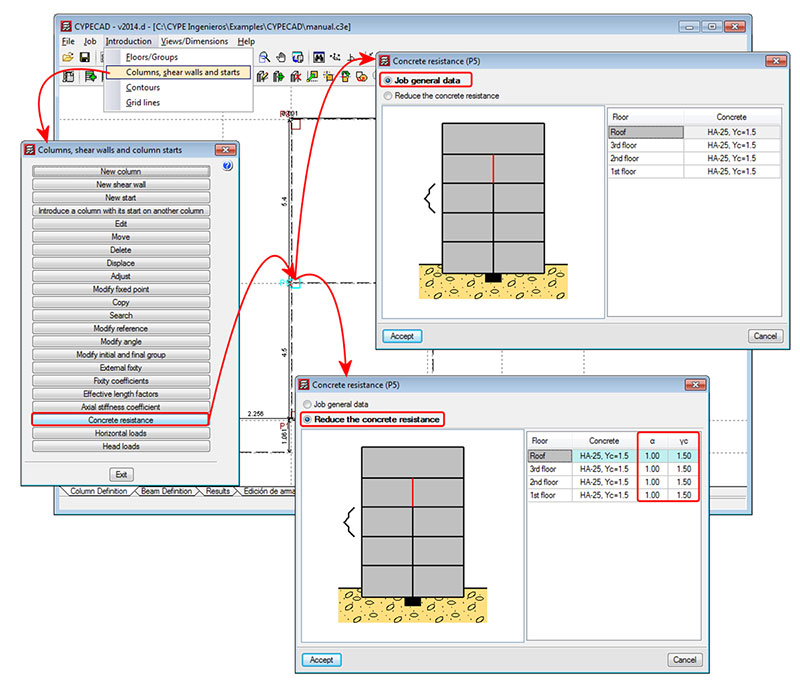
CYPECAD now allows users to apply reduction coefficients to the concrete resistance for each column span that is selected. This is possible with codes which can use the advanced column editor.

These coefficients are defined using the Concrete resistance option (Column Definition tab > Introduction > Columns, shear walls and starts). A column is selected using the left mouse button, after which a dialogue box appears on-screen where users can:

  • If the Job general data option is activated, user can:
    • View the type and general concrete reduction coefficients of the job
  • If the option: Reduce the concrete resistance is activated, users can:
    • View the type and general concrete reduction coefficients of the job
    • Introduce concrete resistance reduction coefficients for each column span
    • Modify the concrete resistance reduction coefficient at the required spans

This allows users to define the design resistance of the concrete for each column span if any tests have been carried out indicating the concrete has a low resistance.

Using the “Copy” option of the “Columns, shear walls and starts” dialogue box (Column Definition tab > Introduction > Columns, shear walls and starts), the program allows for the properties of a selected column to be copied to another that has already been introduced. Amongst the properties that can be copied are the reduction coefficients of the column selected as the model column, if the Concrete resistance option is activated in the dialogue box that appears when the column is selected.

A new option has been implemented whereby users can define a different maximum aggregate size for each type of element: floor slabs, foundations, columns or walls (Job ˃ General data ˃ Aggregate properties in the reinforced concrete section).

Additionally, when the concrete EHE-08 (Spain) or ABNT NBR 6118 Projeto Junho 2013 (Brazil) codes are used, the nature of the aggregate can also be defined, with different values for floor slabs, foundations, columns or walls if users indicate it so. These design codes contain a correction coefficient of the longitudinal deformation module of the concrete, which depends on the nature of the aggregate used for its elaboration.

Using the EHE-08 code, the following aggregate nature types can be selected in accordance with that indicated in Table 39.6 (belonging to the comments of article “39.6. Módulo de deformación longitudinal del hormigón”):

  • Cuarcita
  • Arenisca
  • Caliza normal
  • Caliza densa
  • Ofita basalto y otras rocas volcánicas - Poroso
  • Ofita basalto y otras rocas volcánicas - Normal
  • Granito y otras rocas plutónicas
  • Diabasas

In the EHE-08 design code, the correction coefficient of the modulus of elasticity of the concrete is contained within the comments of the code, and so it is not obligatory for users to comply with it. When the nature of the aggregate is quartzite (cuarcita), the correction factor of the elasticity modulus has a value of 1, and this would be the option to be used if the reduction factor is not to be applied or, obviously, if this is the real nature of the aggregate that is used.

Using the ABNT NBR 6118 Projeto Junho 2013 code, the following aggregate natures can be selected as indicated in article “8.2.8. Módulo de elasticidade”:

  • Basalto
  • Diabásio
  • Granito
  • Gnaisse
  • Calcário
  • Arenito

Using the ABNT NBR 6118 Projeto Junho 2013 code, when a value of 1 is assigned to the correction coefficient of the modulus of elasticity of the concrete, it belongs to aggregates with “Granito” and “Gnaisse” natures.