The quantity export to Arquimedes of rectangular columns, shear walls and footings is carried out in a detailed manner and in such a way that the three dimensions of these elements are included.
Update history
CYPECAD
Column, shear wall and footing quantity export to Arquimedes
- Published on
- 2013.m
Seismic analysis. Seismic design criteria for concrete beams and columns with the NBDS-2006 (Bolivia) and Norma Técnica E.030 (Peru) codes
More information on the seismic design criteria for concrete columns and beams applied by CYPECAD with these two design codes can be found in the section on Improvements in code application (Concrete code and Loads on structures. Seismic loads) on this webpage.
- Published on
- 2013.m
Seismic analysis. Automatic calculation of the number of vibration modes
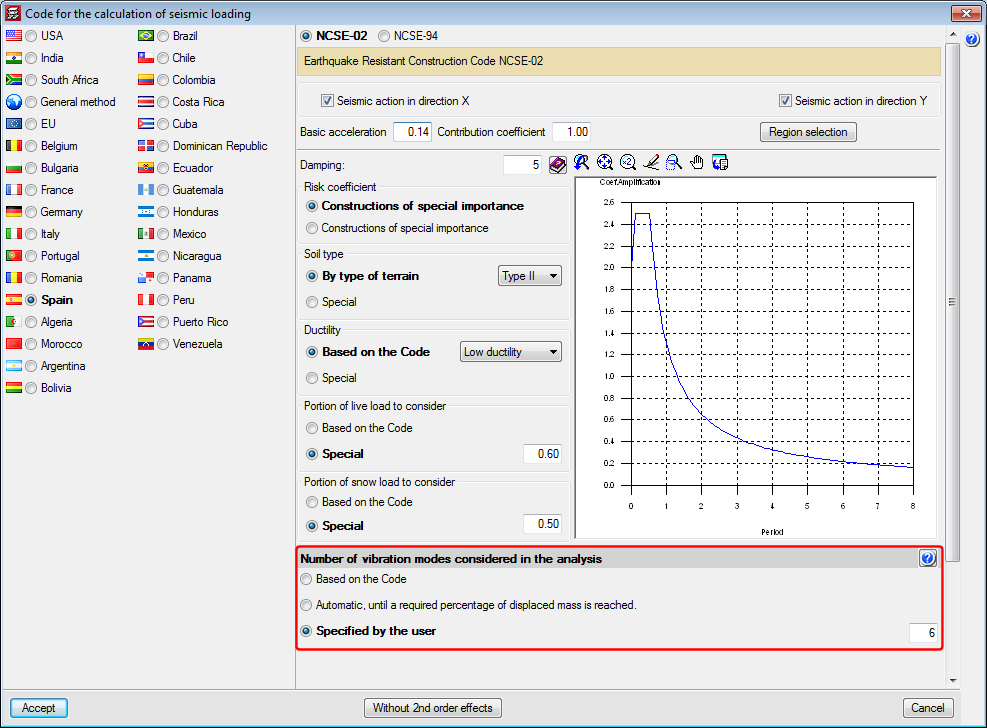
A new section has been implemented within the dialogue box where the selected seismic code parameters are defined (Job > General data > Select With seismic loading > Choose a seismic code): Number of vibration modes considered in the analysis. Here, the program offers different ways to establish the number of vibration modes to be considered in the seismic analysis of the structure:
- Based on the Code
The analysis is carried out in accordance with that specified in the selected seismic code. This section may not exist if the selected seismic code does not specify this data. - Automatic, until a required percentage of displaced mass is reached
Users define the minimum percentage of accumulated modal mass that is required to be displaced in each direction. - Specified by the user
Users indicate the number of vibration modes based on their own judgement. Until now, this was how the number of vibration modes was indicated for the seismic analysis, where users had to choose the value bearing in mind the requirements of the selected code, the structure to be analysed and/or their own considerations.
- Published on
- 2013.m
Export to IFC4 format from CYPECAD and CYPECAD MEP
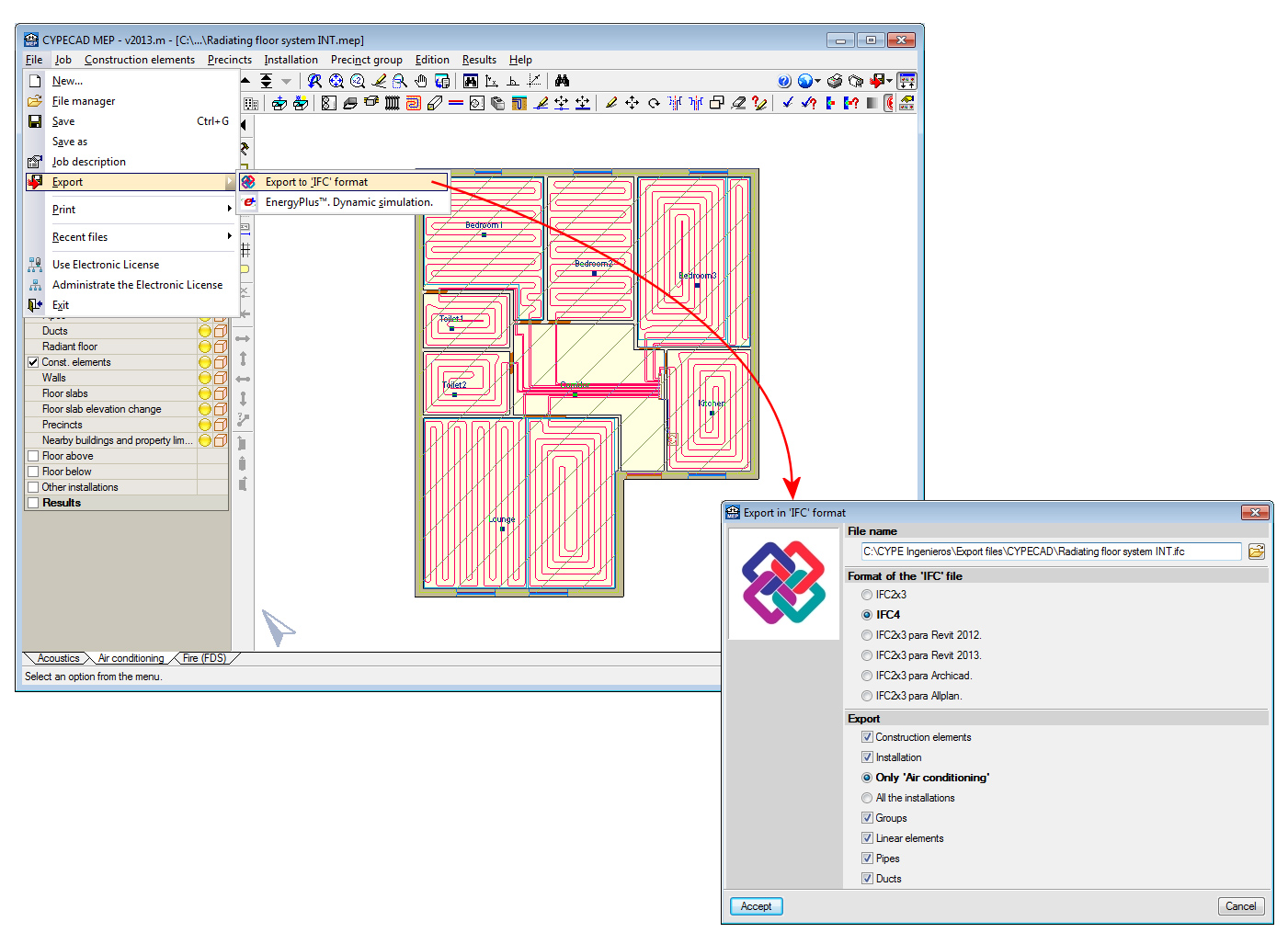
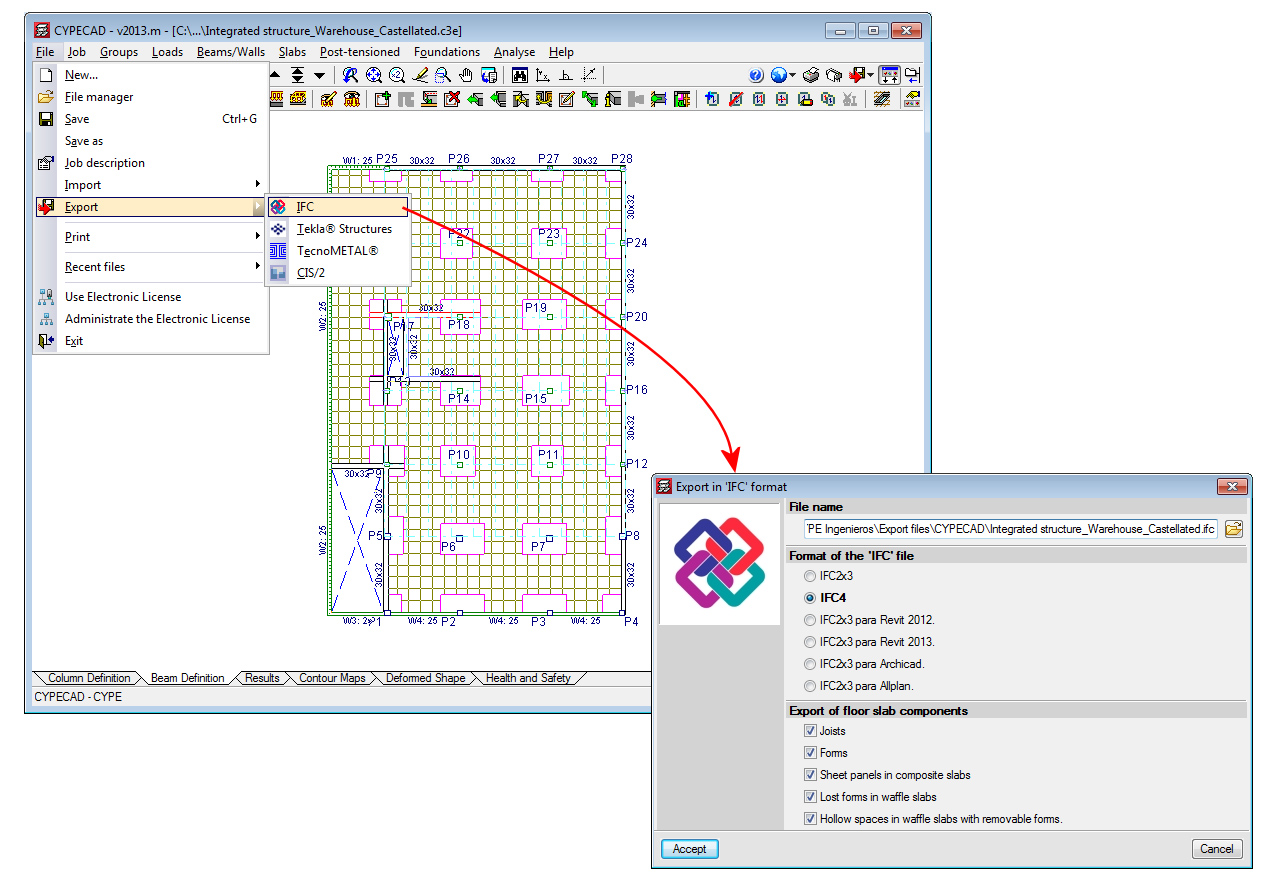
The 2013.m version of CYPE programs incorporates the generic export to IFC4 format (Industry Foundation Classes) in CYPECAD and CYPECAD MEP. This way, CYPE programs have become the first engineering and construction software to export to IFC format with the specifications of the new definitive version: IFC4 (previously known as IFC 2x4).
CYPECAD and CYPECAD MEP currently allow for the export to IFC in the following formats:
- IFC2x3
- IFC4
- IFC2x3 for Revit 2012
- IFC2x3 for Revit 2013
- IFC2x3 for Archicad
- IFC2x3 for Allplan
As Revit, Archicad and Allplan gradually incorporate reading of the IFC4 format in their software, CYPECAD and CYPECAD MEP will incorporate specific exports to these programs in IFC4 format.
- Published on
- 2013.m
Improved code application. Norma Técnica E.030 (Peru)
Norma Técnica E.030 Diseño Sismorresistente.
This concrete code was already implemented in CYPECAD and Metal 3D.
Now, in the 2013.m version, if users select the NTE E.030 code with its corresponding concrete design code (NTE E.060: 2009), CYPECAD’s Advanced beam editor and column editor may also be used. Additionally, by using this code combination, CYPECAD applies the ductility reinforcement criteria and capacity design criteria of the NTE E.060: 2009 code to the seismic design of concrete beams and columns.
- Published on
- 2013.m
Improved code application NBDS-2006 (Bolivia)
Norma Boliviana de Diseño Sísmico (2006). Título A. Análisis y diseño sismo resistente.
This concrete code was already implemented in CYPECAD and Metal 3D.
Now, in the 2013.m version, if users select the Bolivian NBDS 2006 seismic code with the ACI 318M-08 concrete code, CYPECAD’s Advanced beam editor and column editor may also be used. Additionally, by using this code combination, CYPECAD applies the ductility reinforcement criteria of the Bolivian NBDS 2006 seismic code to the design of concrete beams and columns.
- Published on
- 2013.m
Improved code application. NTE E.060: 2009 (Peru)
Reglamento nacional de edificaciones. Norma E.060 Concreto Armado.
This concrete code was already implemented in CYPECAD, Metal 3D and in other CYPE structural programs.
Now, in the 2013.m version, if users select the NTE E.060: 2009 code with its corresponding seismic design code (Norma Técnica E.030), CYPECAD’s Advanced beam editor and column editor may also be used. Additionally, by using this code combination, CYPECAD applies the ductility reinforcement criteria and capacity design criteria of the NTE E.060: 2009 code to the seismic design of concrete beams and columns.
- Published on
- 2013.m
Improved code application. ACI 318M-08 (USA)
Building Code Requirements for Structural Concrete (ACI 318M‑08).
This concrete code was already implemented in CYPECAD, Metal 3D and in other CYPE structural programs.
Now, in the 2013.m version, if users select the ACI 318M-08 code and combine it with the NBDS 2006 Bolivian seismic code, CYPECAD’s Advanced beam editor and column editor may also be used. Additionally, by using this code combination, CYPECAD applies the ductility reinforcement criteria of the Bolivian NBDS 2006 code to the seismic design of concrete beams and columns.
- Published on
- 2013.m
Layout configuration of the grouped frame references in the frames drawings
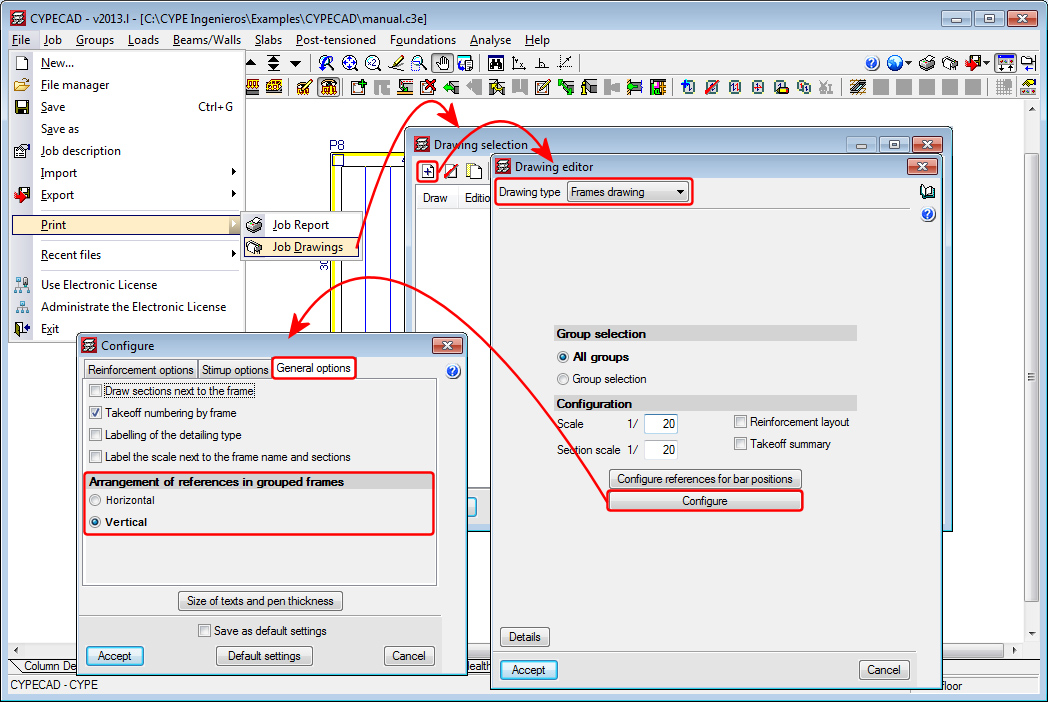
The option: Arrangement of references in grouped frames (File > Print > Job drawings > Add button > Select Frames drawing in “Drawing type” > Configure button > General options tab) has been implemented, which allows for the references of the grouped frames to be placed next to one another (option: Horizontal) or underneath the preceding reference (option: Vertical).
- Published on
- 2013.l
Elimination of the shift of the bending moment diagrams with the IS 456:2000 (India) code
When the selected concrete code in CYPECAD is the IS 456: 2000 (India) code, the values of the bending moments and representation of the bending moment diagrams do not appear shifted.
- Published on
- 2013.l
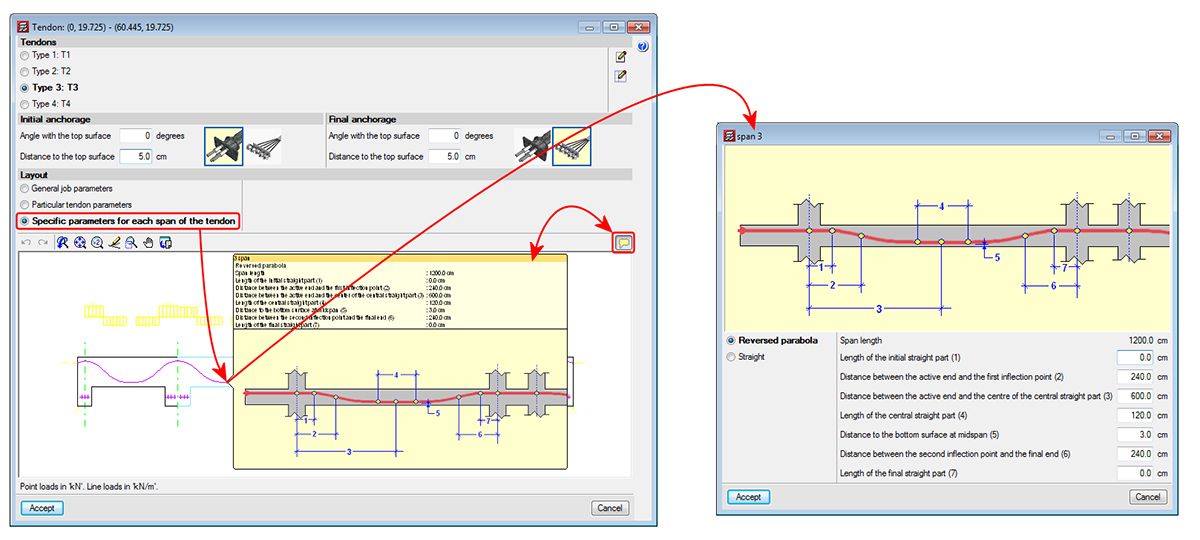
Specific parameters for each span of the tendon
The 2013.l version includes a new option; Specific parameters for each span of the tendon. This option is located in the dialogue in which tendons are edited (Beam Definition tab > Post-tensioned > Edit a tendon). Within this dialogue, users can select three options in the Layout section:
- General job parameters (existing option)
This option displays, at information level, the parameters that have been defined in the Options dialogue box. Upon selecting this option, the general parameters of the job are assigned to the tendons being introduced or under edition. - Particular tendon parameters (existing option)
This option opens a dialogue box where the layout parameters of the tendons being introduced or under edition. By selecting this option, the particular parameters are assigned to those tendons. - Specific parameters for each span of the tendon (new option implemented in the 2013.l version)
Using this option, users can edit each span of the tendon, so different properties can be assigned to the layout of each span. Each span can be defined as curved or straight. If it is defined as curved, the properties of the layout that can be modified are:
- Span length
- Length of the initial straight part
- Distance between the active end and the first inflection point
- Distance between the active end and the centre of the central straight part
- Length of the central straight part
- Distance to the bottom surface at midspan
- Distance between the second inflection pont and the final end
- Length of the final straight part
When this option is selected, and if users place the mouse cursor on a span of the longitudinal section displayed in the edition dialogue box of the tendon, an information box appears indicating the properties of the span. By clicking on it with the left mouse button, these properties can be edited.
- Published on
- 2013.l
Seismic analysis with force amplification in open floors or with partitions that are less rigid than on other floors
It is vitally important to consider the effect non-structural elements (façades and partitions) have on the behaviour of a building exposed to seismic action, especially when open floors are present or a floor contains partitions and façades that are less rigid than those on other floors.
There are design codes that oblige project designers to contemplate the absence or reduction of the stiffness of the partitions and façades on specific floors, by applying moment and shear amplification factors to columns, beams, walls and shear walls situated on floors with less stiffness than the rest when resisting the horizontal displacements caused by seismic action. Examples include IS 13920 (India) -Soft Storey- or Proyecto de Reglamento CIRSOC 103-2008 (Argentina). Logically, the tendency of standards and codes which do not contemplate these effects is to gradually take them into account.
The 2013.l version of CYPECAD allows for moment and shear amplification factors to be applied to columns, beams, walls and shear walls situated on floors chosen by users, regardless of the selected code. To do so, the option Amplification forces by floor has been implemented n the General data dialogue box (Job > General data). Upon activating this option, a dialogue box appears with the same name. If the selected code contemplates the reduced floor stiffness effect due to weaker partitions, the program displays the corresponding moment and shear force amplification factors, which are then applied to the selected floors. Users also have the choice to indicate their own amplification factors. If the selected code does not contemplate these effects, the program allows users to introduce the values they wish for the floors they select.
This method to consider the effect the absence of partitions and façades on specific floors may have when exposed to seismic action, is an approximation to the real behaviour of the building.
In an upcoming version, CYPE will implement a tool that contemplates, in a more precise manner, the influence the distribution of the partitions and façades has on the building. This tool is the result of a R+D+I project CYPE is developing in collaboration with the Centro Internacional de Métodos Numéricos en Ingeniería (CIMNE) of the Universidad Politécnica de Cataluña (UPC), and is financed by the Centro para el Desarrollo Tecnológico Industrial (CDTI) and co-financed by the European Regional Development Fund (ERDF). The aim of this R+D+I project is to develop a dynamic analysis method for buildings exposed to seismic action which includes the effects of the construction elements used in the partitions and façades, and implement them in a design and analysis software tool. This tool is to satisfy the productivity and safety criteria required for the structural project of a building, in other words, ensure the time required to analyse the job is reasonable.
- Published on
- 2013.l