Update history​​

CYPECAD

Improvements have been implemented in the following seismic codes:

  • ASCE 7-05 (USA)
    Minimum Design Loads for Buildings and Other Structures.
  • 2009 IBC (USA)
    International Building Code.
  • CFE93 (México)
    Manual de Diseño de Obras Civiles. Diseño por Sismo.
  • CFE 2008 (México)
    Manual de Diseño de Obras Civiles. Diseño por Sismo. Comisión Federal de Electricidad. México 2008.
  • CPE INEN 5:2001 (Ecuador)
    Código Ecuatoriano de la Construcción. Requisitos Generales de Diseño: Peligro Sísmico, Espectros de Diseño y Requisitos Mínimos de Cálculos para Diseño Sismo-Resistente.
  • NSE-10 (Guatemala)
    Normas de Seguridad Estructural de Edificaciones y Obras de Infraestructura para la República de Guatemala, edición 2010.
  • CHOC-04 (Honduras)
    Código Hondureño de la Construcción. Normas Técnicas Complementarias. XII. Cargas y Fuerzas Estructurales. Diseño por Sismo.
  • REP-04 (Panamá)
    Reglamento para el Diseño Estructural en la República de Panamá 2004 (REP-04).
  • R-001 2011 (República Dominicana)
    Reglamento para el Análisis y Diseño Sísmico de Estructuras.
  • COVENIN 1756-1:2001 (Venezuela)
    Norma Venezolana COVENIN 1756-1:2001. Edificaciones sismorresistentes.

This code was already implemented in CYPECAD and Metal 3D as of previous versions. They are used in CYPECAD together with the ACI 318M-08 (USA - International) concrete code.

As of the 2013.i version, users can use CYPECAD's new beam editor when analysing with the ACI 318M-08 (USA - International) concrete code combined with the mentioned seismic codes. 

Furthermore, if the ACI 318M-08 code is combined with the REP-04 (Panama) seismic code, also mentioned in the previous list, users can use CYPECAD's advanced column editor, as was done for other seismic codes of the 2013.g version.

Reglamento Colombiano de Construcción Sismo Resistente (2010).

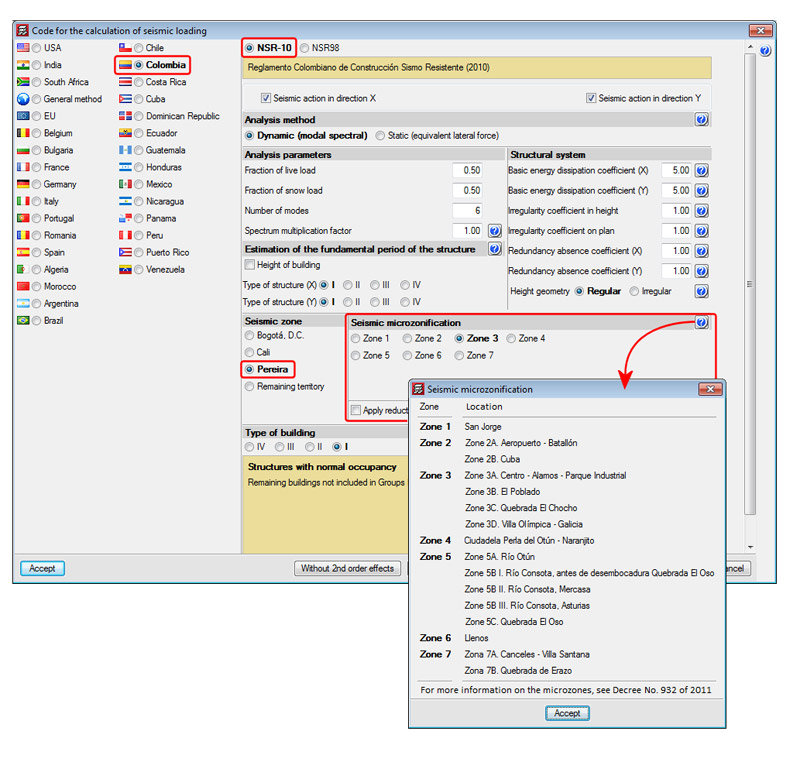
This code was implemented in the 2011.c version for CYPECAD and Metal 3D. The specific calculation for the Seismic Microzonification of Bogotá D.C. was implemented in the 2011.k version, followed by the implementation of the Seismic Microzonification of Cali in the 2012.k version. Now, for the 2013.i version, the specific calculation for the Microzonification of Pereira has been implemented.

In the Code for the calculation of seismic loading dialogue box corresponding to the NSR-10 (Job > General data > activate With seismic action > select Colombia and NSR-10), users can select the seismic zones of Bogotá D.C., Cali or Pereira, or Remaining territory. When any of the specific zones are selected (Bogotá D.C., Cali or Pereira), any of their microzonifications can be selected. Upon selecting them, their corresponding seismic design spectrum definition will be defined. 

CHOC-04 (Honduras): Código Hondureño de la Construcción. Normas Técnicas Complementarias. XII. Cargas y Fuerzas Estructurales. Diseño por Sismo.

This code was already implemented in CYPECAD and Metal 3D as of previous versions for use with the dynamic analysis method (spectral modal).

For this code, the 2013.i version includes in CYPECAD:

  • A static analysis method (equivalent lateral force)
    Users can select the analysis method (dynamic or static) using the Analysis method option within the dialogue box in which seismic action is defined.
  • The correction due to base shear
    This correction is applies when the seismic design is carried out using the dynamic analysis method (spectral modal).

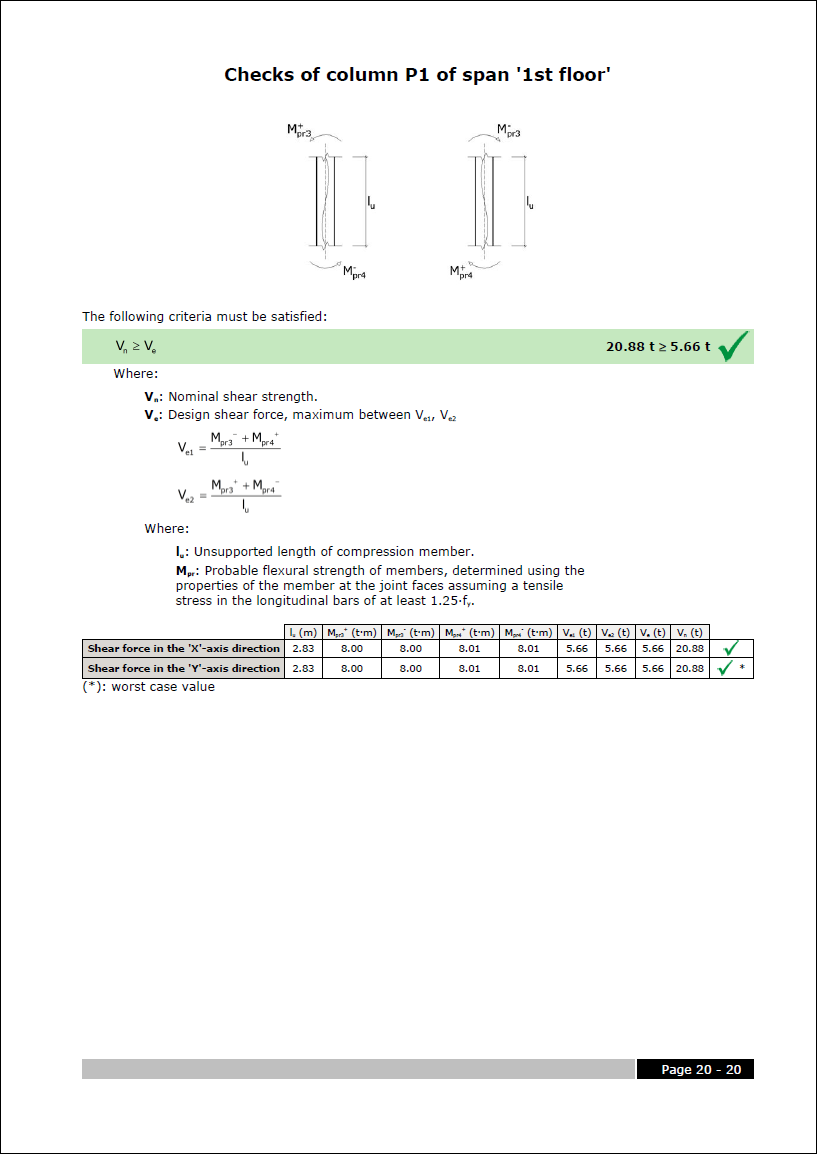
More information on the implementation of capacity design criteria for the seismic design of concrete columns and beams can be found in the Capacity design criteria for seismic design of concrete columns and beams with the ACI 318M-08 (USA) code section of the new features of CYPECAD on this webpage.

Building Code Requirements for Structural Concrete.

Implemented in CYPECAD's new beam editor. This code was already implemented in Continuous beams (as of the 2013.a version) and in other CYPE programs as of earlier versions. More information on this implementation can be found in the section on the ACI 318M-08 (USA) in the new beam editor.

The following improvements have been implemented in the beam detailing representation:

  • Marks at bar ends
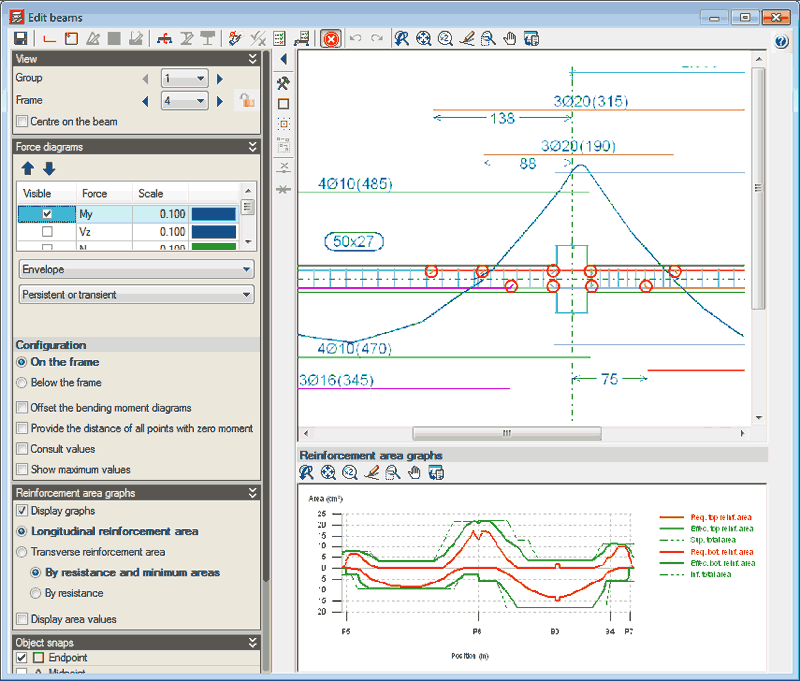
    The program marks (using inclined lines) bars which are anchored without any bends. These marks are visible within the on-screen display of the longitudinal section of the frame and on reinforcement details drawings. These marks are only provided if the ends of the bars are drawn overlapping other bars, due to them being in the same horizontal plane.

    This way, users can distinguish where the bar begins and ends within the longitudinal section of the frame, even if one end overlaps another bar placed in the same horizontal plane (within the longitudinal section).
  • Representation of the reinforcement details in frame drawings
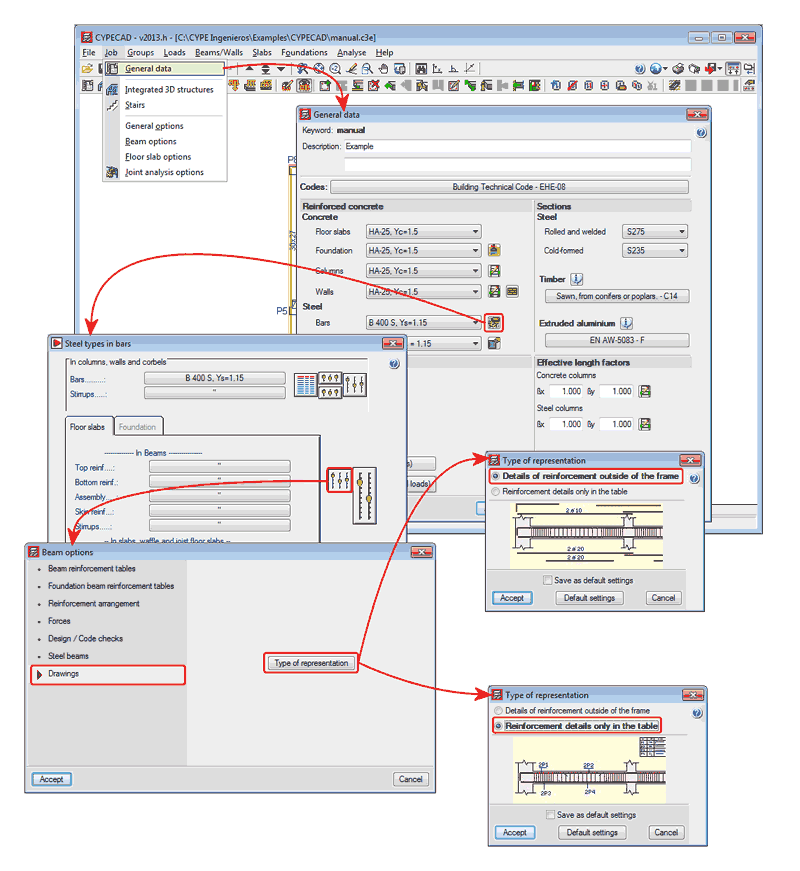
    Two options have been implemented, which are used to represent the reinforcement details in two ways within the frame drawings:
    • Details of reinforcement outside of the frame
      The reinforcement details are drawn outside the longitudinal section of each frame. This method has been used to represent the details as of previous versions.
    • Reinforcement details only in the table
      The reinforcement details are not drawn in the frame and are only defined in the Reinforcement details table.

The 2013.e and 2013.g versions of CYPECAD implemented the capacity design criteria for bending at the supports in accordance with Annex 10 of the EHE-08 code and in accordance with the NCSE-02 code, and the capacity design criteria for shear for the seismic design of beams in accordance with the same codes.

Now, for the 2013.h, the following codes have been implemented:

  • The capacity design criteria for shear at concrete supports in accordance with Annex 10 of the EHE-08 code (Spain).
  • The capacity design criteria for shear at concrete supports and beams in accordance with the IS 13920: 1993 (Indian).

The capacity design criteria which are currently implemented are:

  • For concrete supports:
  • Capacity design criteria for bending and shear in accordance with Annex 10 of the EHE-08 code (Spain).
  • Capacity design criteria for bending in accordance with NCSE-02 (Spain)
  • Capacity design criteria for shear in accordance with IS 13920: 1993 (India)
  • For concrete beams:
  • Capacity design criteria for shear in accordance with Annex 10 of the EHE-08 code (Spain).
  • Capacity design criteria for shear in accordance with NCSE-02 (Spain)
  • Capacity design criteria for shear in accordance with IS 13920: 1993 (India)

These design criteria are applied in CYPECAD and are specified in the Detailed Ultimate Limit State check reports if the selected codes are those which have been indicated.

Reglamento para el Diseño Estructural en la República de Panamá (REP-04).

This code was already implemented as of previous versions for CYPECAD and Metal 3D for the dynamic analysis method (spectral modal).

The 2013.h version includes in CYPECAD:

  • static analysis method (equivalent lateral force)

The analysis method selection (dynamic or static) is carried out using the Analysis method option within the dialogue box where the seismic load is defined.

  • Correction due to base shear

This correction is applied to the seismic analysis when this is done using the dynamic analysis (spectral modal). More information on this topic can be found in the Correction due to base shear section.

Information on the implementation of Seismic capacity design criteria for concrete columns and beams can be found in the new features of CYPECAD on this webpage.

CYPECAD's new beam editor (implemented in the 2013.e version) includes the following new features for the 2013.g version:

  • Redesign frame reinforcement
  • Block reinforcement
  • Join assembly or skin reinforcement
  • Conservation of the lateral menu configuration

 Redesign frame reinforcement

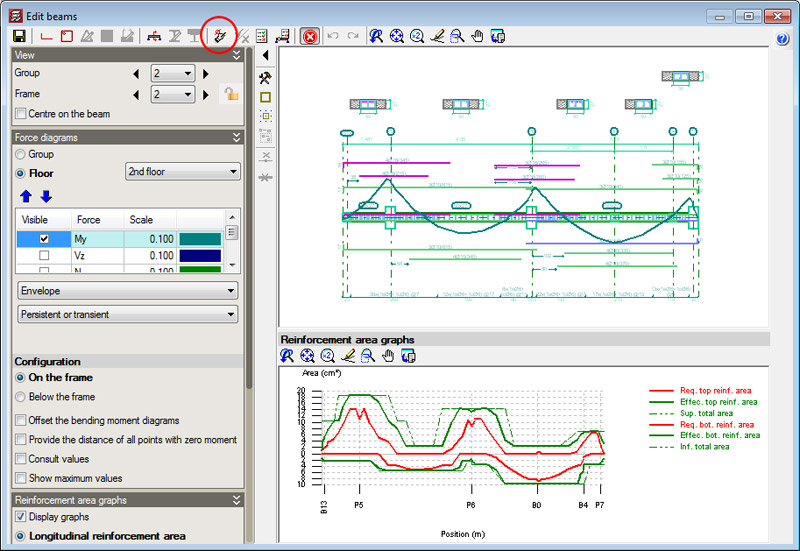
A new option: Redesign frame, represented by the  button, has been implemented in the top toolbar of the beam editor. This option redesigns the frame with the forces calculated by CYPECAD, even if the option to block the reinforcement of the frame is activated in the editor (new option implemented in this version, more details of which are provided below.)

/ Block/Unblock frame reinforcement

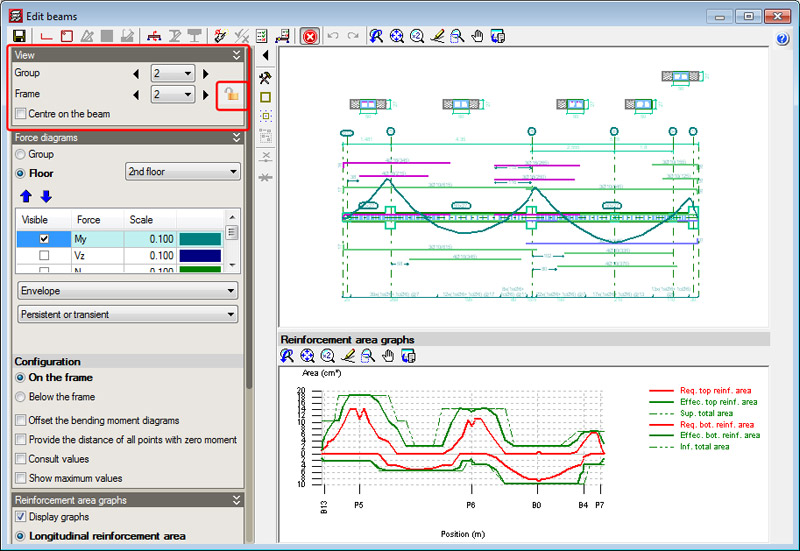
The new Block or Unblock frame reinforcement option is represented by an icon situated in the View section of the lateral menu of the new beam editor. This icon can be represented in two ways: open padlock () or closed padlock (). The open padlock ()  indicates the reinforcement of the frame being edited is not blocked and the closed padlock ()indicates it is blocked. By clicking on the icon, the blocked status of the beam reinforcement changes. Blocking of the reinforcement is only effective for actions carried out outside the editor. In other words, if the frame's reinforcement is blocked, () CYPECAD will not be able to modify it with any of the reinforcement options or even by analysing the job (Beam Definition tab > Analyse). Nonetheless, even if the reinforcement of the frame is blocked () it can be modified in the Beam editor (changing it manually or using the Redesign button  implemented in this version).

Join assembly or skin reinforcement

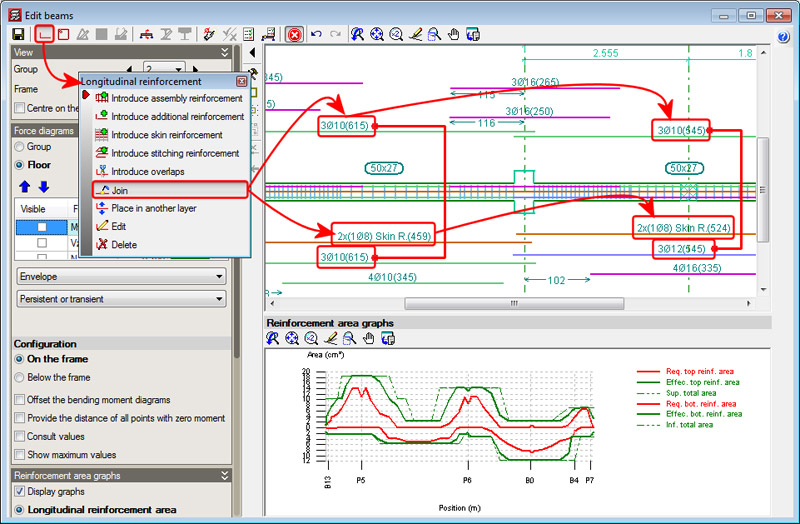
A new option was implemented in the 2013.e version: Join longitudinal reinforcement (included in the Longitudinal reinforcement dialogue box which is activated using the  button from the toolbar of the beam editor), for CYPECAD's beam editor and for Continuous beams. Since then, this option allows for additional reinforcement bar packs of the same diameter to be joined.

Now, in the 2013.g version, the Join reinforcement option allows for assembly and skin reinforcement in adjacent spans to be joined. Using this option, users can also select the assembly or skin reinforcement of a span and then that of the adjacent span. The program will join the selected assembly or skin reinforcement, by copying the reinforcement which is first selected to that which is selected in second place. Unlike the joining of additional reinforcement (for which the program only allows for reinforcement of the same diameter to be joined without substituting the reinforcement of one span for the other), joining of the assembly or skin reinforcement implies that the reinforcement selected in second place will be substituted by those that were selected first (regardless of the number of bars and diameter).

Maintenance of the lateral menu configuration

The configuration options of the beam editor are saved automatically for the next time users edit the reinforcement of a frame. These options are the same for CYPECAD's beam editor and Continuous beams.

The 2013.e version of CYPECAD implemented "the capacity design criteria for bending at the supports in accordance with Annex 10 of the EHE-08 code". Now, for the 2013.g version, other capacity design criteria will be implemented for seismic design, with which CYPECAD designs concrete beams and columns. The capacity design criteria implemented up to now are:

  • The capacity design criteria for bending at the supports in accordance with Annex 10 of the EHE-08 code (Spain) - as of the 2013.e version.
  • The capacity design criteria for bending at the supports in accordance with the NCSE-02 seismic code (Spain) - as of the 2013.g version.
  • The capacity design criteria for shear in beams in accordance with Annex 10 of the EHE-08 code (Spain) - as of the 2013.g version.
  • The capacity design criteria for shear in beams in accordance with the NCSE-02 seismic code (Spain) - as of the 2013.g version.

These design criteria are applied in CYPECAD and are specified in the Detailed Ultimate Limit State check reports if the selected codes are those which have been indicated.

Norma Venezolana COVENIN 1756-1:2001. Edificaciones sismorresistentes.

This code was already implemented as of previous versions for CYPECAD and Metal 3D for the dynamic analysis method (spectral modal).

The 2013.g version includes in CYPECAD:

  • static analysis method (equivalent lateral force)
    The analysis method selection (dynamic or static) is carried out using the Analysis method option within the dialogue box where the seismic load is defined.
  • Correction due to base shear
    This correction is applied to the seismic analysis when this is done using the dynamic analysis (spectral modal). More information on this topic can be found in the Correction due to base shear section.