Create a new bill of quantities from scratch
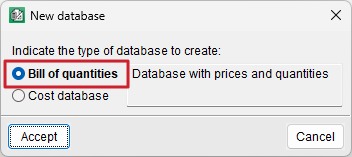
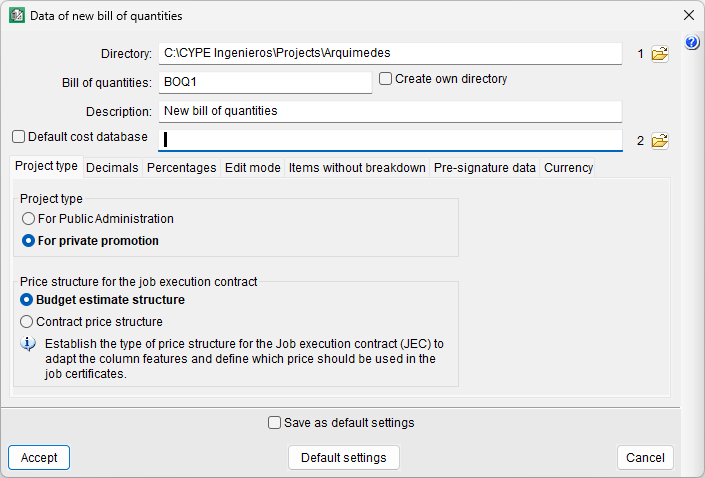
To create your own bill of quantities, click the "New database" icon on the top bar or select "New..." from the "File" menu, then choose the "Bill of quantities" option. You will then need to specify the directory, the code and the description of the bill of quantities, and whether a cost database is to be used for the project (tick the checkbox and select the database).
A number of tabs also appear:
- Project type
Sets the project type (Public Sector or private development) and the pricing structure (bill of quantities or sales). - Decimal places
Sets the number of decimal places for measurements/quantities and amounts. - Percentages
Defines the percentages that vary for each project or contract. - Edit mode
- You can choose between two database creation options: "Normal" and "Insert". In the latter case, you can also set the levels of work sections and sub work sections.
- Items without breakdown
Ensures that indirect costs are not generally applied to any item that does not have a concept with breakdown. You can also hide them from a range of reports. - Pre-signature data
Specifies the data that will appear on the last page of the bill of quantities, such as the project location and date. - Currency
Select the currency to be used.
| Best practice: |
|---|
| By ticking the "Save as default settings" checkbox at the bottom of the dialogue box, you can save the settings so that they appear by default the next time the program is run. |
Once this process is complete, the output displayed in the "Cost breakdown structure" window will consist of a hierarchical structure containing empty work sections, sub work sections and sections.