Modal vibration analysis
The "Modal vibration analysis" module in CYPE 3D is used to perform a modal analysis of the structure, based on its geometry and properties, including any possible nonlinearities. The process starts with a non-linear analysis of the structure for each of the defined load cases, from which a "linearised" equivalent model is obtained with its corresponding stiffness matrix. To analyse the mass matrix, only the gravity loads involved in the load case analysed are considered, with the coefficients defined in the combination.
A number of points are developed below to elaborate on this feature in more detail.
Design model for the modal analysis
To carry out a modal analysis of a structure, users need to know which is the starting design model on which the eigenvalue and eigenvector analysis is to be applied, i.e. with which stiffness and mass matrices the modes of vibration are to be analysed.
Once the structure has been entered into the program, the geometry and properties of the structure can be checked. Regarding the latter, possible non-linearities may have been incorporated into the model: elastic supports that only work in tension or compression, bars only in tension, plates with a ballast modulus only in compression or plastic hinges.
The next step is to look at the load cases for the vibration analysis. This analysis is carried out independently for each of the defined load cases, studying the behaviour of the non-linear elements of the model.
Stiffness matrix
Starting from a load case, the program carries out a non-linear analysis of the structure subjected to these loads. At the last load step, it analyses the behaviour of the non-linear elements and studies whether the non-linearities are activated or not and, in the case of plastic hinges, it analyses whether they have formed and in what state they work. The program replaces the non-linear elements by their equivalent linear element and obtains an equivalent "linearised" model, which is the starting model for the modal analysis that provides the necessary stiffness matrix.

Mass matrix
For the modal spectral analysis, in order to compute the seismic mass of the structure, the gravity loads acting on the structure in a given non-linear combination are analysed and 100 % of the live load and dead load are considered, and the percentage of the service and snow overloads are considered as permanent, which is set in the seismic panel of the program.
For the vibration analysis it can be considered that, for mass purposes, only the loads of gravity nature involved in the load case under analysis contribute and they will do so with the coefficients defined in the combination.

| More information: |
|---|
| For more information on the differences between the spectral modal analysis for non-linear analysis and the vibration analysis described in this module, please refer to the following link. |
Benefits of vibration analysis on structures
The vibration analysis of structures is essential to guarantee their safety, durability and functioning. These analyses can predict how the structure will respond to dynamic loads such as wind, traffic or earthquakes, and enable a suitable structural design to be carried out so that it is resistant and stable.
Structures can experience vibrations due to a variety of factors, including external forces (such as passing vehicles), resonant frequencies (such as synchronised rhythmic passing on walkways), and system disturbances (such as operating machinery). Vibration analysis helps to understand the natural frequencies, vibration modes and dynamic response of structures to ensure that they remain within acceptable limits.
| More information: |
|---|
| All details related to the benefits of structural vibration analysis can be found at this link. |
How the the "Modal vibration analysis" module works in CYPE 3D
First, the bars to be considered must be selected via the "Vibrations" option in the "Bars" group, located in the "Properties" tab ("Structure" tab). Then, the load cases must be defined through the "Load cases" option in the "Modal" group, in the "Analysis" tab (also in the "Structure" tab). The vibration analysis is carried out separately for each of the load cases defined in this dialogue box.
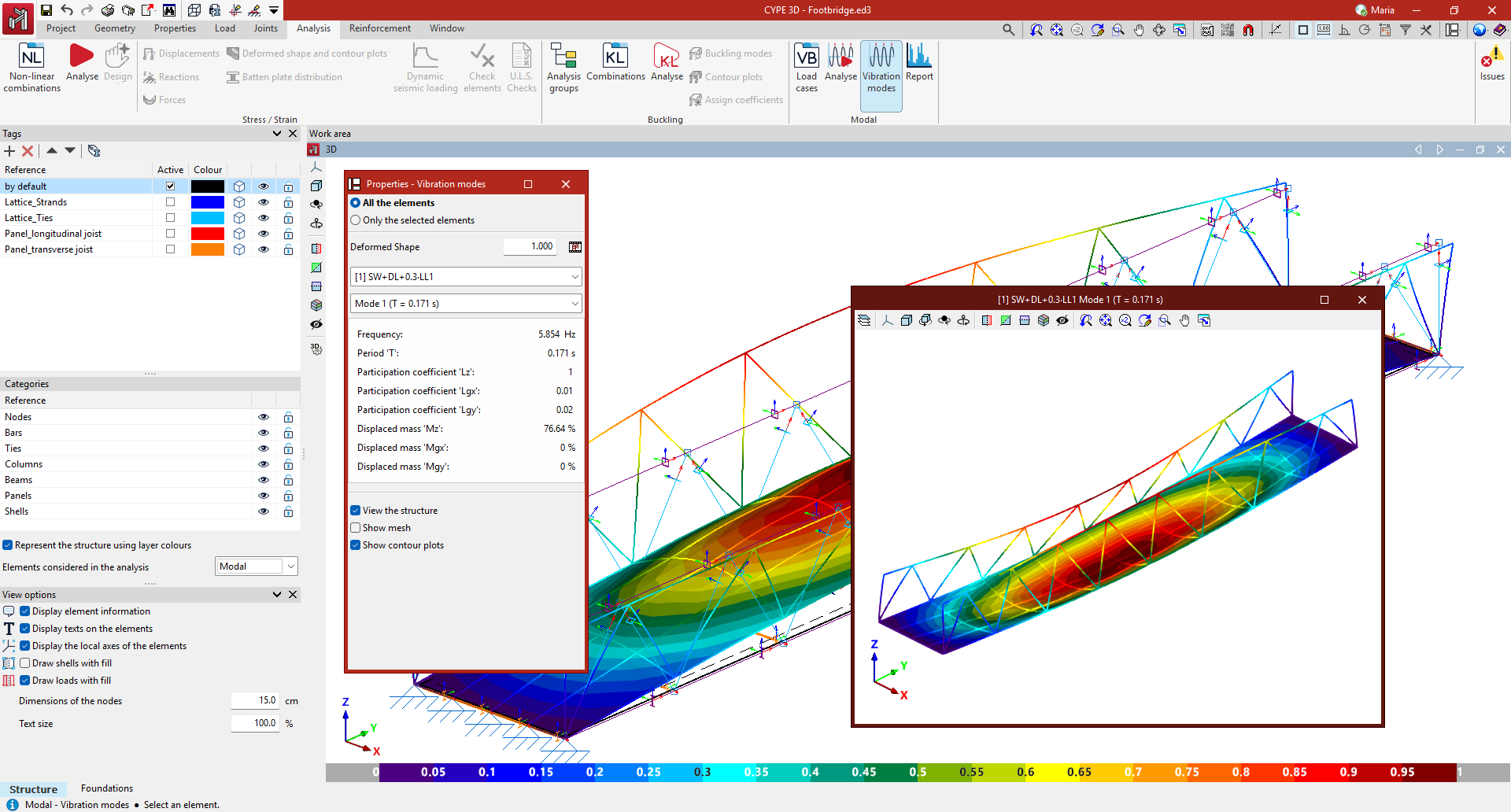
The program displays the results both in a report format and graphically on the screen, including animations for each defined load case and each vibration mode.
First, the load cases must be defined via the "Load cases" option. The vibration modal analysis is carried out independently for each of the load cases defined in this dialogue box. Then, the modal analysis is run from the "Analysis" option, with the possibility of activating the discretisation of bars. Finally, from the "Vibration modes" option, the program displays the results graphically on the screen for each load case defined and each vibration mode, including animations. They can also be generated in the form of a report, using the option with the same name.
In the report, the most relevant mobilised mass percentages are highlighted in blue to make it easier to identify them. As a result, users can now check the dynamic behaviour of the structure more efficiently to ensure that it is within the commonly accepted thresholds of safety and comfort.