Obtaining reports
Once the data that makes up a bill of quantities (work sections, items, quantities, etc.) has been entered, different types of reports can be generated.
In Arquimedes, reports are organised into customisable report templates, which extract information from the open database.
Document text styles
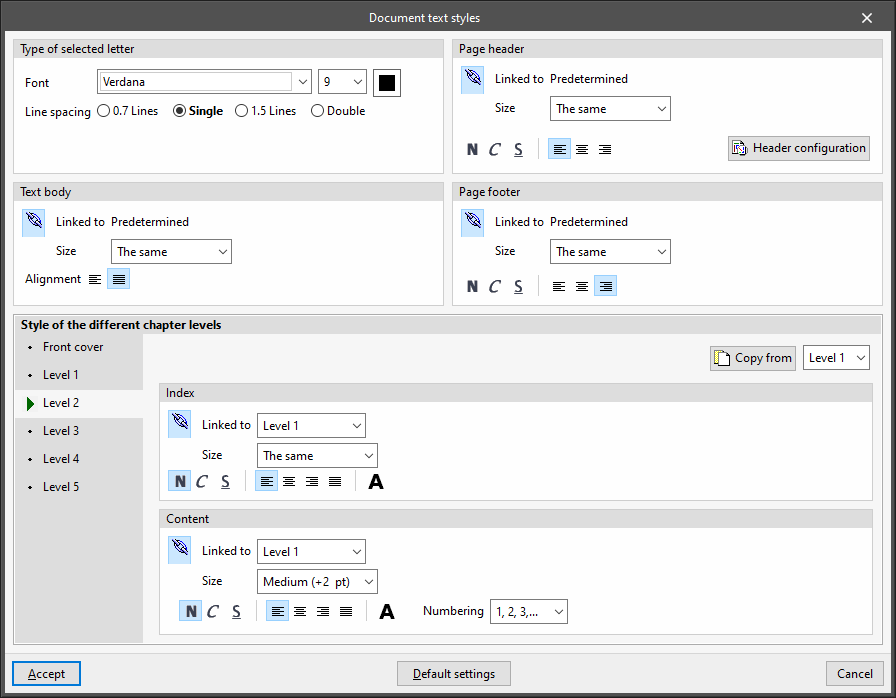
Configures the styles of the documents. The characteristics of each style can be linked to those of the default font style, indicating whether it has the same or different font "Size", or unlinked, to define them independently.
- Type of selected letter
Sets the default font:- Font style
- Font size
- Colour
- Line spacing (0.7 lines / Single / 1.5 lines / Double)
- Page header
Sets the style used in the document's page header. The format can be set to bold, italic or underlined, and the alignment can be changed. The following editing panel can also be accessed:- Header configuration
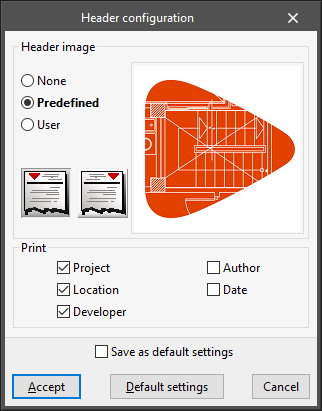
Sets the image and the data to be printed in the page header:- Header image
- None / Predefined / User defined
- Image on the left / Image on the right
- Header image
- Header configuration
- Text body
Configures the style used in the text body of documents. The alignment can be changed. - Page footer
Sets the style used in the footer of documents. The formatting can be set to bold, italic or underlined, and the alignment can be changed. - Style of the different chapter levels
Configures the style used in the different levels of chapters, both in their "Table of contents" and in their "Contents". Using the "Copy from" option, the style defined in each level is copied to any other level. The style of one level can also be linked to the style defined in another level. Also, using the "Numbering" option, users can select the heading numbering system. The available levels are as follows:- Front cover
- Level 1
- Level 2
- Level 3
- Level 4
- Level 5