Update history​​

CYPECAD

When users select the CIRSOC 201-2005 code (Reglamento Argentino de Estructuras de Hormigón) CYPECAD then allows for the following seismic codes to be selected:

  • CIRSOC 103-1991

Normas Argentinas para Construcción Sismorresistente. Reglamento CIRSOC 103 Parte I: Construcciones en general.

  • CIRSOC 103-2008

Normas Argentinas para Construcción Sismorresistente. Proyecto de Reglamento CIRSOC 103, Parte I: Construcciones en general.

The CIRSOC 103-2008 code is due to replace the CIRSOC 103-1991 code, which is still in force.

In both cases (and even though CIRSOC 103-1991 contains reinforcement ductility criteria), the reinforcement ductility criteria and capacity design criteria for seismic design of CIRSOC 103-2005 (Normas Argentinas para Construcción Sismorresistente. Parte II: Construcciones de Hormigón Armado) are applied. Capacity design criteria is a new feature of CIRSOC 103-2005 and this code is compulsory as of January 2013. The ductility criteria and capacity design criteria are justified in CYPECAD in the U.L.S. reports generated by its Advanced beam editor and column editor.

The CIRSOC 103-2005 seismic code combined with the CIRSOC 103-1991 or CIRSOC 103-2008 seismic codes, and the CIRSOC 201-2005 concrete codes are complex to apply. This, together with the absence of structural analysis programs that contemplate this code combination, has resulted, in many cases, in them not being applied correctly.

The 2013.l version of CYPECAD includes the implementation of the CIRSOC 103-1991 and CIRSOC 103-2008 seismic codes. Now, using the CIRSOC 201-2005 concrete code (combined with the CIRSOC 103-1991 and CIRSOC 103-2005 seismic codes, or the CIRSOC 103-2008 and CIRSOC 103-2005 seismic codes), CYPECAD becomes the first structural analysis program that contemplates analysis and design procedures using this code combination.

CYPECAD also allows users to select the revoked concrete code; CIRSOC 201-1982 (Proyecto, Cálculo y Ejecución de Estructuras de Hormigón Armado y Pretensado), and hence, be able to check projects which were designed in accordance with it.

Selection of CIRSOC 201-1982 only allows for the CIRSOC 103-1991 seismic code to be selected, together with its reinforcement ductility criteria.

In CYPECAD, the revoked CIRSOC 201-1982 code is not prepared for use with its advanced beam and column editors, and so, even though the program analyses and designs in accordance with that code, it does not generate Ultimate Limit State (U.L.S.) justification reports.

  • ASCE 7-05 (USA)

Minimum Design Loads for Buildings and Other Structures

  • 2009 IBC (USA)

International Building Code.

  • 2011 PRBC (Puerto Rico)

Puerto Rico Building Code.

These codes were already implemented in CYPECAD and Metal 3D as of previous versions for use with the dynamic analysis method (spectral modal).

For this code, the 2013.l version includes in CYPECAD:

  • A static analysis method (equivalent lateral force)

Users can select the analysis method (dynamic or static) using the Analysis method option within the dialogue box in which seismic action is defined.

  • The correction due to base shear

This correction is applies when the seismic design is carried out using the dynamic analysis method (spectral modal).

Código Sísmico de Costa Rica 2010.

This concrete load was already implemented in CYPECAD and Metal 3D as of previous versions. As of the 2013.l version, if users select the CSCR-2010 code and combine it with the ACI 318-08 (USA) concrete code or NCh430.Of2008 (Chile) concrete code, CYPECAD’s Advanced beam editor and column editor may also be used.

Additionally, the U.L.S. reports for columns and beams that are generated by these advanced editors, include the capacity design criteria for bending and shear for the seismic design of concrete supports, and capacity design criteria for shear for the seismic design of concrete beams

Normas Argentinas para Construcción Sismorresistente. Parte II: Construcciones de Hormigón Armado.

The 2013.l version of CYPECAD includes the CIRSOC 103-2005 seismic code. This code contemplates reinforcement ductility criteria and the capacity design criteria for seismic design, which are to be used with the CIRSOC 201-2005 concrete code (Reglamento Argentino de Estructuras de Hormigón). Application of the CIRSOC 103-2005 seismic code is obligatory as of January 2013.

Users do not select to apply the CIRSOC 103-2005 code in the program. The combination of the CIRSOC 201-2005 concrete code together with the CIRSOC 103-1991 (current seismic code of Argentina) or CIRSOC 103-2008 (seismic code which is due to substitute the CIRSOC 103-1991 code) implies the application of reinforcement ductility criteria and the capacity design criteria of the CIRSOC 103-2005 code.

More information on these codes can be found in the section on Application of the concrete and seismic codes of Argentina in CYPECAD in the New features of CYPECAD.

Normas Argentinas para Construcción Sismorresistente - Proyecto de Reglamento CIRSOC 103, Parte I: Construcciones en general.

The 2013.l version of CYPECAD includes the CIRSOC 103-2008 code (code that will substitute the CIRSOC 103-1991 code) to be used together with the CIRSOC 201-2005 concrete code (Reglamento Argentino de Estructuras de Hormigón).

The combination of CIRSOC 103-2008 or CIRSOC 103-1991 together with the CIRSOC 201-2005 concrete code implies the application of reinforcement ductility criteria and the capacity design criteria for seismic design indicated in the CIRSOC 130-2005 code (Normas Argentinas para Construcción Sismorresistente. Parte II: Construcciones de Hormigón Armado), whose application is compulsory as of January 2013. These criteria are justified in the U.L.S. reports generated by the Advanced beam editor and column editor of CYPECAD.

Reglamento Argentino de Estructuras de Hormigón.

This concrete code was already implemented in CYPECAD and Metal 3D as of previous versions. As of the 2013.l version, if users select the CIRSOC 201-2005 code and combine it with CIRSOC 103-1991 (current seismic code of Argentina) or CIRSOC 103-2008 (seismic code which is due to substitute the CIRSOC 103-1991 code), CYPECAD’s Advanced beam editor and column editor may also be used.

Additionally, the U.L.S. reports for columns and beams that are generated by these advanced editors, include reinforcement ductility criteria and the capacity design criteria for seismic design (bending and shear for the seismic design of concrete supports, and capacity design criteria for shear for the seismic design of concrete beams) indicated in the CIRSOC 130-2005 code (Normas Argentinas para Construcción Sismorresistente. Parte II: Construcciones de Hormigón Armado).

The CIRSOC 103-2005 and CIRSOC 103-2008 codes have now been implemented in CYPECAD (as indicated in Loads on structures. Seismic loads). Application of the CIRSOC 103-2005 code is compulsory as of January 2013 whereas CIRSOC 103-2008 is a project code that will substitute CIRSOC 103-1991.

By implementing these seismic codes in CYPECAD, CYPE software is the first structural analysis program that contemplates analysis and design procedures using CIRSOC 103-2005 and CIRSOC 103-2008.

More information on these codes can be found in the section on Application of the concrete and seismic codes of Argentina in CYPECAD in the New features of CYPECAD.

The 2013.e, 2013.g, 2013.h, 2013.i and 2013.j versions of CYPECAD implemented the capacity design criteria for bending and shear for the seismic design of concrete supports, and capacity design criteria for shear for the seismic design of concrete beams in accordance with the following codes: ACI 318M-08 (USA – International), EHE-08 (Spain), NCSE-02 (Spain), NSR10 (Colombia) and IS 13920:1993 (India).

Now, implemented for the 2013.k version, are the capacity design criteria for bending and shear for the seismic design of concrete supports, and capacity design criteria for shear for the seismic design of concrete beams in accordance with the 1997 UBC (USA) code.

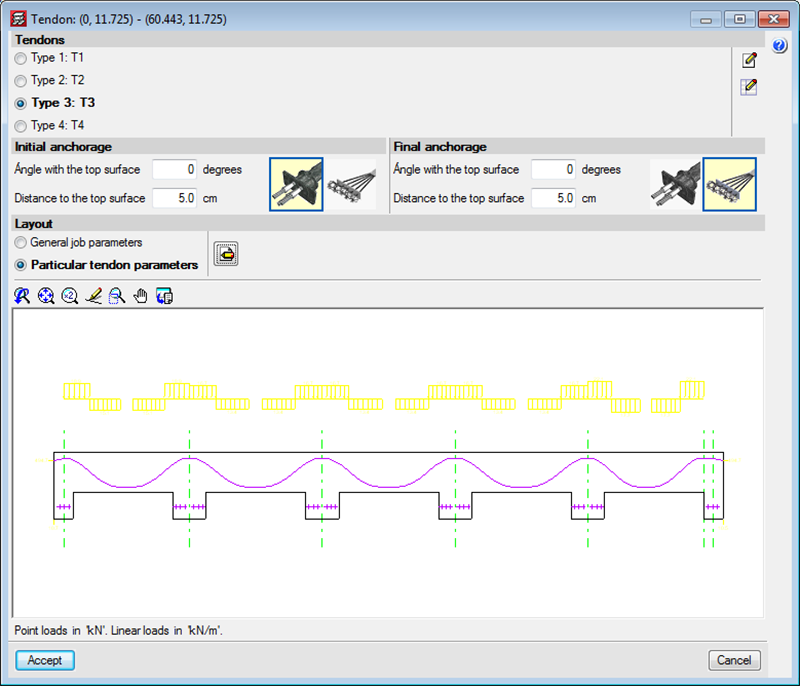
The 2013.k version includes the representation of the deviation loads of a tendon in the longitudinal section that appears in its edition dialogue box (Beam Definition tab >  Post-tensioned > Edit a tendon).

The distance between the tendons and the top surface at intermediate supports (their least top cover) is defined as generic data for the job in the Options dialogue box (Beam Definition tab > Post-tensioned > Options), together with the other parameters to be introduced to define the layout of the tendons.

Different parameters can be defined for the tendons when these are being introduced (Beam Definition tab > Post-tensioned > Introduce concentrated tendons or Introduce distributed tendons) or when editing a specific tendon (Beam Definition tab > Post-tensioned > Edit a tendon). Users can select two options in the Layout section of the dialogue boxes that appear when introducing or editing tendons:

  • General job parameters
    This option informs users of the parameters that have been defined in the Options dialogue box. By selecting it, the general job parameters can be assigned to the introduced or edited tendons.
  • Particular tendon parameters
    This option opens a dialogue box where the layout parameters of the tendons that are being introduced or edited can be defined. By selecting it, the specific parameters are assigned to those tendons. The previous versions contained the option to define the Distance between the tendons and the top surface at intermediate supports. In the 2013.k version, this parameter has disappeared from the dialogue boxes which assign specific parameters and, now, the smallest top cover is defined when introducing the flexure lines of the tendons. The general cover for the whole job is still defined in the Options dialogue box (Beam Definition tab > Post-tensioned > Options).

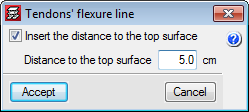
In the new 2013.k version, when a flexure line is introduced, a dialogue box appears in which users can activate the option to Insert the distance to the top surface and define its numerical value for the flexure line that is being introduced. The tendons that cross this flexure line will adopt this value as their minimum top cover at that point. If the option to “Insert the distance to the top surface” has not been activated, the value of the cover will be that which has been defined in the Options dialogue box (Beam Definition tab > Post-tensioned > Options) in the parameter: Distance to the top surface in the intermediate supports.

Bearing in mind the introduction of the flexure lines now includes this possibility, two new options have been implemented in the “Pot-tensioned” dialogue box (Beam Definition tab > Post-tensioned), which allow for a flexure line, which has already been introduced, to be edited (Edit flexure lines of the tendons) or assign a selected flexure line to others that are selected individually or using a capture window (Assign flexure lines of the tendons).

By having the distance between the tendons and the top surface at intermediate supports as an option in the flexure lines box, different top covers can be defined for the same tendon in a more rapid and intuitive manner, which is useful for cantilevers or slabs with varying depths.

As of previous versions, CYPECAD provided U.L.S. reports for concrete columns using its advanced column editor, which displayed all the checks carried out during the design process (Results > Columns > Edit > select column > select  from the “Summary of code checks” table – to generate the U.L.S. checks report of the selected column span -, or click on the  button – to generate the U.L.S. checks report of the worst case span for each check).
To identify the failed checks or consult a specific check, users had to run through the entire report.

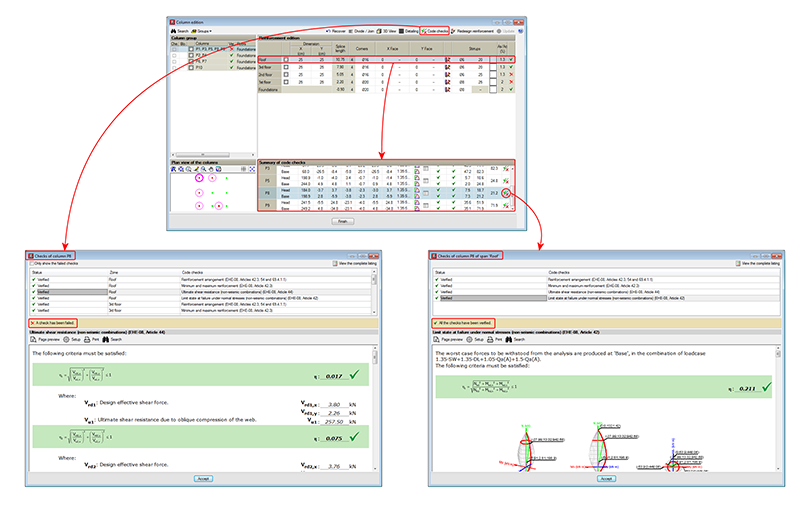
Now, as of the 2013.k version, a detailed check and specific check have been implemented in CYPECAD’s advanced column editor, for each U.L.S. check, which helps to speed up the verification procedure. As has been done with the U.L.S. and S.L.S. checks reports for concrete beams, when users select any of the options to consult the U.L.S. checks of the concrete columns  symbol or button), a dialogue box appears, displaying a list of the checks that have been carried out in the top-half of the box. Users select the check to be consulted, which is then displayed in more detail in the bottom-half of the screen.

This dialogue box has the same properties as the dialogue box that appears when using the concrete beam editor, explained in detail, in the previous section of this webpage (Advanced beam editor of CYPECAD).

In previous versions, the U.L.S. and S.L.S checks dialogue box displayed the complete report of the checks carried out by the program U.L.S. and S.L.S. checks at the worst case point or U.L.S. and S.L.S. checks at a point buttons of the Advanced beam editor). To identify the failed checks or consult a specific check, users had to run through the entire report.

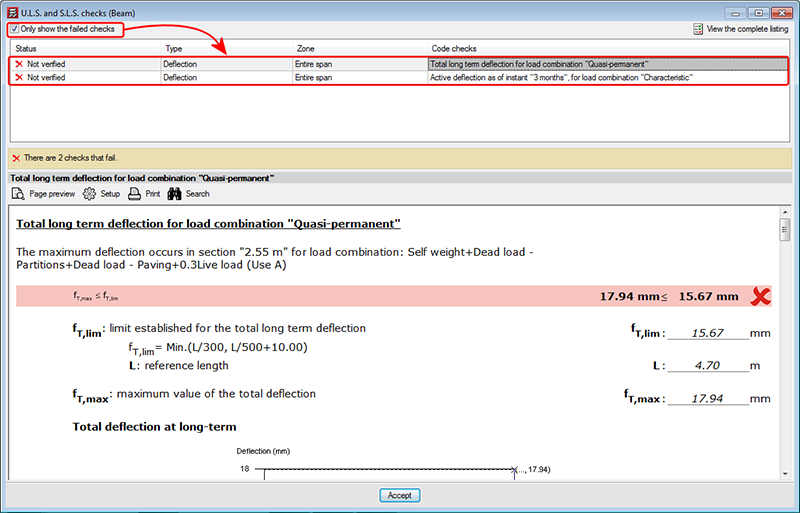
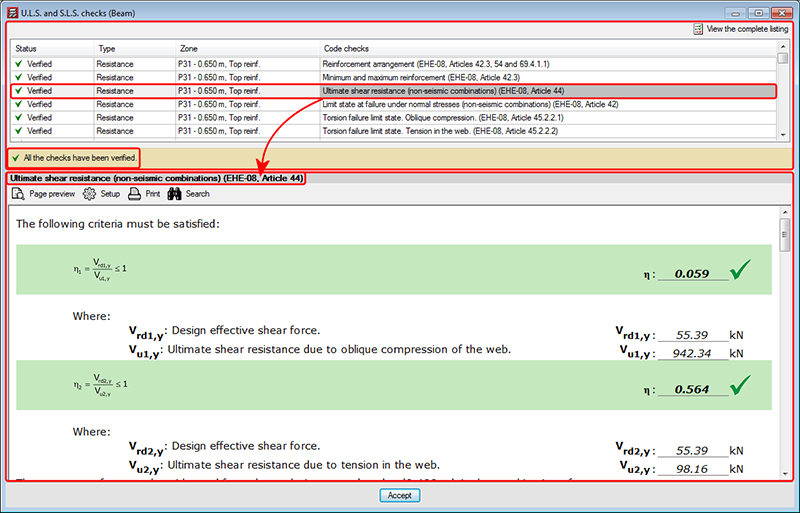
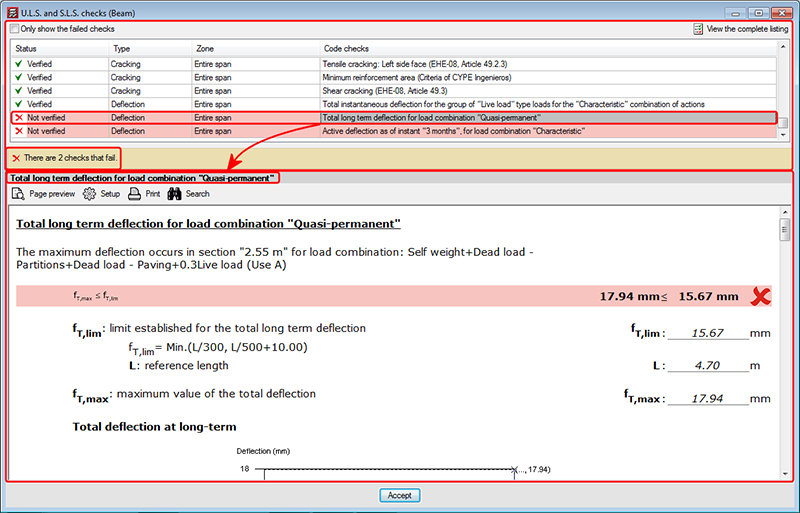
Now, as of the 2013.k version, a detailed check and specific check have been implemented in the dialogue box, for each U.L.S. and S.L.S. check, which helps to speed up the verification procedure. These checks can be found in the U.L.S. and S.L.S. checks dialogue box; within the top-half is a list of the checks that have been carried out (indicating whether or not these fail). Users select the check to be consulted, which is then displayed in more detail in the bottom-half of the screen:

The checks that have been carried out are displayed in a table containing the following columns:

  • Status
    Displays a green tick with the word Verified, or a red cross with Not verified.
  • Type
    Indicates the type of check (resistance, cracking, deflection...).

    If the checks that have been carried out are of the same type, the “Type” column will not appear. This may occur in the case of a frame with steel spans for which only the surrounding temperature resistance has been checked, without checking for fire resistance or deflection limits.
  • Zone
    Indicates the span interval at which the check has been carried out and the zone of the affected transverse section (top or bottom reinforcement). If the check affects the whole span, then a text will appear indicating the entire span.

    If the U.L.S. and S.L.S. checks dialogue box has been viewed using the Comprobaciones  E.L.U. y E.L.S. en un punto button (U.L.S. and S.L.S. checks at a point), the “Zone” column does not appear in the report.

  • Code checks
    Includes a description of the check.

Above the table is a box that users can mark to Only show the failed checks, which will not appear if no checks fail or if all fail.

Below the table, the program indicates the number of checks that fail (together with a red cross on the left) or a text indicating “All the checks have been verified” (together with a green mark on the left).

The details of the check selected in the table appear in the bottom-half of the “U.L.S. and S.L.S. checks” dialogue box. This part of the dialogue box is headed with the description of the check selected in the table displaying the checks (the same text that appears in the Code checks column), and is the followed by detailed information on the check. This information can be seen in the preview of the print-out or be printed directly.

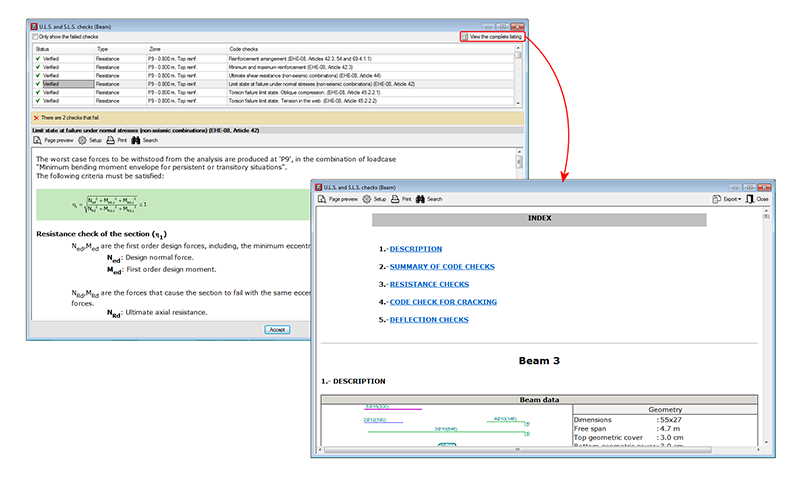
The complete U.L.S. and S.L.S. checks report ( U.L.S. and S.L.S. checks at the worst case point or , U.L.S. and S.L.S. checks at a point buttons, both of the selected span) as was in previous versions in the U.L.S. and S.L.S. checks dialogue box, can now be obtained by selecting the button, situated in the top right-hand corner of this dialogue box.
These detailed and specific U.L.S. checks have also been implemented in CYPECAD’s advanced column editor, and in the U.L.S. checks dialogue box of Metal 3D or Integrated 3D structures of CYPECAD.

Uniform Building Code.

This seismic load was already implemented in CYPECAD and Metal 3D as of previous versions. As of the 2013.k version, if users select the 1997 UBC (USA) code and combine it with any of the concrete codes CYPECAD allows to be used with the Advanced beam editor, the editor may also be used.

Additionally, the U.L.S. reports for columns and beams that are generated by their advanced editors, include the capacity design criteria for bending and shear for the seismic design of concrete supports, and capacity design criteria for shear for the seismic design of concrete beams.