
Introduction
CYPE Cost Estimator is a program designed to facilitate the automatic estimation of the bill of quantities for the execution of a building job during the preliminary phases of the architectural project. Its practical and simple approach means that bills of quantities can be generated quickly, efficiently and accurately, using a design model that takes into account key factors such as floor area, building height and typological, constructional, geographical and socio-economic aspects.
Work environment
The CYPE Cost Estimator user interface is divided into three tabs corresponding to each of the preliminary project phases covered by the application:
- Phase I: Preliminary studies
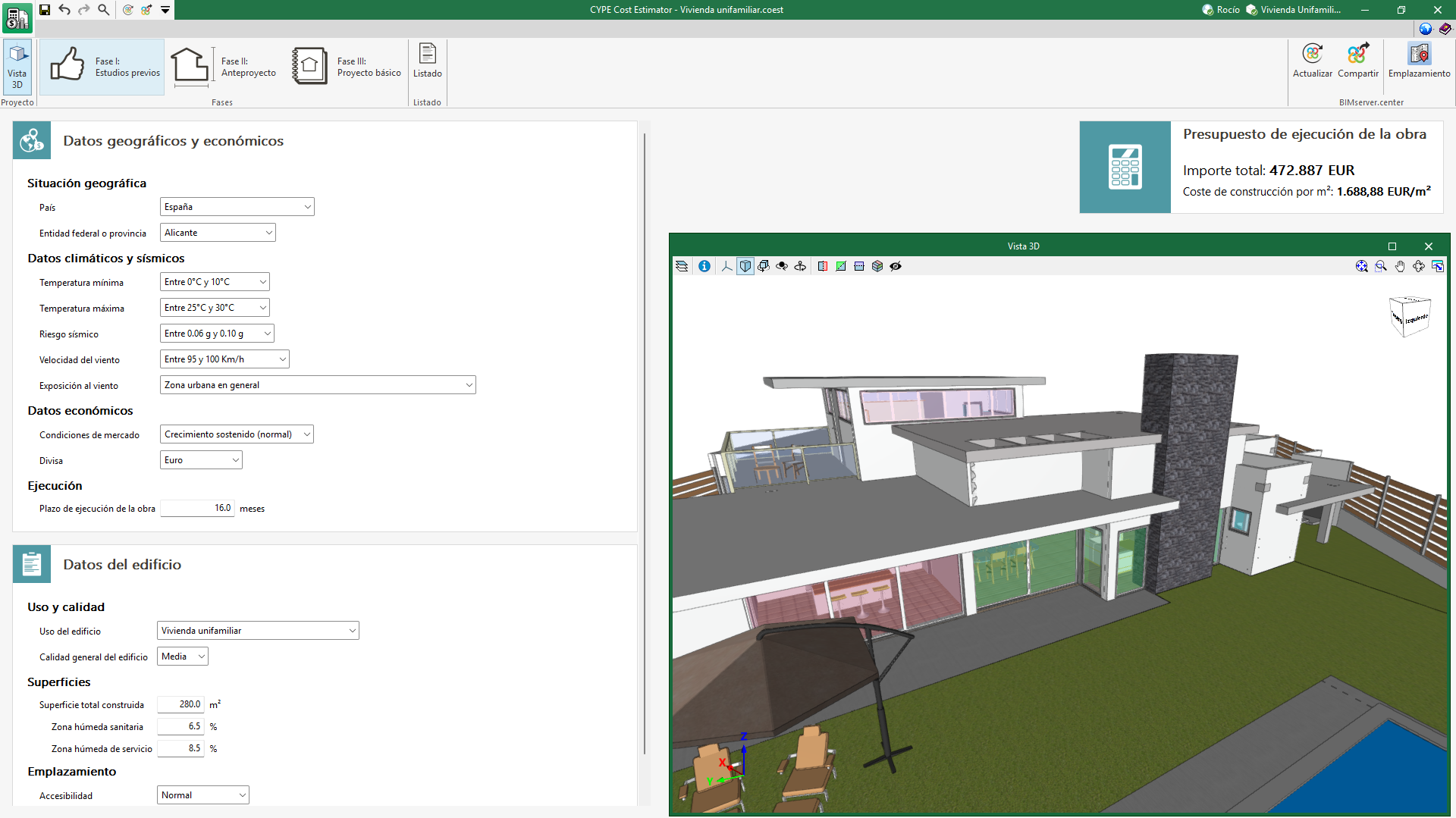
The application requests the geographic and economic data relating to the location of the job and the general data of the building. As output results, the amount of the job execution budget and the construction cost per m2 is displayed. - Phase II: Draft project
The application requests the typological characteristics of the building and its floor plan configuration. As output results, in addition to what was indicated in phase I, the bill of quantities by work sections is generated together with a graph in order to facilitate the visualisation of the bill of quantity progress. - Phase III: Design project
Finally, the application requests more precise data on the characteristics of the building concerning foundations, structure, construction systems and MEP systems. As output results, in addition to what is indicated in phase II, sub-work sections are included in the bill of quantities by work sections.
Creating a new job and linking it to a project
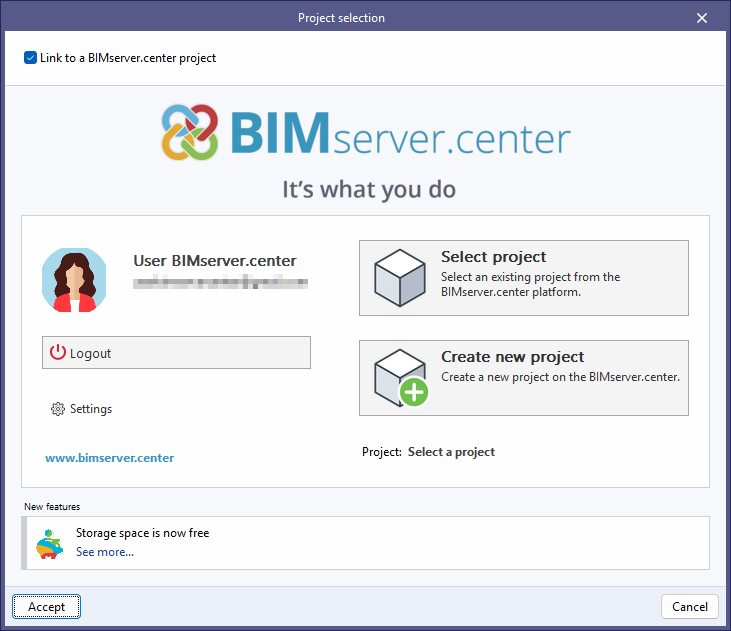
When launching the app and clicking on "New", users are given the option of creating a "New job", which can then be integrated into an existing project in BIMserver.center.
There is also the option to "Create new project". In this case, the created project will be visible from BIMserver.center from that moment on.
Once the new job has been created, users then access the interface, in which the graphic window showing the model or models that have been imported is displayed.
Users also have the option of starting the project without being linked to the BIMserver.center platform. To do this, simply uncheck the "Link to a BIMserver.center project" box in the top left-hand corner.
Files can be shared or imported at any time while the project is in progress via the BIMserver.center tab located at the top right of every program.
Phase I: Preliminary analysis

Within the "Phase I: Preliminary analysis" section, the program allows you to enter "Geographical and economic data" and "Building data".
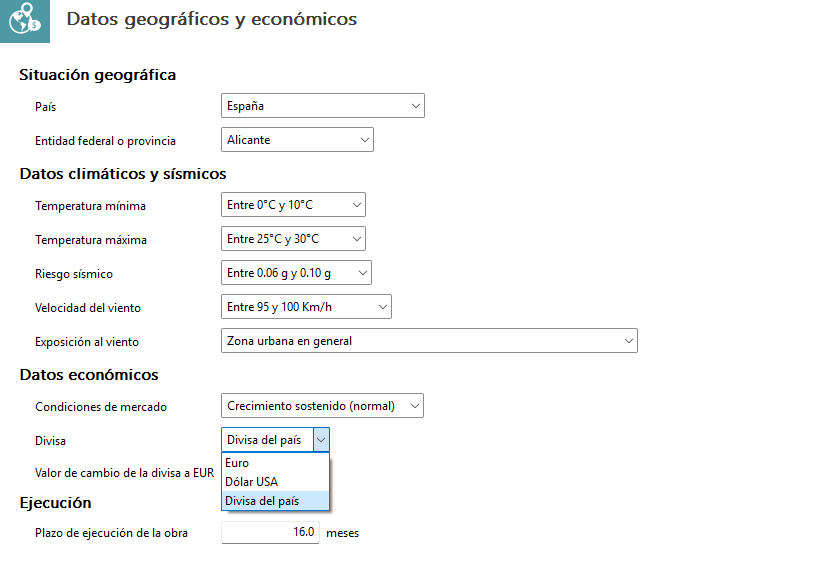
Geographical and economic data
The "Geographical location" section specifies the country and the federal state or province. You can choose from a wide range of countries, including Spain, the United States, France, Japan, Morocco, Portugal, Hong Kong, Malaysia, the United Kingdom and Ecuador, amongst others.
In the "Climate and seismic data" section, you can specify a range of minimum and maximum temperatures, seismic risks and wind speed, as well as the project’s degree of exposure to wind.
The "Economic data" section provides details of the property market situation. You can also choose the currency from "Euros", "US Dollars" or the "Country currency" specified in the "Country" section. If you select the "Country currency" option, the "Currency to EUR exchange rate" field will be filled in automatically. However, due to the volatility of some currencies, you have the option to adjust this value manually.
Finally, the "Execution" section provides an estimate of the number of months required for the planned duration of the works.
Building details
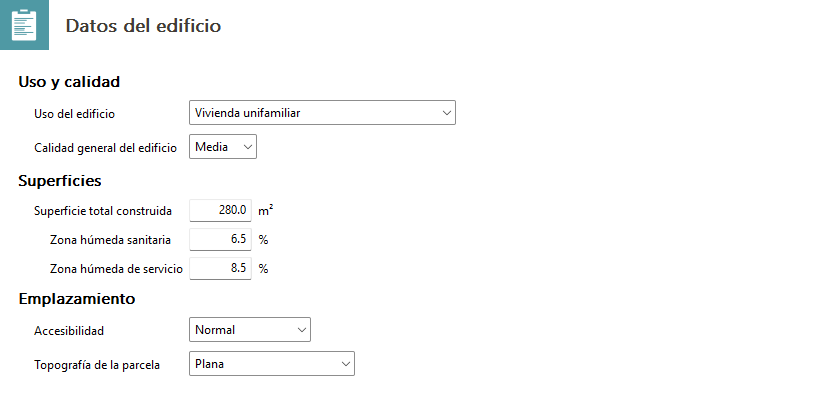
In the first section, "Use and quality", the building’s primary use must be specified; this may include residential, office, industrial, cultural, hospitality, healthcare, administrative or sports facilities, amongst others. The "General quality of the building" is also specified here, as costs can rise considerably depending on the range of materials used.
It is necessary to define the "Total floor area" by specifying the approximate percentage allocated to wet areas and that allocated to service wet areas.
Finally, you must specify the expected "Accessibility" for the project by selecting an option from the menu ranging from "Very good" to "High difficulty". You must also specify the type of plot, as its layout affects construction costs.
Phase II: Draft project

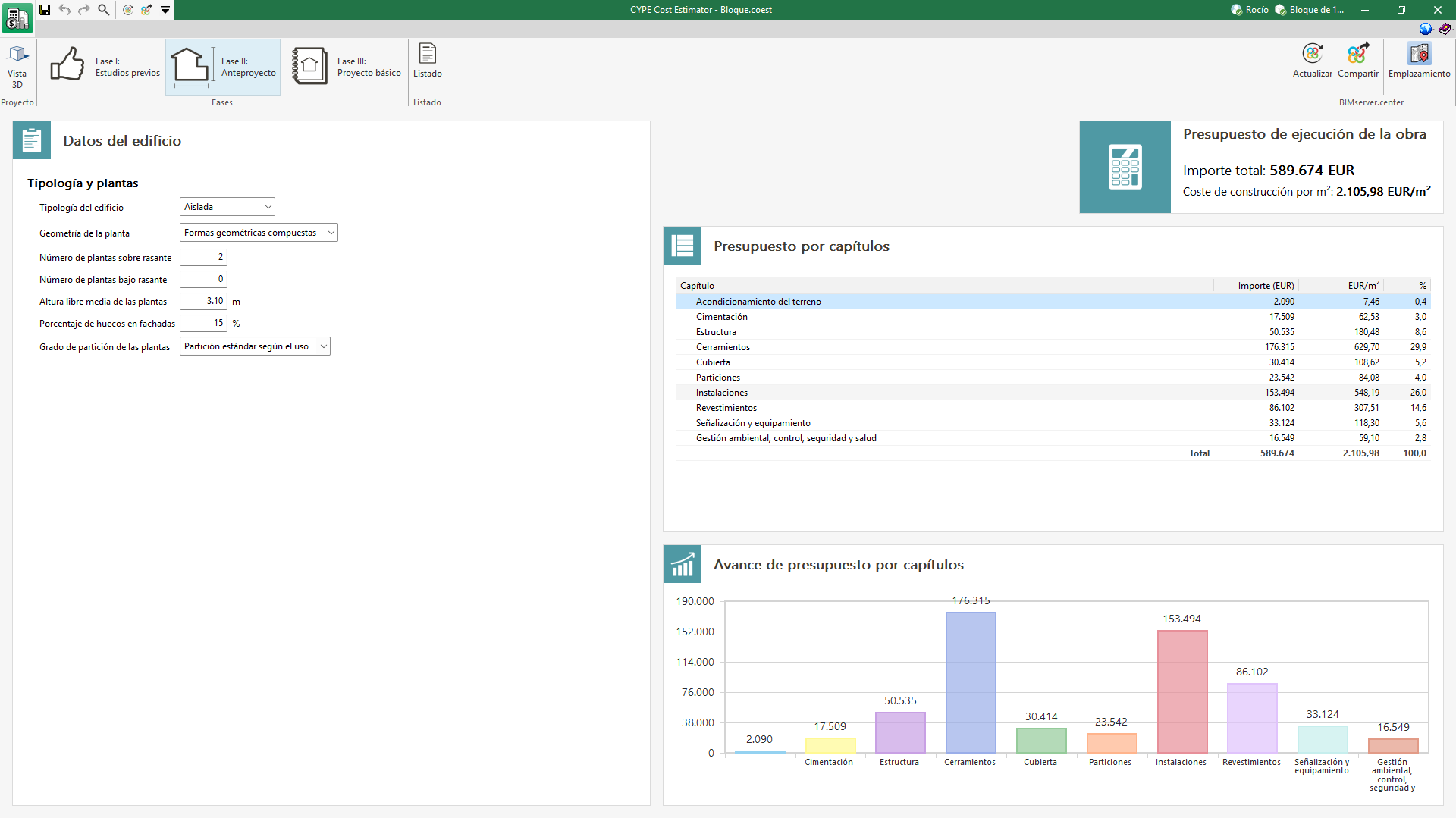
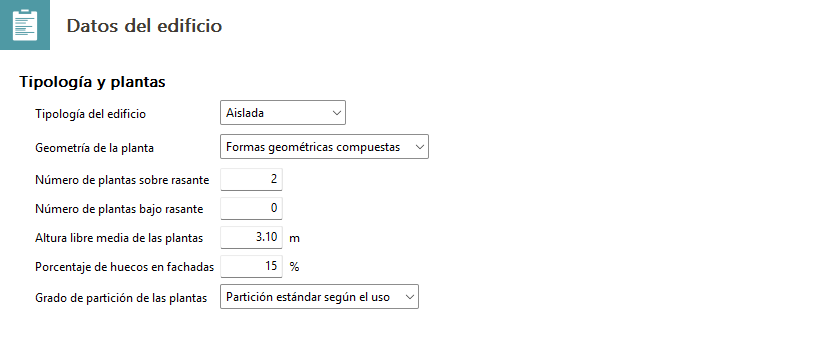
In the "Phase II: Draft project" section, you must complete the details for the "Building data" section.
In the "Building type" section, the program offers three options: detached, semi-detached and corner. This is an important factor, as the building type determines the layout and design of the floors, façades, external walls and internal partitions.
Under the "Building geometry" option, you can choose from the five levels of geometric complexity offered by the program. The complexity of the floor plan often results in a loss of performance, so it is a significant factor.
It is also essential to enter the following details correctly:
- Number of floors above ground level
This refers to the total number of habitable storeys located above the level defined as ground level. Spaces located below the ground floor slab and those with a height of less than 1.5 m should not be included. - Number of floors below ground level
This refers to the total number of habitable floors located below the level defined as ground level. Floors that are not entirely below ground level, such as semi-basements, should be treated as floors above ground level, as they have windows and other features characteristic of a façade. - Percentage of openings in the façade
This is the ratio of the area of all external openings to the total area of the external envelope, as viewed from the outside; in other words, it includes the area occupied by the floor slab, walls and external columns.
Finally, the "Partition grade of the floors" section specifies the level of compartmentalisation. This parameter affects the costs in the section relating to internal partitions and cladding.
Phase III: Design project

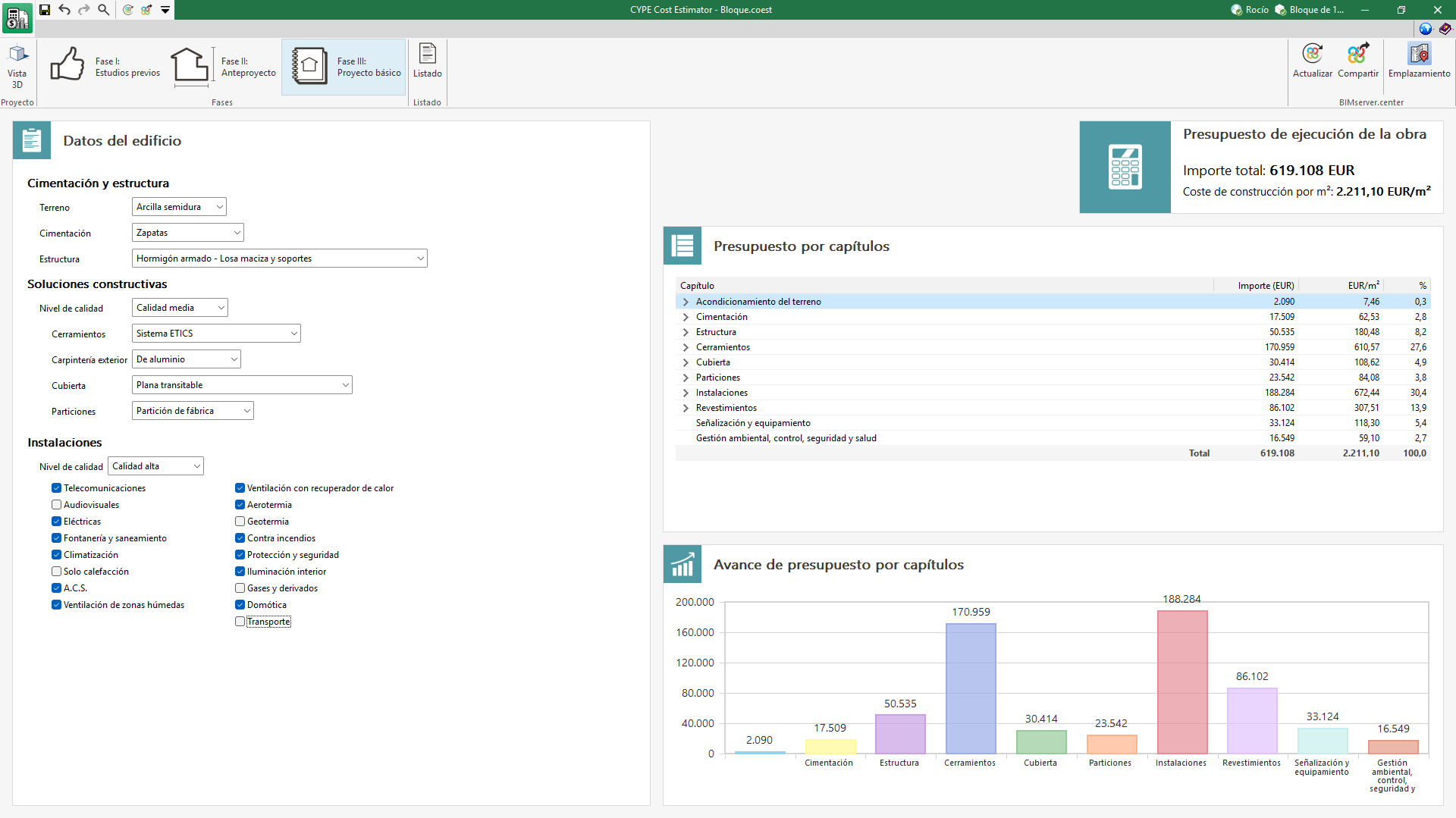
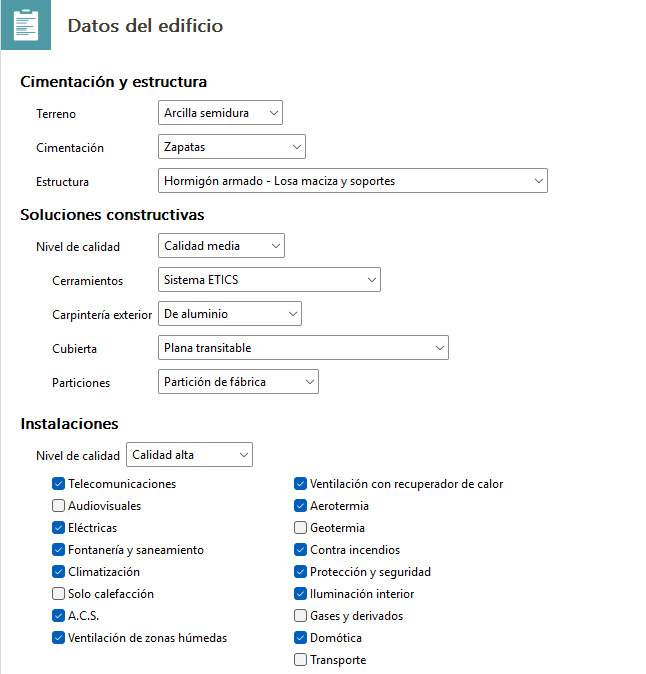
In the "Phase III: Design project" section, the details relating to the systems are finalised.
In the "Foundations and structure" section, you must select the type of ground from the nine options available. You must also specify how the foundations will be constructed, choosing from options such as strip footings, piles or slabs, amongst others.
In the "Construction systems" section, you should begin by specifying the quality level of the proposed solutions. Next, you need to select the type of façade cladding; the program offers eight different options for this. Another key element is the external joinery, which is a determining factor in calculating the bill of quantities. In this case, you can choose from materials such as aluminium, aluminium-wood, PVC, timber or steel.
In addition, the type of roof must be selected from the ten available options, which include variants such as a flat accessible roof, a pitched tiled roof or an intensive green roof. Finally, it is also necessary to decide whether the partitions will be prefabricated, dry-built or industrialised, a decision that directly influences the project’s specifications and costs.
Finally, in the "Installations" section, tick the boxes corresponding to the installations you wish to include in the quote. The available options are: "Telecommunications", "Audiovisuals", "Electrical", "Plumbing and drainage", "Air conditioning", "Heating only", "DHW", "Ventilation for wet areas", "Ventilation with heat recovery", "Air source heat pumps", "Geothermal energy", "Fire protection systems", "Security and safety", "Interior lighting", "Gases and derivatives", "Home automation" and "Transport".
Requirements
To ensure that the bill of quantities generated by the CYPE Cost Estimator program is in line with market rates, it is essential to meet the following requirements:
- The construction system used must comply with the standards of "international architecture". Consequently, distinctive building types that utilise traditional construction systems and/or materials, as well as unique buildings, are excluded.
- The building project must meet the minimum requirements for safety, habitability and health.
- The building must have the necessary infrastructure in place for the works to be carried out, and the access routes must be in a satisfactory condition.
- The completion deadline must be consistent with the scale of the project, as a deadline that is either too short or too long can lead to deviations in the bill of quantities.
- Currency stability and inflation control are essential prerequisites. It is not possible to adjust prices to market levels in situations of high inflation or fluctuating exchange rates.
- The construction cost estimate provided by the program should not be used for contracting the work, as a more detailed definition of the specifications, construction details and quantities is required; these aspects are only available at the detailed design stage.
- It must not be used for valuations or appraisals, as the program only covers new-build properties constructed to current building standards. In such cases, other factors come into play, such as the age of the building, its state of repair, the level of maintenance, and the environmental impact of the surroundings, all of which affect the final value.
Cost estimate tolerances
The specifications of the General Services Administration (GSA) and the American Institute of Architects (AIA) indicate, depending on the project stage, the acceptable tolerances in a project cost estimate, as summarised in the following table:
| Project phase | Tolerance (%) according to GSA | Tolerance (%) according to AIA |
|---|---|---|
| Previous studies | 10 | 10–15 |
| Preliminary draft | 7–10 | 7.5–12.5 |
| Basic design | 5–7.5 | 5–10 |
Depending on the level of detail and development of the project (preliminary analysis, draft project and design project), the calculation of the bill of quantities is adjusted accordingly, thereby increasing its level of accuracy.
In the case of CYPE Cost Estimator, the tolerances relating to the deviation of the initial bill of quantities from the final cost of the works, provided that the initial project parameters regarding areas, heights or construction characteristics are maintained, are summarised in the following table:
| Project phase | Tolerance (%) CYPE Cost Estimator |
|---|---|
| Preliminary analysis | ≤ 12 |
| Draft project | ≤ 10 |
| Design project | ≤ 7 |
Factors taken into account when applying prices
The prices used in drawing up the bill of quantities take into account various factors that directly or indirectly influence the final cost of the project. These are categorised as geographical, socio-economic, typological, construction-related, and climatic and seismic factors.
Geographical factors
These are factors related to the geographical and climatic conditions of the area, which are intrinsically linked to the socio-economic factors that affect labour costs and productivity, notably:
- Population density
Influences supply and demand and, therefore, market prices. - Tourism development in the area
Increases demand and the purchasing power of local residents. - Condition and development of transport infrastructure
Influences the cost of distributing and transporting materials, goods and services.
Socio-economic factors
These are factors that depend on the economic, political and social situation in each area and which influence the cost of materials, labour and machinery; these include the following:
- Net monthly salary in the construction sector
Influences labour costs. - National minimum wage
Influences labour costs. - Gross national income (GNI) per capita (purchasing power parity, PPP)
Influences prices in general. - Inflation rate
Leads to a sustained increase in prices. - Unemployment rate
Reflects the availability of labour and, therefore, hiring costs. - Exchange rate
Particularly affects imported goods and services. - Market conditions
Indicate the relationship between supply and demand in the procurement of materials, the hiring of labour, and the rental of equipment and machinery used in the construction process. This does not refer to supply and demand in the real estate market, but rather to contractor demand, material supply, and the labour market. - Imports of goods and services
Influence the prices of imported materials. - Industrial production growth rate
Reflects the availability of auxiliary means that facilitate construction activities. - Corruption Perceptions Index (CPI)
Indirectly affects prices in general: the higher the level of corruption, the higher the construction costs. - Human Development Index (HDI)
An indicator of health, education and economic level, reflecting the competitiveness and productivity of the population, and therefore directly influencing construction performance and final costs.
The adjustment coefficients associated with each socio-economic and geographical factor have been quantified through the study and analysis of data provided by recognised statistical sources, such as the World Bank, the European Commission, Datos Macro Expansión, IndexMundi, Preciosmundi and XE Live Exchange Rates.
Typological factors
- Gross floor area
Affects both costs and labour productivity. - Building use
Involves specific construction solutions and building services and, therefore, affects the overall building cost. - Number of floors above ground level
Building height entails more complex and costly structural and construction solutions, while also making vertical movement more difficult, which reduces productivity. - Number of floors below ground level
The construction of basements introduces additional complexity that affects construction costs, particularly in the earthworks and foundations trades. - Average floor-to-ceiling height
Directly influences the building volume, especially in the external walls, partitions and finishes trades. It also increases vertical movement, leading to reduced productivity. - Building typology
Affects the floor plan configuration and façade area and, therefore, the construction cost. - Complexity of the floor plan geometry
Influences the building cost, as it generally reduces productivity. - Percentage of openings in façades
Openings in façades increase their cost. - Degree of internal partitioning
Affects the cost of partitions, joinery and internal finishes. - Accessibility
Refers to site access conditions and the возможности for storing materials outside the building plot. - Site topography
Assesses the difficulty caused by level differences within the site, which affect the productivity of machinery and labour. - Quality level
This is intrinsically linked to the total construction cost. The program allows the quality level to be selected independently for the building as a whole, the construction systems, and the building services.
The quality level is defined according to the characteristics of the materials, equipment and construction processes used on site, based on the following criteria:- Basic
They strictly comply with current regulations. Their cost falls below the 30th percentile of the overall market price range. - Medium
They exceed the minimum requirements set out in current regulations and add further quality to the building as a whole. Their cost falls within the range defined by the 30th–70th percentiles of the overall market price range. - High
They comfortably exceed the minimum requirements set out in current regulations and represent a significant improvement in the quality of the building as a whole. Their cost is above the 70th percentile of the market price range.
- Basic
Construction factors
Depending on the selected use, the program sets the standard units of work that make up the various sections of the estimate:
- Ground conditioning
- Foundations
- Structure
- External walls
- Roof
- Partitions
- Facilities
- Cladding
- Signage and equipment
- Environmental management, monitoring, health and safety
You can change the default settings that the program offers for each use.
Climatic and seismic factors
The program also takes into account these other factors that affect the building’s bill of quantities:
- Thermal conditions
The external temperature influences the design and sizing of the building envelope and its heating and cooling systems, particularly the cost of insulation and external joinery. - Wind speed
The dynamic wind pressure determines the design, dimensions and cost of the structure and external joinery. - Degree of exposure to wind
This has an impact on the cost of the structure and external joinery, particularly in buildings located near cliffs, the seashore, or open countryside, amongst others. - Seismic risk
Seismic forces influence the design and dimensioning of the foundations and the structure. They therefore affect the final cost of the building.
Results output
CYPE Cost Estimator has several ways of displaying the values of the magnitudes evaluated so that users can analyse the results in the most efficient way according to their needs.
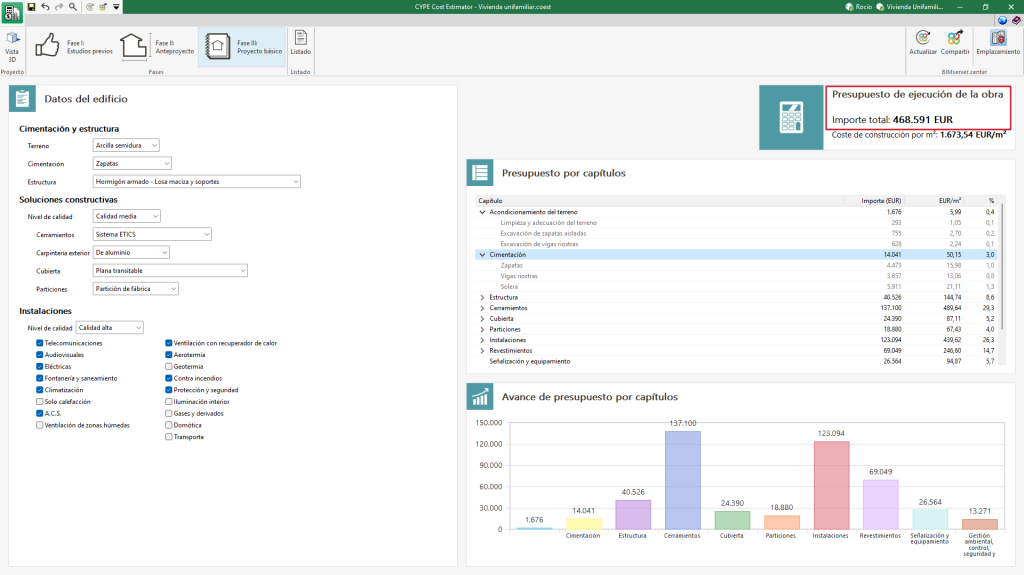
Project execution budget
The budget determined by the program corresponds to the budget for the execution of the job, which includes the total amount of direct and indirect costs necessary for its execution, understood as follows:
Hard costs
These are those costs directly attributable to the execution of the project's items, which are made up of:
- Materials.
- Machinery and equipment.
- Manual labour.
- Ancillary or complementary hard costs, are determined as a percentage of the cost of the above components (materials, machinery and labour).
Soft costs or construction costs
These include costs that are not directly attributable to units of the job, but to the job as a whole. These include: office facilities on the job site, warehouses, workshops, laboratories, and salaries of technical staff and managers, among others.
Excluded from the project execution budget are the contractor's overheads and industrial profit, which correspond to the contract budget or basic tender budget, as well as taxes.
Construction cost per m2
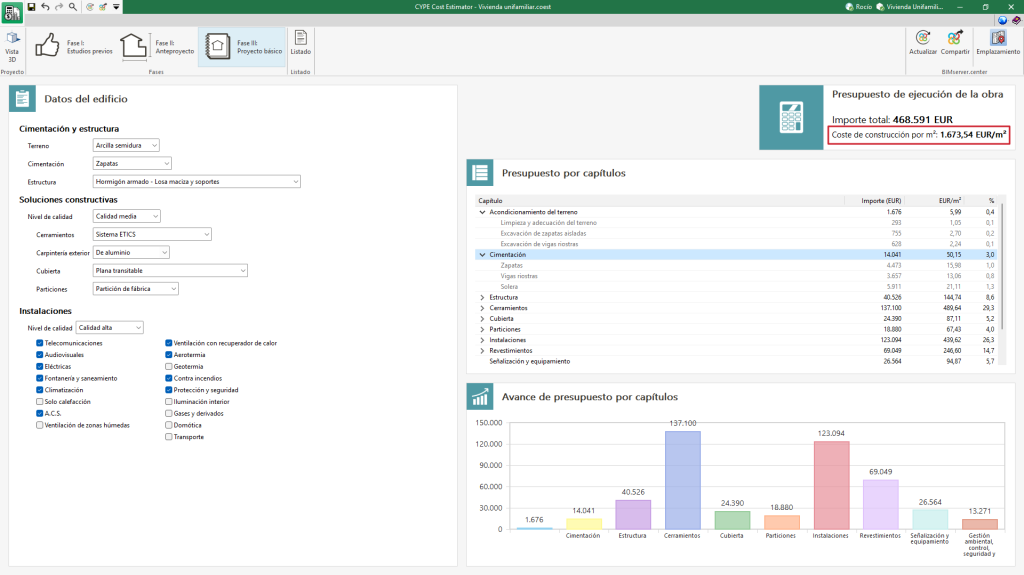
The construction cost per m2 is defined as the result of dividing the total amount of the "Project execution budget" by the "Total built-up area (S)", expressed in square metres.
The "Total built-up area (S)" is the area bounded by the perimeter lines of the external enclosures and, where appropriate, by the axes of the party walls. All overhangs, terraces and balconies covered by roofs shall be counted as 100 % of their floor area when they are enclosed laterally by walls, otherwise only 50 % of their area shall be counted.
Bill of quantities by work sections
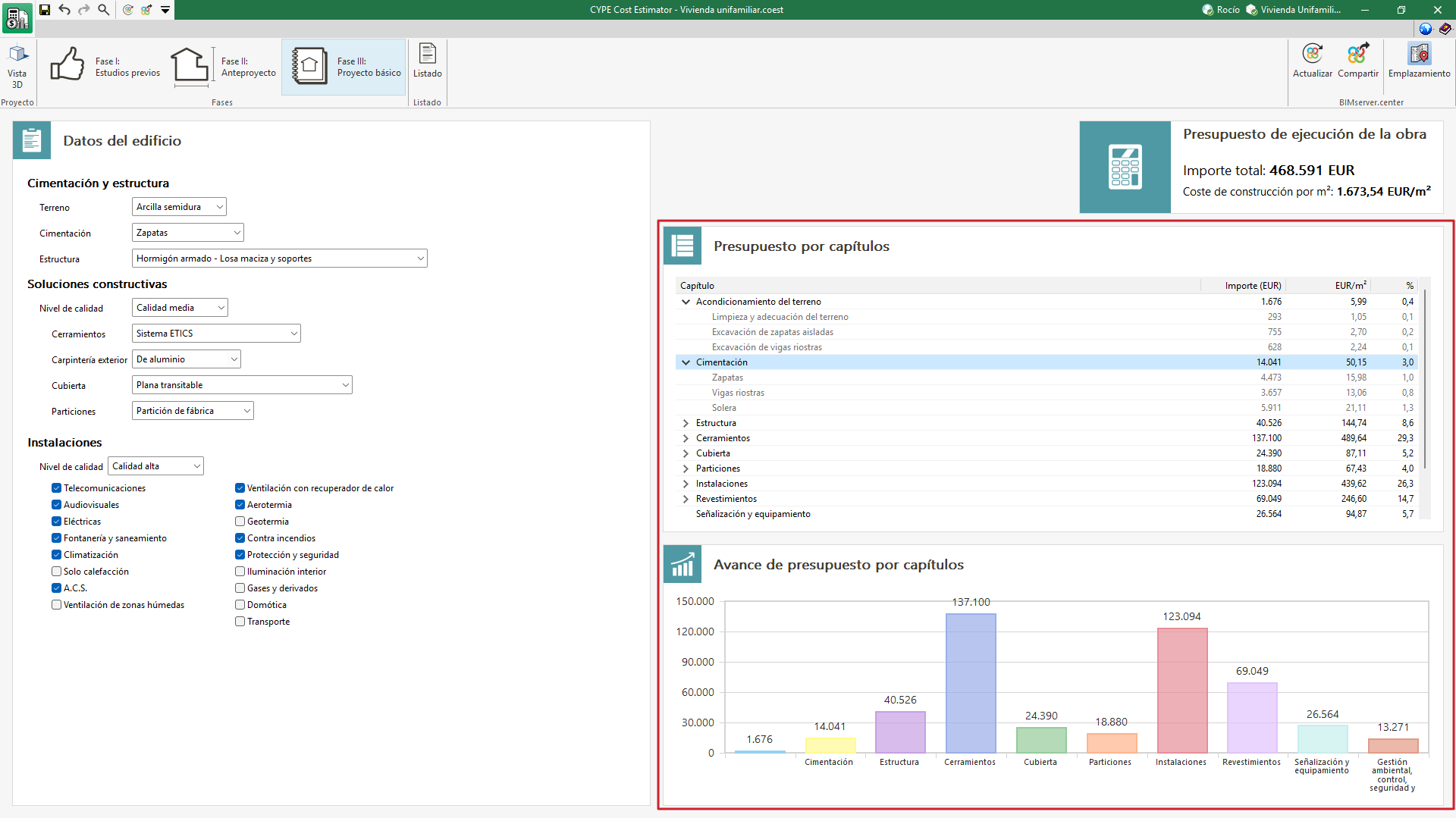
CYPE Cost Estimator can display the breakdown of the project execution budget by chapters in phases II (Draft project) and III (Design project). Additionally, in phase III (Design project) these work sections can be displayed and the sub-work sections can be shown.
For each work section or sub-work section, the amount, the cost per m² and its impact on the project execution budget are indicated.
Preview of the bill of quantities by work sections
At the bottom is a graph that displays the cost of each of the items graphically.
Reports

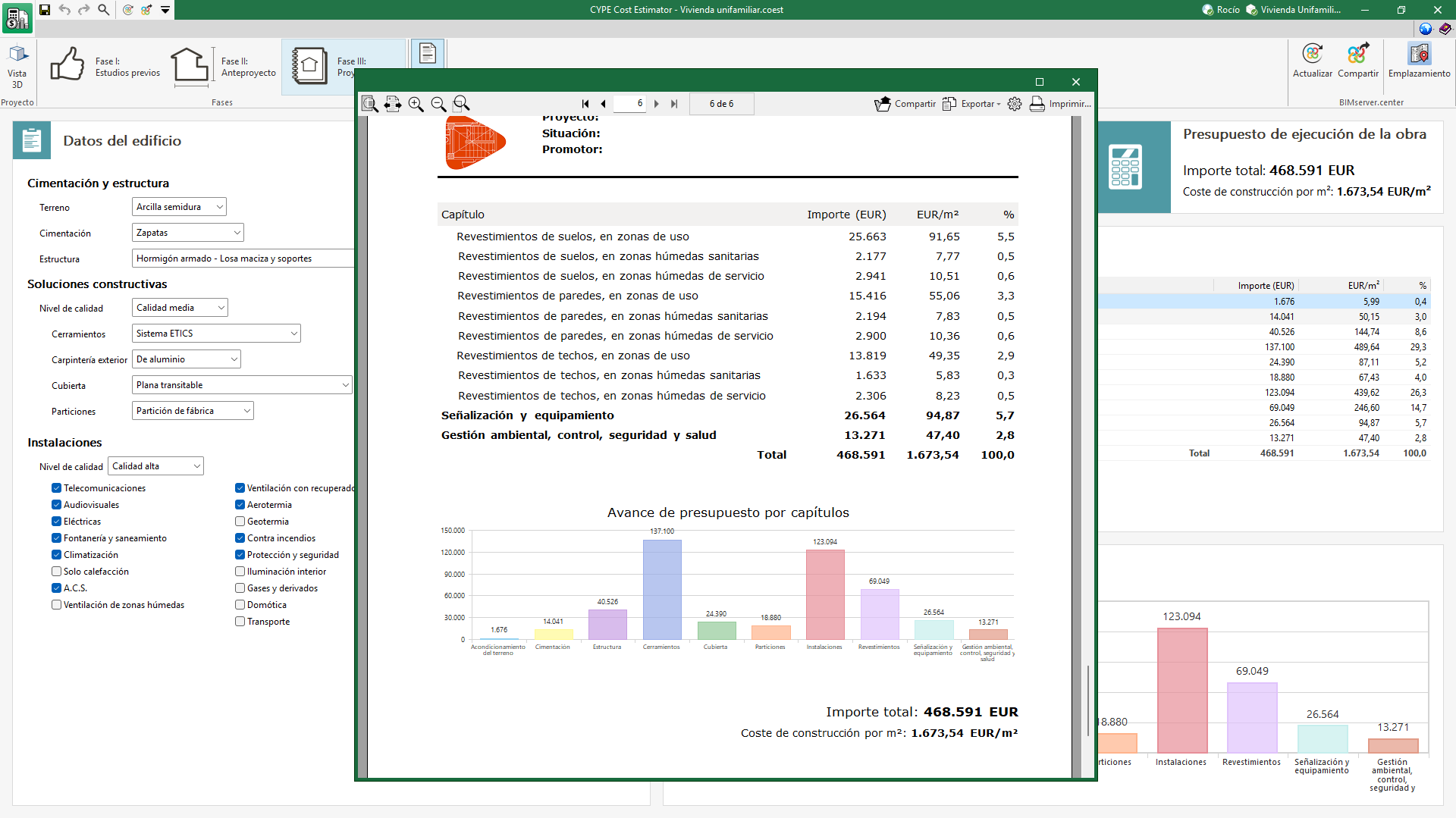
CYPE Cost Estimator can generate a supporting document for each of the preliminary phases of the project covered by the application.
This document includes the project data entered and the results of the calculation of the project execution budget.
The data included in each report, according to the corresponding phase, shall be as follows:
- Phase I: The amount of the project execution budget and the construction cost per m² is shown.
- Phase II: In addition to phase I, the bill of quantities per work section is generated together with a graph to facilitate the visualisation of the budget progress.
- Phase III: As an additional result to phase II, sub-work section are included in the bill of quantities per work sections.
The report can be printed directly from the application and exported to PDF, DOCX, TXT, HTML and RTF formats.
Integration into the BIMserver.center platform
Many of CYPE's programs are connected to the BIMserver.center platform and allow collaborative work to be carried out via the exchange of files in formats based on open standards.
Please note that, to work on BIMserver.center, users can register on the platform free of charge and create a profile.
When accessing a program connected to the platform, the program connects to a project in BIMserver.center. This way, the files of the projects that have been developed collaboratively in BIMserver.center are kept up to date.

| More information: |
|---|
| For further details related to using CYPE software via the BIMserver.center platform, please click on this link. |
Options available in CYPE Cost Estimator

In the top-right corner of the main toolbar are the tools you need to use CYPE Cost Estimator alongside other tools from BIMserver.center.
Importing and updating BIM models
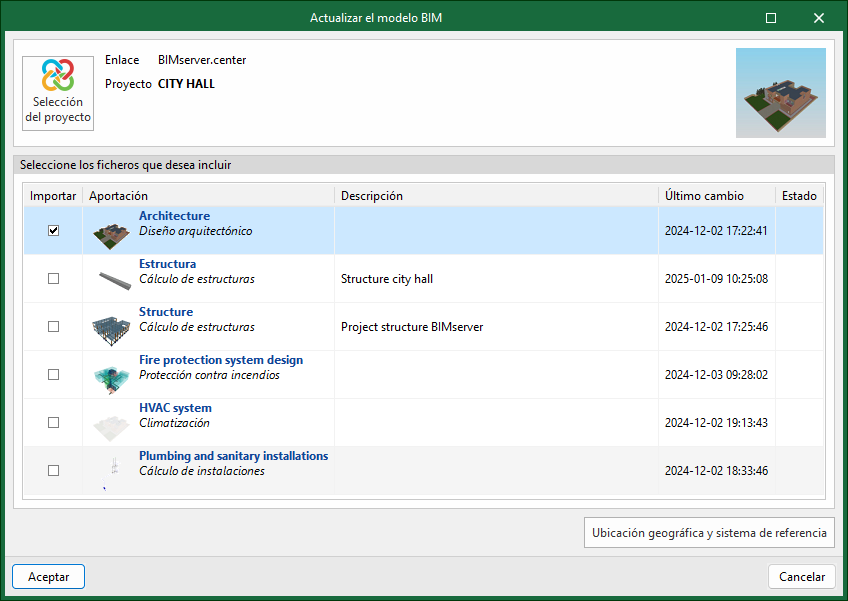
By clicking the "Update" button, you can update the information contained in the models previously imported into the project, or import new models if you wish.
In the "Update BIM model" window, you can use the "Project selection" button to choose, from the list of your projects on BIMserver.center, which project to link to the CYPE Cost Estimator BIM model.
Using the "Geographic location and reference system" option, you can adjust the model's geographic location data and reference system.
Share the BIM model with other users
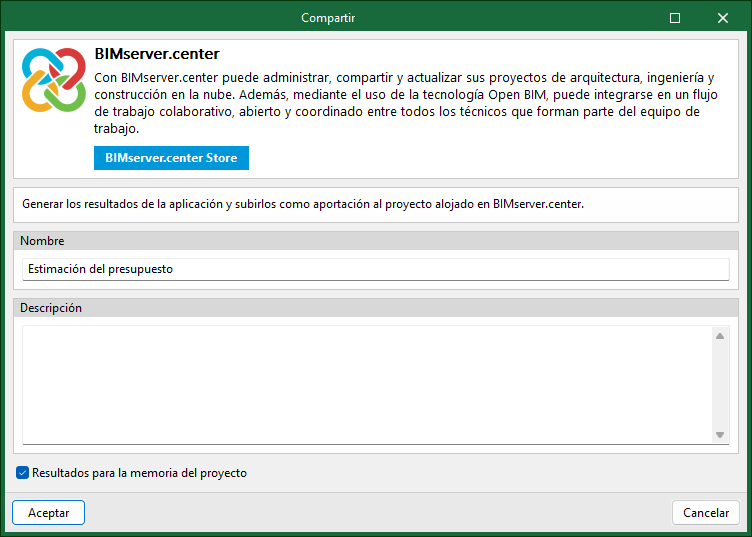
By clicking the "Share" button, you can export the information contained in the model created in CYPE Cost Estimator to the BIMserver.center platform.
During the export process, you can specify various details regarding the identification of the files to be exported and the file types to be generated.
Direct integration with other programs
Like other CYPE tools connected to the BIMserver.center platform, CYPE Cost Estimator offers options for direct connection to the Open BIM Site construction site management app. To this end, a "Site" button has been added to the "BIMserver.center" group on the toolbar. Selecting this option will export the data relating to the cost estimate to the BIMserver.center project and automatically launch the Open BIM Site tool to continue with the project development according to the usual workflow.