Element libraries
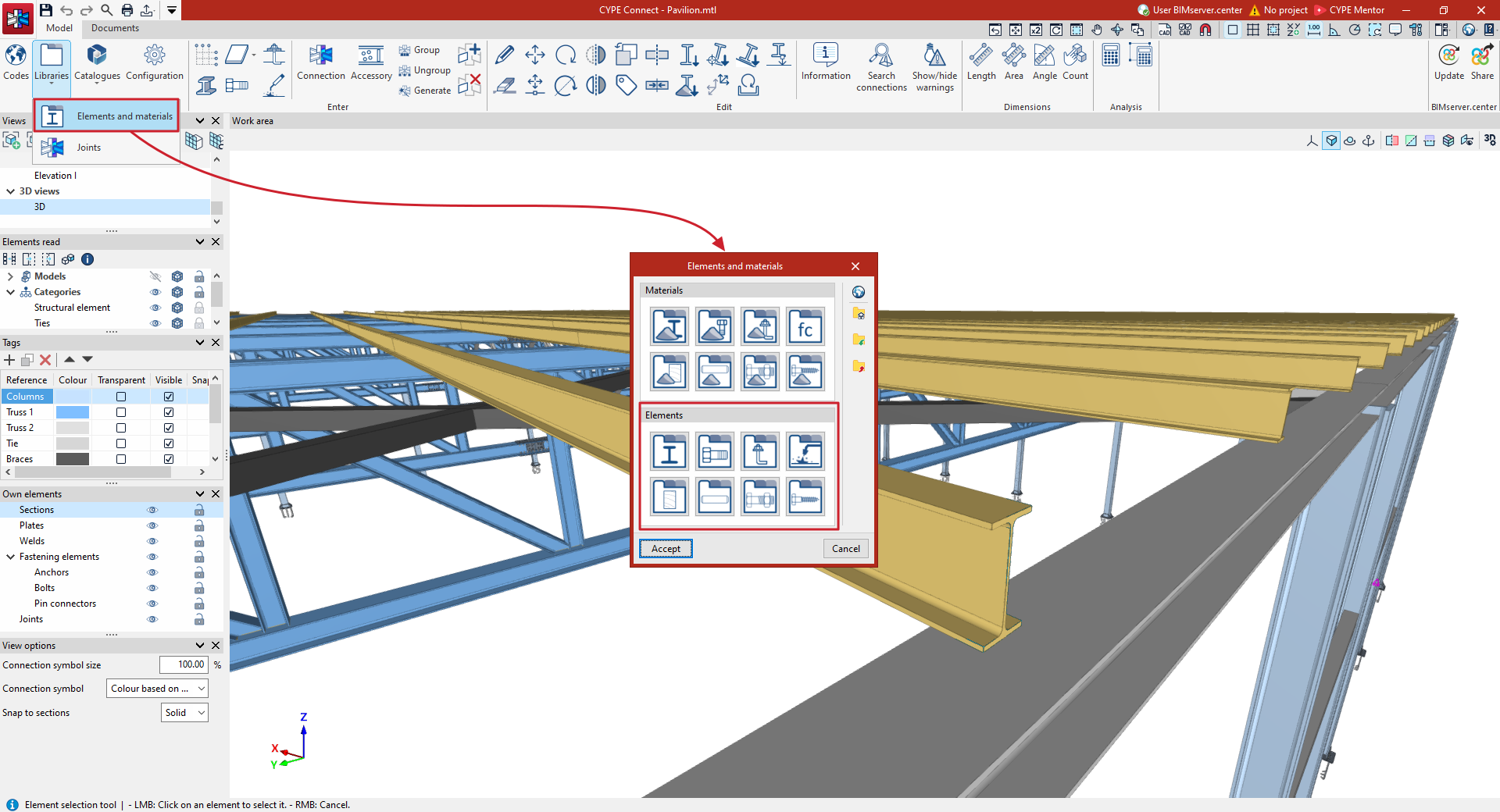
The "Elements" libraries can be found in the section of the same name, within the window that appears when you click on the "Elements and materials" option in the "Libraries" menu.
From here, the following options can be selected to define:
- Section library
- Bolt library
- Pre-installed anchor library
- Electrode library
- Timber sections library
- Dowel library
- Bolt library
- Screw library
Once the library elements have been defined in each specific editing panel, click "Accept" to return to the previous window.
After clicking "Accept" again, the library elements will be available for use in defining the structure and joins. The first element in each list will be taken as the default value.
| Note: |
|---|
| If the adopted workflow includes the process of importing from a BIM model of the structure developed in CYPECAD or CYPE 3D, CYPE Connect will import the necessary element types and add them to the project library automatically, provided they are compatible with the program. |
Section library
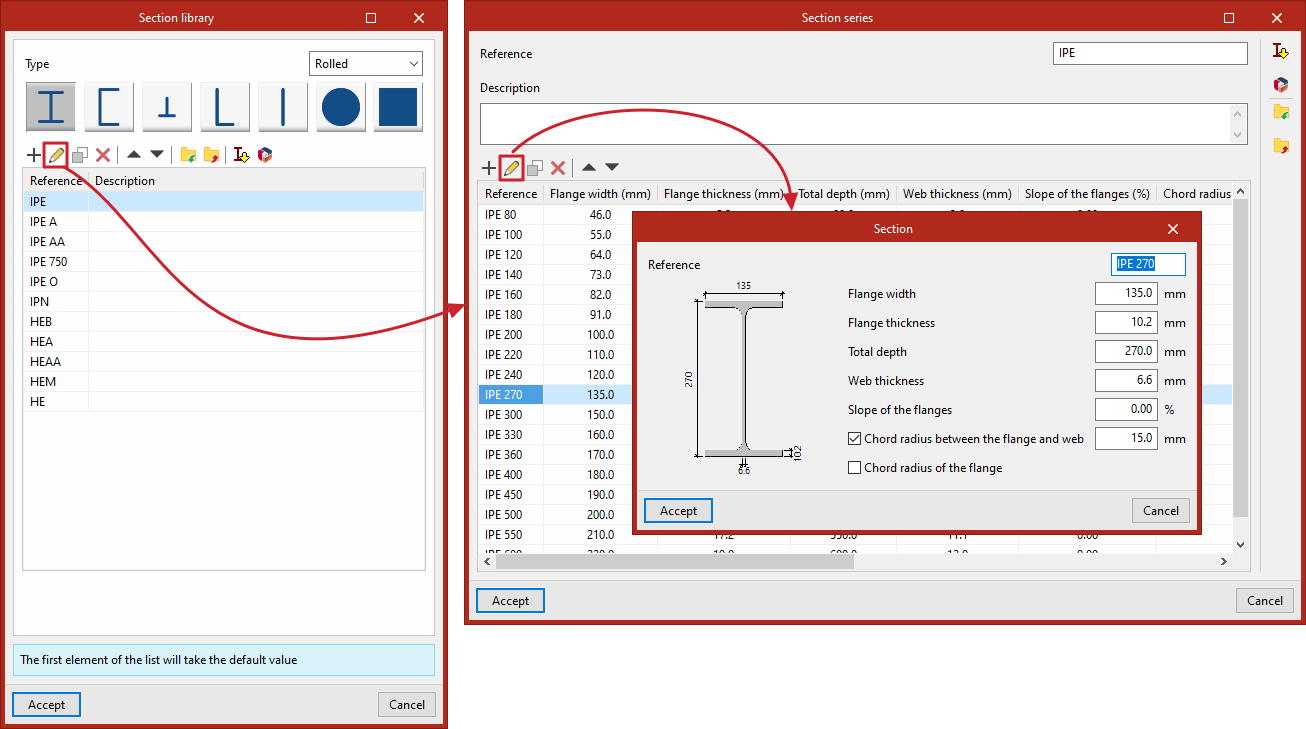
To edit the "Section library", click on the option to open a window displaying the range of steel sections.
First, you select the section "Type", which can be:
- Laminated
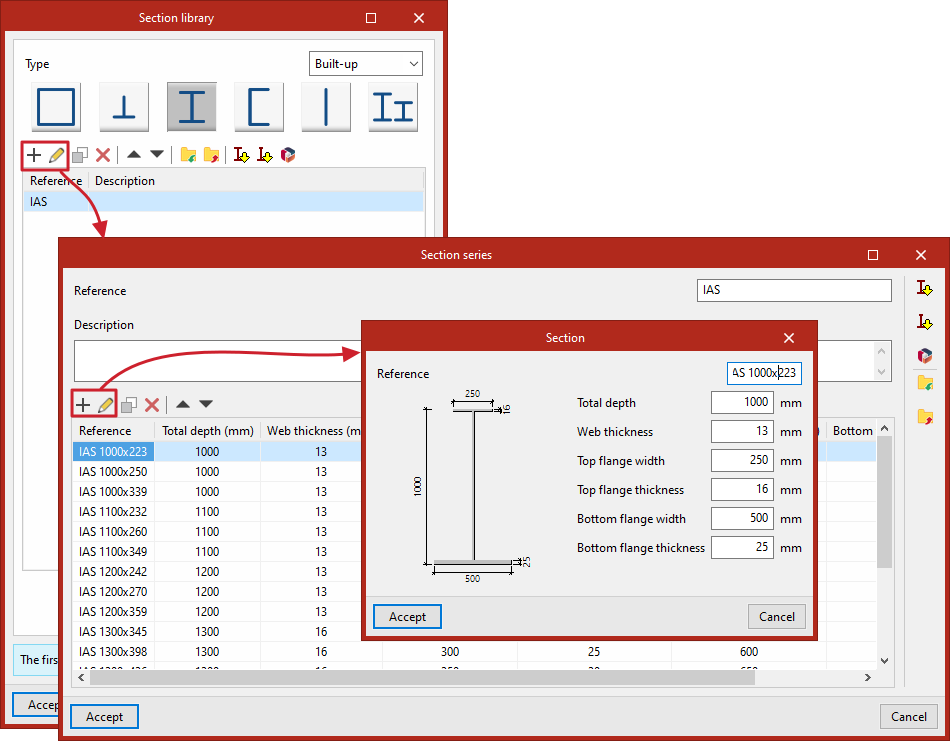
- Reinforced
- Rolled
- Hollow section
For each section type, the program offers various options, which can be viewed via this link. For example, selecting Rolled takes you to the following section tables:
- I sections
- U sections
- T sections
- Angles
- Flat bars
- Solid round bars
- Solid square bars
At the top of the table, the program provides options to "Add", "Edit", "Copy", "Delete" or move elements in the list.
You can also "Import" and "Export" the information for the selected elements to a file on the hard drive.
The option on the far right allows you to "Import predefined section series" taken from various manufacturers’ technical data sheets and standards.
You can also import "Manufacturer catalogues" included in the Open BIM Database using the following option at the top of the page.
Each row in the table corresponds to a specific set of sections, which has a "Reference" and a "Description".
You can view or edit the data by selecting a series and clicking on "Edit".
This opens the "Section series" window. All the sections defined in the selected series are displayed here.
Once again, you can "Add", "Edit", "Copy", "Delete" or move profiles in the list using the tools at the top, as well as "Import predefined profile sets" or "Manufacturer catalogues" "Import" and "Export" the information for the selected series to a file on the hard drive, using the options in the right-hand column.
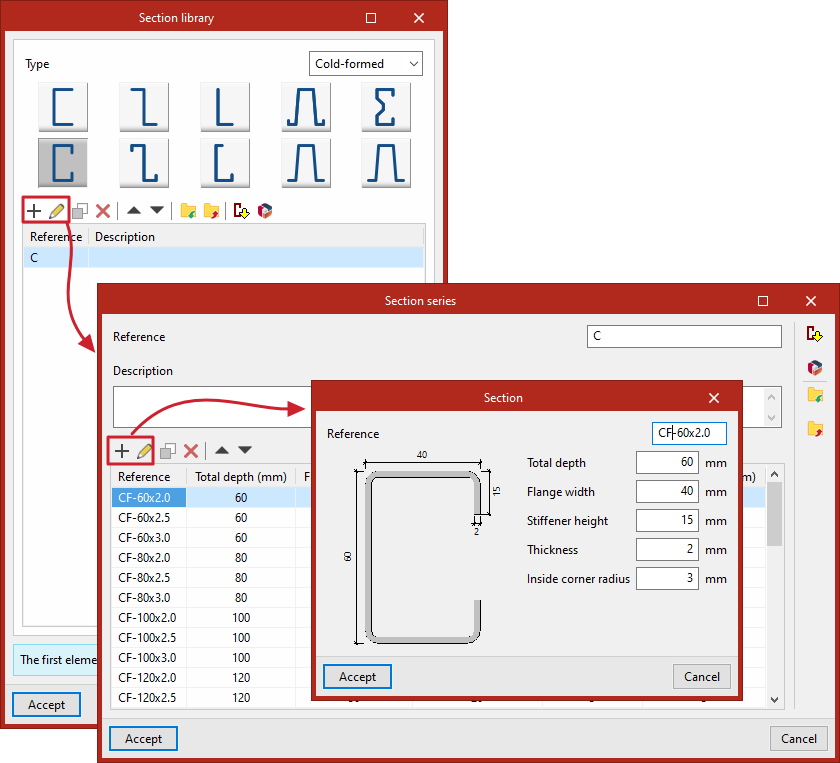
When you "Add" or "Edit" a section in the table, the "Section" window opens. Here you can enter its "Reference" number, as well as the geometric parameters that define it.
For example, in a double-T section, these are as follows:
- Flange width
- Flange thickness
- Total depth
- Thickness of the web
- Slope of the flanges
- Chord radius between the flange and web
- Chord radius of the flange
To confirm the values entered, click on "Accept".
Bolt library
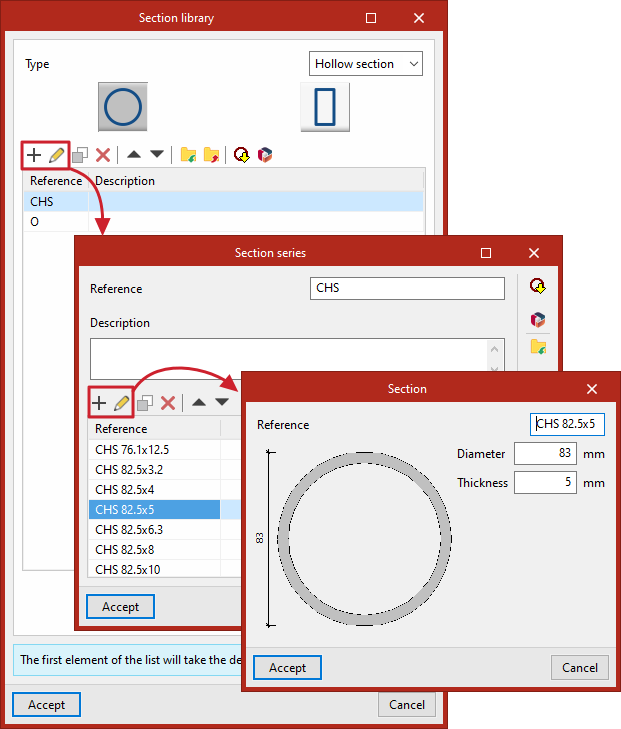
In this library, different bolt series are entered into different lists, one for each bolt type ("Prestressed" and "Not prestressed"). At the top, the program provides tools to In this library, different bolt series are entered into different lists, one for each bolt type ("Prestressed" and "Not prestressed"). At the top, the program provides tools to "Add", "Copy", "Delete" or move items within each list.
"Add", "Copy", "Delete" or move items within each list.
You can also "Import predefined data" by clicking on the relevant option at the top. Then, tick the relevant boxes to "Import" the desired items and click "Accept".
Each series of bolts is defined by the part numbers for the "Series", the "Bolt", the "Nut" and the "Washer"; furthermore, you indicate whether or not a "Lock nut" is required by ticking the relevant box, enter the "Number of washers on the side of the head" and the "Number of washers on the side of the nut", and provide the list of available "Bolts".
The following are defined in the edit panel for each bolt in this list:
- On the "Bolt" tab:
- Nominal diameter
- Diameter of the thread
- Head diameter
- Thickness of the bolt head
- Tensile strength area
- In the "Nut" tab:
- Outside diameter
- Inside diameter
- Thickness
- In the "Washer" tab:
- Outside diameter
- Inside diameter
- Thickness
- Finally, the list of available lengths is shown at the bottom, including the total "Length" of the screw and the "Length of the threaded section".
Library of pre-installed anchors
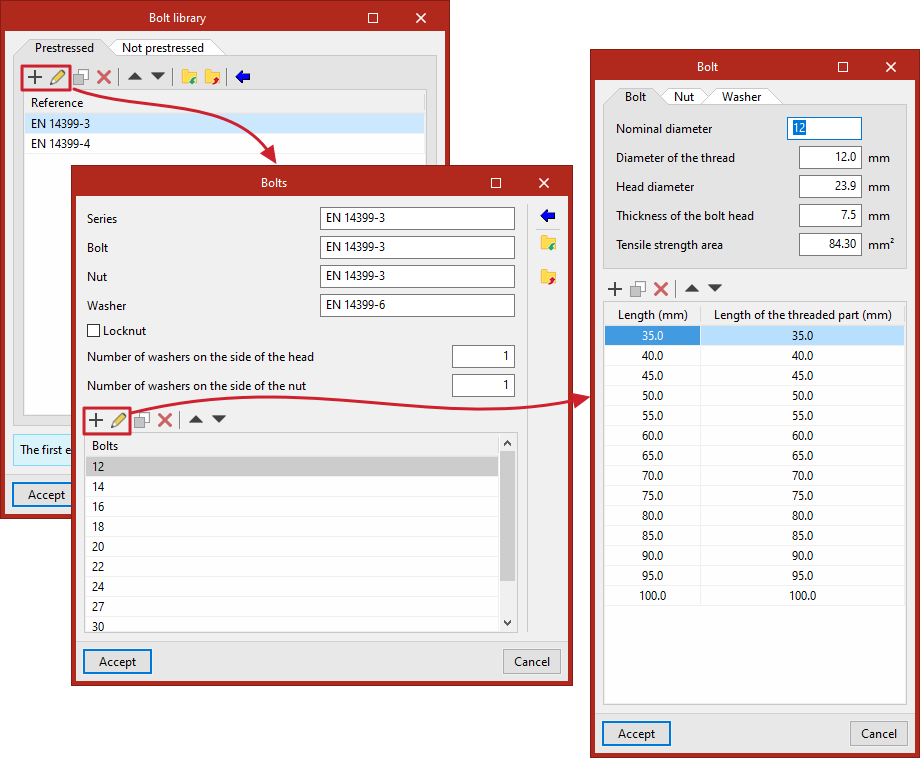
In this library, various series of pre-installed anchors are included in different lists, one for each type of anchor ("Corrugated bar" "Threaded rod" and "Smooth bar"). At the top, the program provides tools to "Add", "Copy", "Delete" or move items within each list.
You can also "Import predefined data" by clicking on the relevant option at the top. Then, tick the relevant boxes to "Import" the desired items and click "Accept".
Each series of anchors is defined by the part numbers for the "Series", the "Anchor", the "Nut" and the "Washer", and by the list of available "Anchors".
The following are defined in the edit panel for each anchor in this list:
- "Anchorage" data:
- Nominal diameter
- Shaft diameter
- Effective cross-sectional area of the anchor (optional)
- "Nut" data:
- Outside diameter
- Inside diameter
- Thickness
- "Washer" data:
- Outside diameter
- Inside diameter
- Thickness
Electrode library
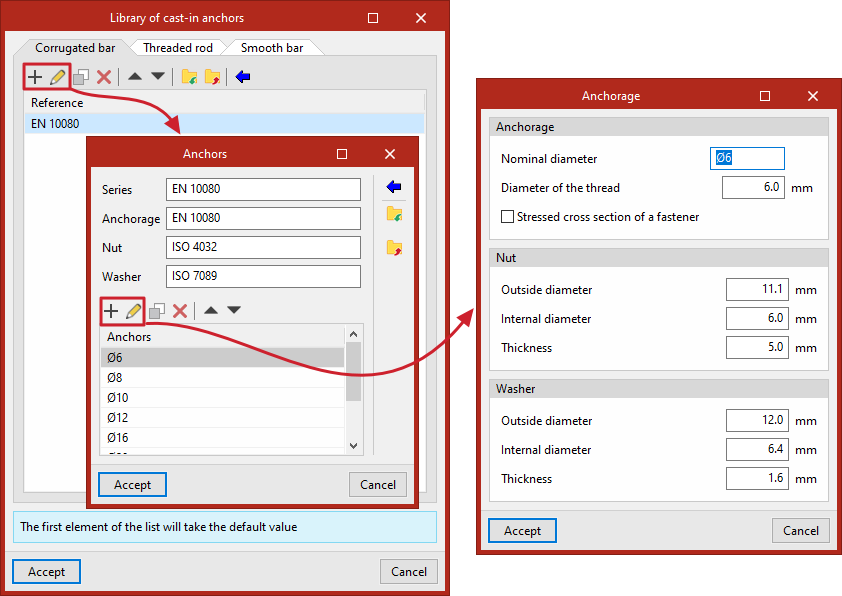
In this library, various electrodes are added to a list. At the top, the program provides functions to "Add", "Copy", "Delete" or move elements in the list.
You can also "Import predefined section series" by clicking on the relevant option at the top. Then, tick the relevant boxes to "Import" the desired elements and click "Accept".
Each electrode is defined by:
- Reference
- Strength (Fexx)
Timber section library
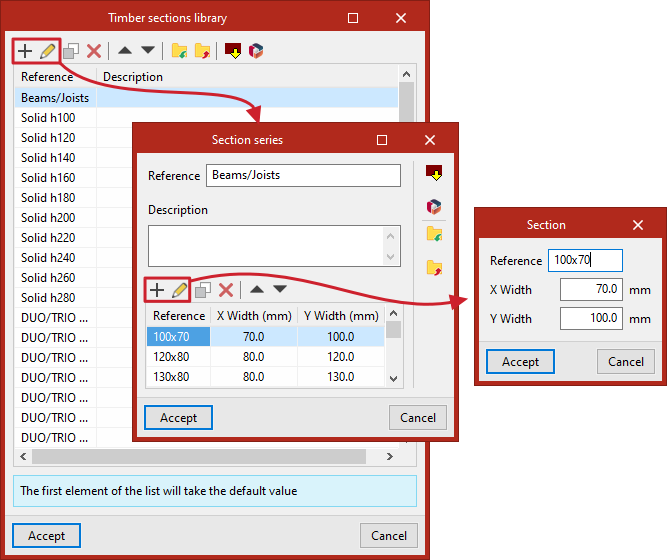
In the timber section library, different section series are added to a list. At the top, the program provides tools to "Add", "Copy", "Delete" or move elements in the list.
You can also "Import predefined section series" by clicking on the relevant option at the top. Then, tick the relevant boxes to "Import" the desired elements and click "Accept".
In addition, it is possible to import "Manufacturer catalogues" included in the Open BIM Database using the following option at the top of the page.
Each "Section series" is defined by its "Reference", its "Description" and the list of available sections.
In each section of the list, the following is entered:
- Reference
- X width
- Y width
Pin library
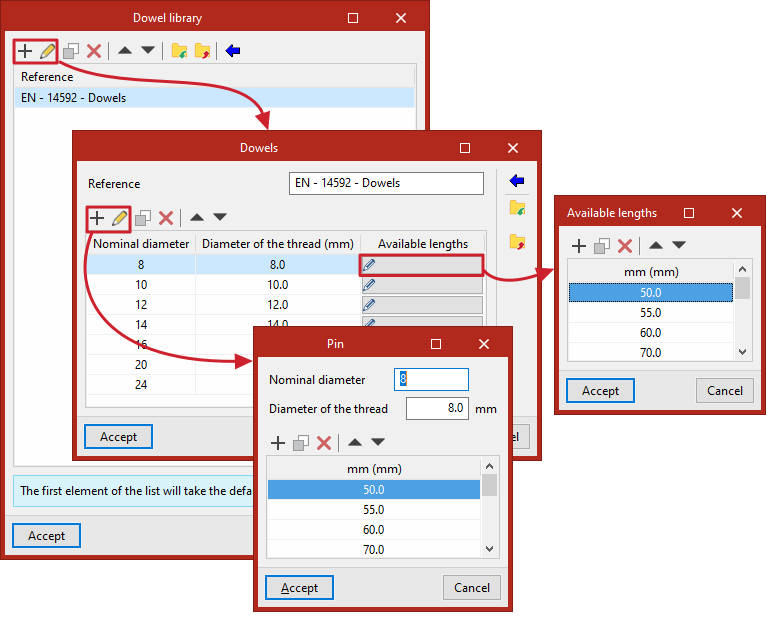
In the pin library, different sets of pins are added to a list. At the top, the program provides tools to "Add", "Copy", "Delete" or move elements in the list.
You can also "Import predefined data" by clicking on the relevant option at the top. Then, tick the relevant boxes to "Import" the desired elements and click "Accept".
Each series of "Pins" is defined by its "Reference" and the list of available pins.
For each element in the list, the following details are entered in its edit panel:
- Nominal diameter
- Shaft diameter
- Available lengths
Bolt library
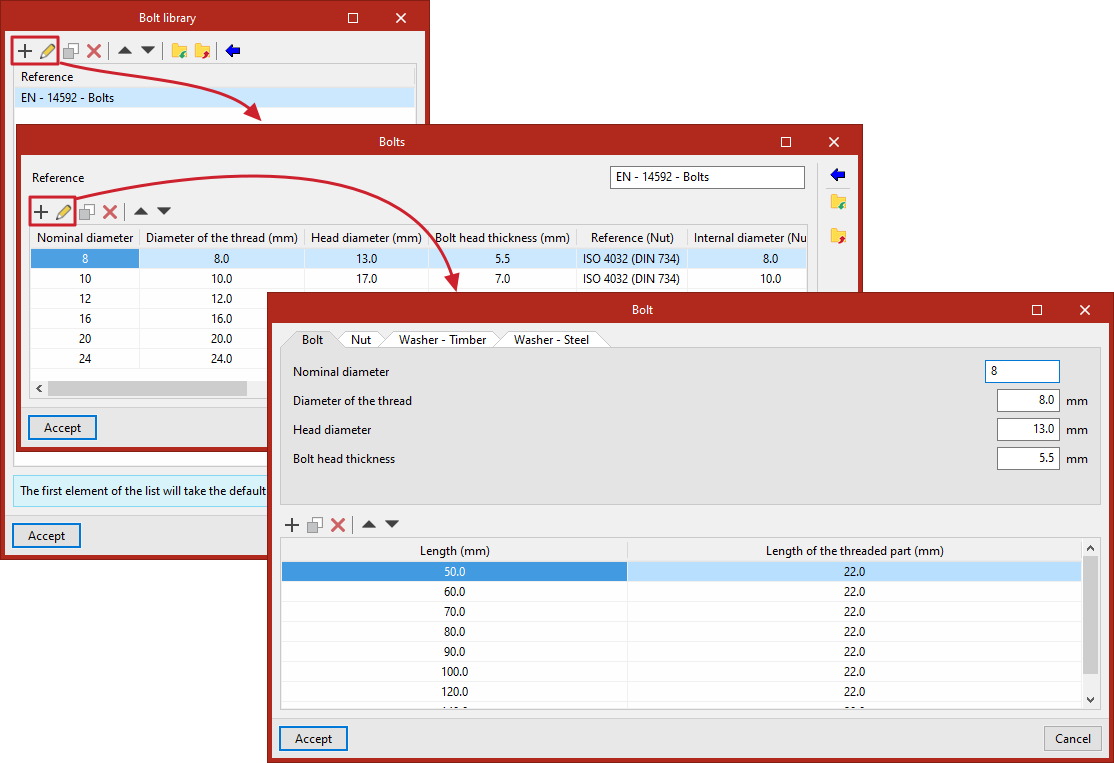
In the bolt library, different bolt series are entered into a list. At the top, the program provides tools to "Add", "Copy", "Delete" or move items in the list.
You can also "Import predefined data" by clicking on the relevant option at the top. Then, tick the relevant boxes to "Import" the desired items and click "Accept".
Each "Bolt" series is defined by its "Part number" and the list of available bolts.
For each element in the list, enter the following details in its edit panel:
- The "Bolt" tab includes:
- Nominal diameter
- Shaft diameter
- Head diameter
- Bolt head thickness
- The "Nut" tab includes:
- Reference
- Inside diameter
- Outside diameter
- Thickness
- Lock nut (by ticking the relevant box)
- The "Washer – Timber" and "Washer – Steel" tabs show the specifications for washers made from both materials:
- Reference
- Outside diameter
- Thickness
- Finally, the list of available lengths is shown at the bottom, including the total "Length" of the bolt and the "Length of the threaded part".
Bolt library
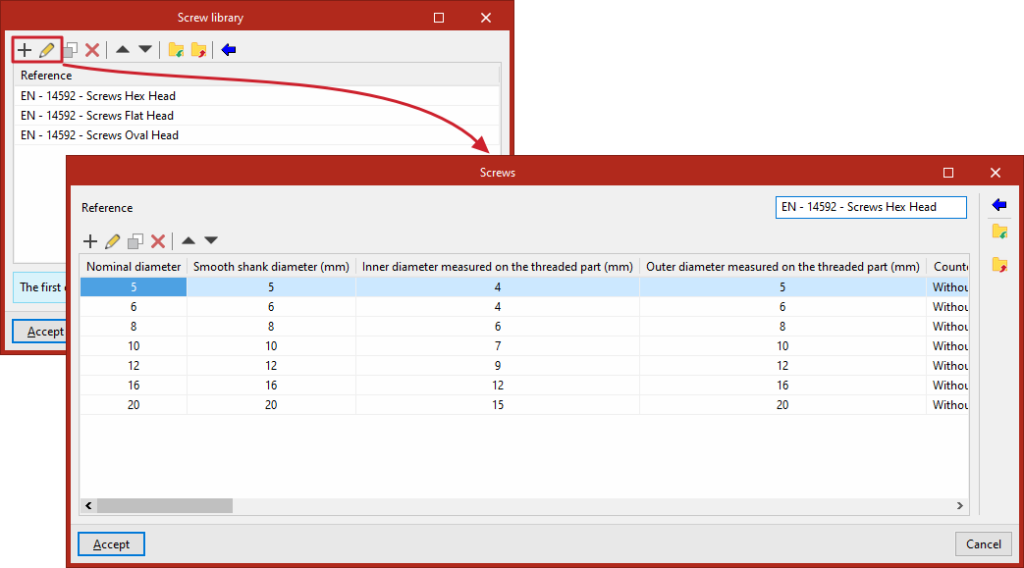
In the bolt library, different bolt series are added to a list. At the top, the program provides functions to "Add", "Copy", "Delete" or move elements in the list.
You can also "Import predefined data" by clicking on the relevant option at the top. Then, tick the relevant boxes to "Import" the desired items and click "Accept".
For each series of "Screws", the "Reference" and the list of available screws are specified.
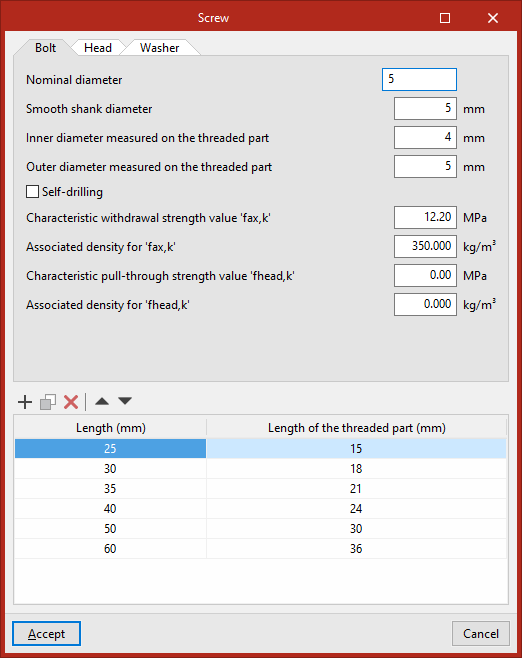
For each lag screw on the list, enter the following details in its edit panel:
- The "Bolt" tab includes:
- Nominal diameter
- Smooth shank diameter
- Inner diameter of the threaded part
- Outer diameter of the threaded section
- Self-drilling (select the checkbox as applicable)
- Characteristic withdrawal strength value 'fax,k'
- Associated density for 'fax,k'
- Characteristic pull-through strength value 'fhead,k'
- Associated density for 'fhead,k'
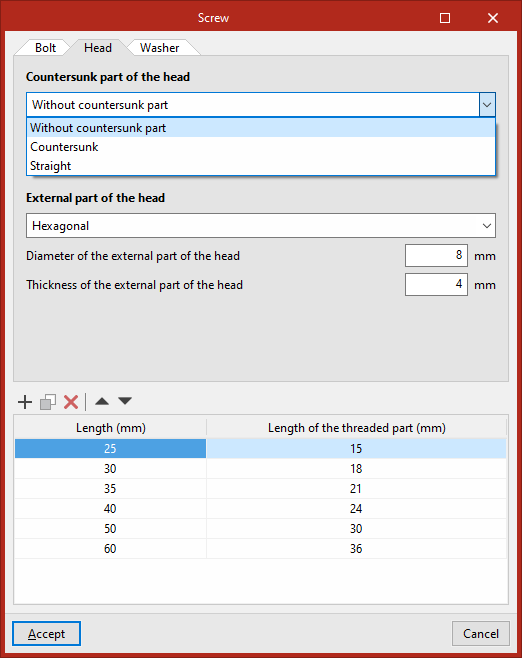
- The "Head" tab includes:
- Countersunk part of the head (Non-countersunk, Countersunk or Straight), and its properties:
- Diameter of the external part of the head
- Thickness of the external part of the head
- External part of the head (Without external part, Cylindrical, Square or Hemispherical), and its properties:
- Diameter of the external part of the head
- Thickness of the external part of the head
- Countersunk part of the head (Non-countersunk, Countersunk or Straight), and its properties:
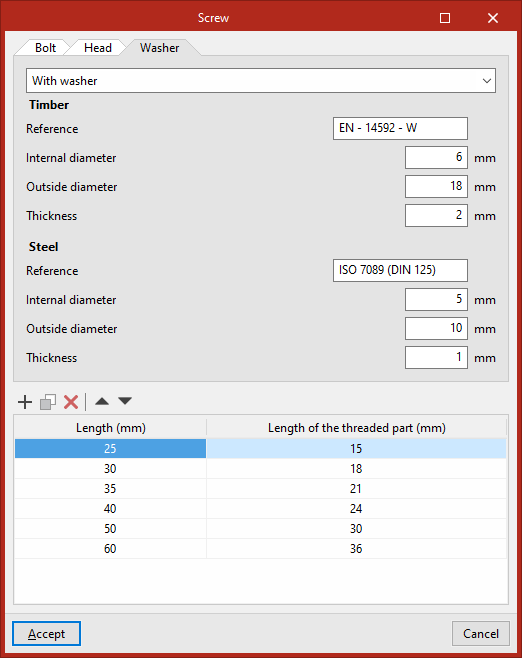
- On the "Washer" tab, select one of the following options:
- Without washer
- With washer, in which case the definition applies to both "Timber" and "Steel":
- Reference
- Inside diameter
- Outside diameter
- Thickness
- With built-in washer, including:
- External diameter of the built-in washer
- Thickness of the built-in washer
- Finally, the list of available lengths is shown at the bottom, including the total "Length" of the screw and the "Length of the threaded part".