
Report Template Editor interface
The interface that appears when you open the Report Template Editor contains the following areas, options and menus:
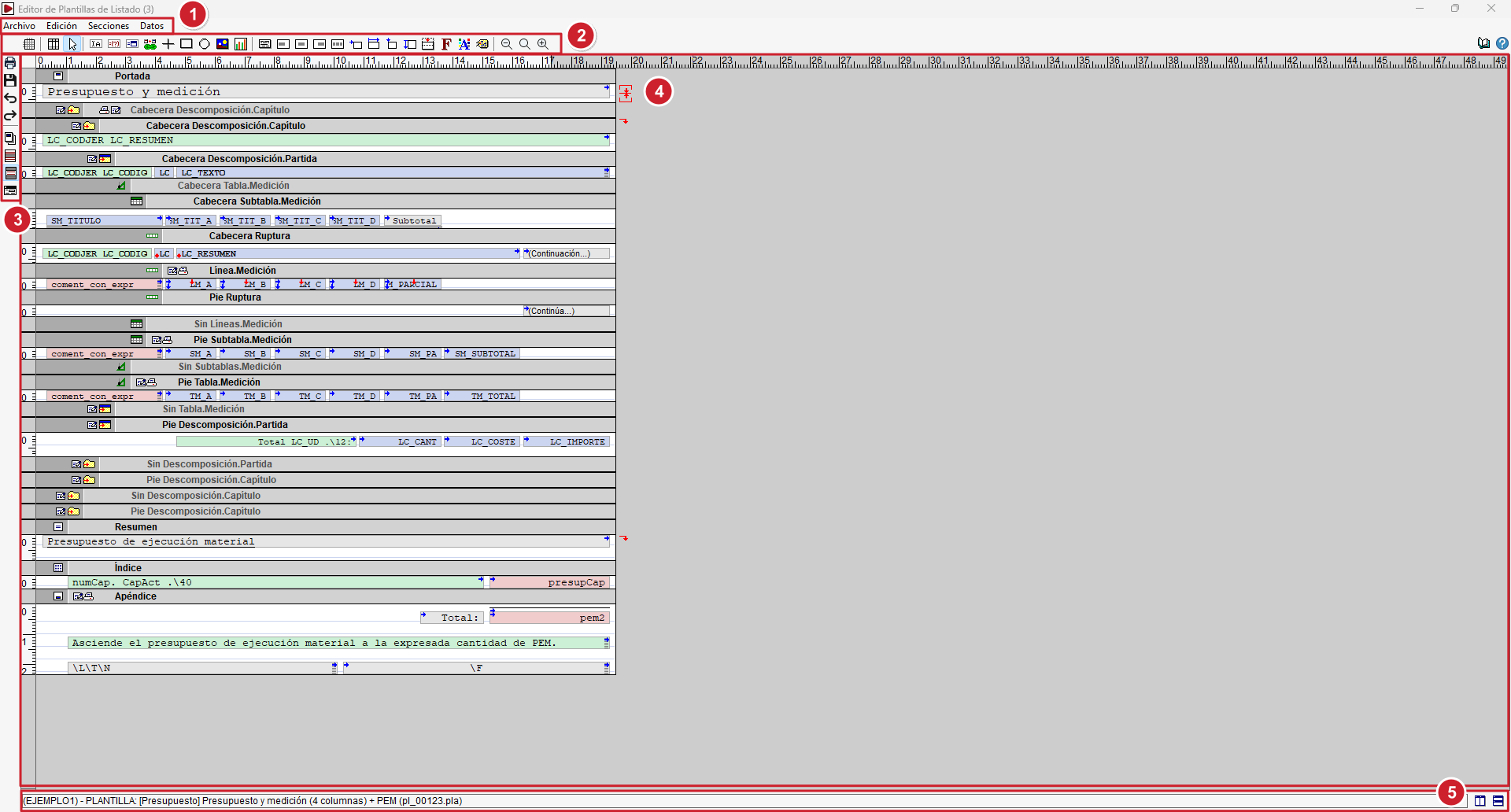
- At the top are the editor’s main menus: ‘’
- "File" menu
Options for template management, page settings and printing. - "Edit" menu
Various editing tools and general template settings. - "Sections" menu
Manage the sections that make up the template and access their options. - "Data" menu
Access various elements relating to the data and the template’s functionality, such as variables, sections, the page template and scripts.
- "File" menu
- The top toolbar contains the tools for inserting and editing the various alphanumeric and graphic objects in the template, as well as other design, alignment and adjustment tools.
- The side toolbar contains shortcuts to various options for editing and managing the template.
- In the centre is the editing area, which graphically displays the content and structure of the template, organised into sections, zones and rows, upon which the various objects are arranged. The horizontal and vertical guides make it easier to position and redesign them.
- At the bottom are the status bar and the tools for working with multiple windows.
