Update history​​

CYPECAD


CYPECAD exports a BIM model to a project on the BIMserver.center platform which includes the quantities related to certain structural elements, among other things. As a result, programs such as Open BIM Quantities can use these quantities to generate the bill of quantities for these elements. These quantities are exported using the standardised IFC format.

In version 2022.g, the number of quantities associated with construction elements that can be exported has been extended. CYPECAD now exports the following quantities, which are listed by construction element and indicating the IFC entity that it contains:

  • Walls (entity “IfcWall”, set of quantities “Qto_WallBaseQuantities”)
    • Length (“Length”)
    • Width (“Width”)
    • Height (“Height”)
    • Gross footprint area (“GrossFootprintArea”)
    • Net footprint area (“NetFootprintArea”)
    • Gross side area (“GrossSideArea”)
    • Net side area (“NetSideArea”)
    • Gross volume (“GrossVolume”)
    • Net volume (“NetVolume”)

  • Slabs ( entity ”IfcSlab”, set of quantities ”Qto_SlabBaseQuantities”)
    • Width (“Width”)
    • Length (“Length”)
    • Depth (“Depth”)
    • Perimeter (“Perimeter”)
    • Gross area (“GrossArea”)
    • Net area (“NetArea”)
    • Gross volume (“GrossVolume”)
    • Net volume (“NetVolume”)
    • Gross weight (“GrossWeight”)
    • Net weight (“NetWeight”)

  • Beams (entity ”IfcBeam”, set of quantities ”Qto_BeamBaseQuantities”)
    • Length (“Length”)
    • Cross section area (“CrossSectionArea”)
    • Outer surface area (“OuterSurfaceArea”)
    • Gross volume (“GrossVolume”)
    • Net volume (“NetVolume”)

  • Columns (entity ”IfcColumn”, set of quantities ”Qto_ColumnBaseQuantities”)
    • Length (“Length”)
    • Cross section area (“CrossSectionArea”)
    • Outer surface area (“OuterSurfaceArea”)
    • Gross volume (“GrossVolume”)
    • Net volume (“NetVolume”)

  • Footing (entity ”IfcFooting”, set of quantities ”Qto_FootingBaseQuantities”)
    • Length (“Length”)
    • Width (“Width”)
    • Height (“Height”)
    • Gross volume (“GrossVolume”)
    • Net volume (“NetVolume”)
    • Gross weight (“GrossWeight”)
    • Net weight (“NetWeight”)

  • Piles (entity “IfcPile”, set of quantities “Qto_PileBaseQuantities”)
    • Cross section area  (“CrossSectionArea”)

In order to export the quantities, the complete analysis of the job must be carried out and the "Quantities" option must be selected in the "Share" dialogue box, which appears when clicking on the "Share" option in the "BIMserver.center" menu.
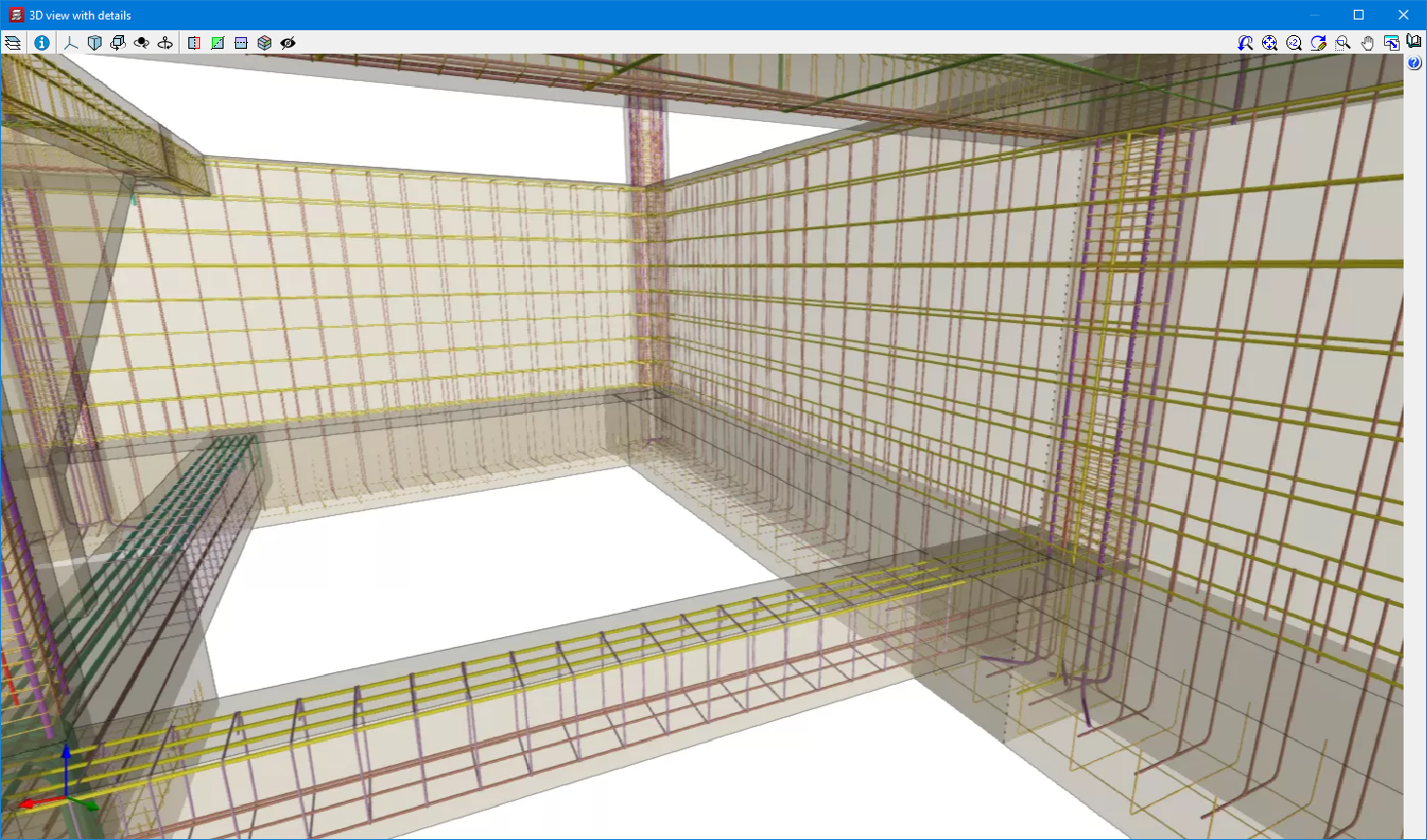
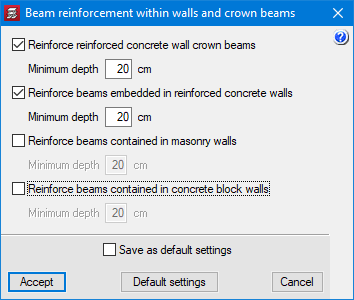
CYPECAD version 2022.g allows the reinforcement of concrete walls to be exported to the BIM project.

Therefore, the concrete elements that export their reinforcement to the BIM project up to this version are:

  • Concrete walls
  • Beam frames
  • Columns
  • Corbels
  • Foundation elements
    Footings, pile caps, strap beams and tie beams.
  • Floor slabs
    Joist floor slabs, waffle slabs, hollow core plate floor slabs, composite slabs and flat slabs.

This reinforcement, along with the reinforcement exported from StruBIM Shear Walls, can be viewed in the StruBIM Rebar program.

They can also be viewed in the "Results" tab (Groups menu > 3D view with details).

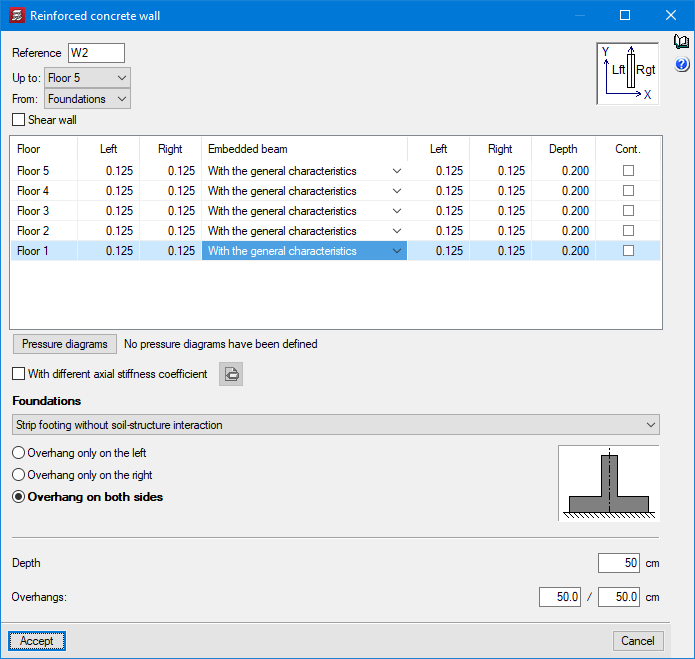
In previous versions, crown beams could be defined in concrete walls. As of version 2022.g, embedded beams can also be defined at the level of each intermediate floor.

As of version 2022.g, the service class can be defined individually for each timber element (columns, beams and joist floor slabs).

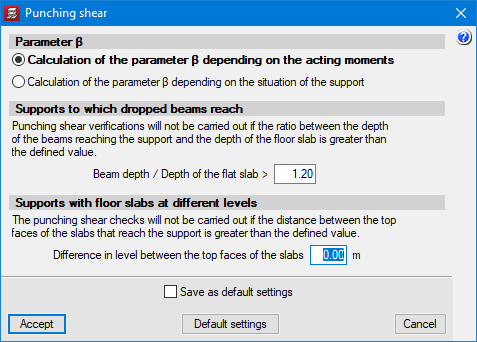
In the “Flat, waffle and joist floor slab options” - “Punching shear” (“Project” menu > “General data” > steel bars “By position” button), the difference between the top surfaces of the floor slabs can be defined in order to carry out the punching shear check in the same way as if they were at the same level. If the distance between the top surfaces of the floor slabs facing the support is greater than the defined value, the punching shear checks will not be carried out.

Version 2022.g of CYPECAD includes other minor improvements and corrections of the program that could occur in certain cases:

  • Improvement in the “Forces in columns, shear walls and walls by loadcase” report
    The “Worst case forces” column in the “Summary of code checks” table has been improved. As of version 2022.g, the worst case forces in the table include the minimum eccentricity and are amplified in order to take into account the second order effects caused by the slenderness of the column, in accordance with the code's criteria.

  • Improved ratio reports
    The “Job ratios” and “Reinforcement ratios, per diameter” reports include the measurement of column starts with external fixity that do not start on a foundation element.

  • Improved calculation of the dimensioned length of beam spans in the "Frame editor"
    In some cases where two continuous beams with different widths meet, the span lengths displayed could be slightly longer than the actual span lengths.

  • Reinforced and prestressed joist floor slabs
    An error that prevented reinforced and prestressed joist floor slabs from being imported in jobs where the Spanish structural code "Código Estructural" standard was selected has been fixed.

  • Improved shear wall removal
    After deleting a shear wall in "Column Definition" its associated beams do not remain on the floors where it was defined unless it was in contact with a panel.

  • Check fire resistance of the current group
    An error that occurred in the "Fire check of the current group" option if shear walls were defined in the job has been fixed.

  • Improvement in the “Tags > Assign” option
    The joints reference is drawn in the “Show References > Joints” option is checked.

  • “Column forces and reinforcement” report
    An error that occurred when obtaining the “Column forces and reinforcement” report if only generic columns were installed in the job has been fixed.

  • Checking column forces
    An error that occurred when checking column forces in jobs that had only defined the foundation level has been fixed.

  • Improved calculation of reinforcement ratios for punching shear checks
    The calculation of reinforcement ratios  “⍴x” and “⍴y” in punching shear checks has been improved. In some cases, the base reinforcement was not taken into account correctly. Furthermore, as of version 2022.g, the default reinforcement is taken into account.

  • Improved punching shear checks
    In the drop panels of waffle slabs, the checks are carried out on the perimeter corresponding to the area outside the punching shear reinforcement as long as this perimeter is completely enclosed by the drop panel.

  • Improved punching shear checks
    After adding reinforcements, the reinforcement ratios are updated if there are changes in the critical perimeter.

  • Column reinforcement drawings
    An error that occurred during the generation of drawings when the transverse reinforcement of a generic section column was not correctly defined has been fixed.

  • Improved import of beams from BIM models
    When importing a BIM model with grouped beams, only the first one was imported. Now, they are all imported.

  • Updating the BIM model
    An error that occurred when updating a BIM project after adding a floor with beams in the project has been fixed.

  • Sharing the BIM model
    An error that occurred when selecting the "Share" option from "BIMserver.center" in the top menu has been fixed. The error occurred when inverted type reinforced joist floor slabs with a central edge value equal to 0 were defined in the job.

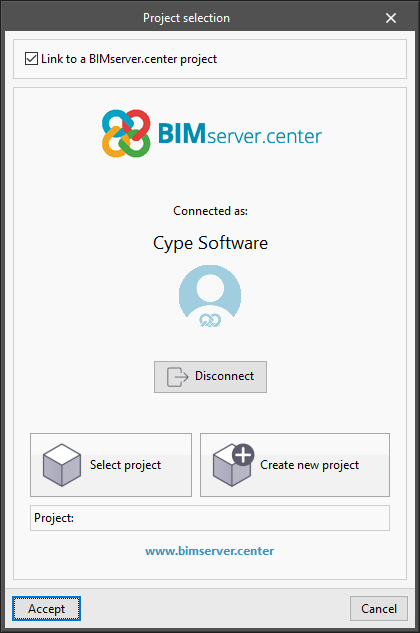
As of version 2022.g, applications that can be linked to a project on the BIMserver.center platform allow the user account to be changed during the project selection process. To do this, a "Disconnect" button has been added below the user's name and image in the "Project selection" panel. When disconnecting the active account, the credentials of the account (email and password) that the user wishes to work with can be entered.

Spanish code "Código estructural" (Real Decreto 470/2021) has been implemented for analysing and designing rolled and built-up section steel structures in CYPECAD and CYPE 3D.

In the previous version (2022.c), it was already implemented in CYPECAD, CYPE 3D, Reinforced concrete cantilever walls, and Embedded retaining walls, for analysing and designing concrete structures; and in CYPE Connect Steel and StruBIM Steel for designing and checking steel connections.

Polish National Annex to Eurocode 3 (Design of steel structures - Part 1-1: General rules and rules for buildings).

Implemented in CYPECAD and CYPE 3D.

"Normas Técnicas Complementarias Para Diseño y Construcción de Estructuras de Acero (Ciudad de México, 2020)".

Implemented in CYPECAD and CYPE 3D.

Polish National Annex to Eurocode 3 (Design of steel structures - Part 1-3: General rules - Supplementary rules for cold-formed members and sheeting).

Implemented in CYPECAD and CYPE 3D.

Version 2022.f of CYPECAD includes other minor improvements and corrections of the program for certain cases:

  • Foundation
    An error that occurred when analysing jobs containing foundation elements with soil-structure interaction in floors affected by wind loads has been fixed.

  • Non-structural beams
    Non-structural beams or limit beams are allowed at the ends of timber joists.

  • Columns schedule
    An error that occurred when obtaining the columns schedule of jobs containing a code without U.L.S checks, and that had a special character in the job name (punctuation marks, for example) has been fixed.  This error occurred in the changes made in version 2022.e.

  • Columns schedule
    An error that occurred when obtaining the column schedule in some unique cases involving sloping roofs has been fixed.

  • Concrete code selection
    There is an improvement in the organisation of concrete codes when it comes to selecting them.

  • Foundation beam dimensioning
    The dimensioning of foundation beams in walls in the drawing of frames has been improved. In some cases, the length shown was somewhat longer than the actual length.

  • Jobs with shear walls and deleted temporary files
    An error that occurred when a job with shear walls was opened and its temporary files were deleted after it had been analysed, has been fixed.

  • Sharing with BIMserver.center with the Spanish structural code "Código Estructural" as the selected standard
    In the "Share" dialogue box (BIMserver.center menu > Share) users can select the "CYPE Memorias CTE" option if the selected standards are those corresponding to the Spanish structural code "Código Estructural".
CYPE Mentor