An option to lock the reinforcement of sloped beams has been implemented in the dialogue box for editing the reinforcement of sloped beams. With this option, users can lock the reinforcement that has been calculated for a given sloped beam after it has been revised or modified. This way, when re-analysing the job, the reinforcement remains locked and the strength checks are carried out with that reinforcement.

Update history​​
CYPECAD
Locking the reinforcement of concrete sloped beams
- Published on
- 2024.b
Ramps. Initial and final support
The support at the beginning and at the end of each section of a ramp is now optional. This possibility can be useful when the ramp is designed with lateral supports.
- Published on
- 2024.b
Ramps. Initial screed and elevation change
Users can now enter an initial screed and elevation change in the desired ramp sections.
- Published on
- 2024.b
Stairs and ramps. Editing reinforcement
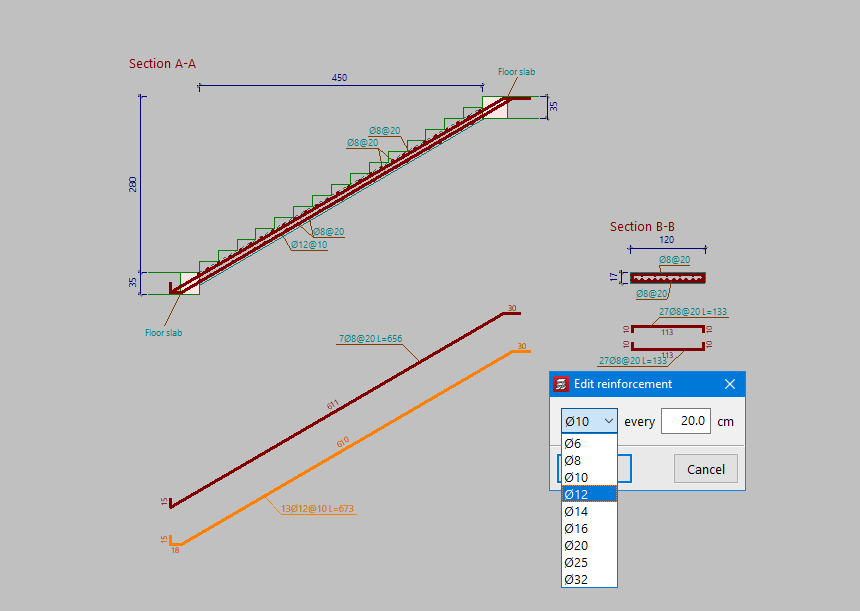
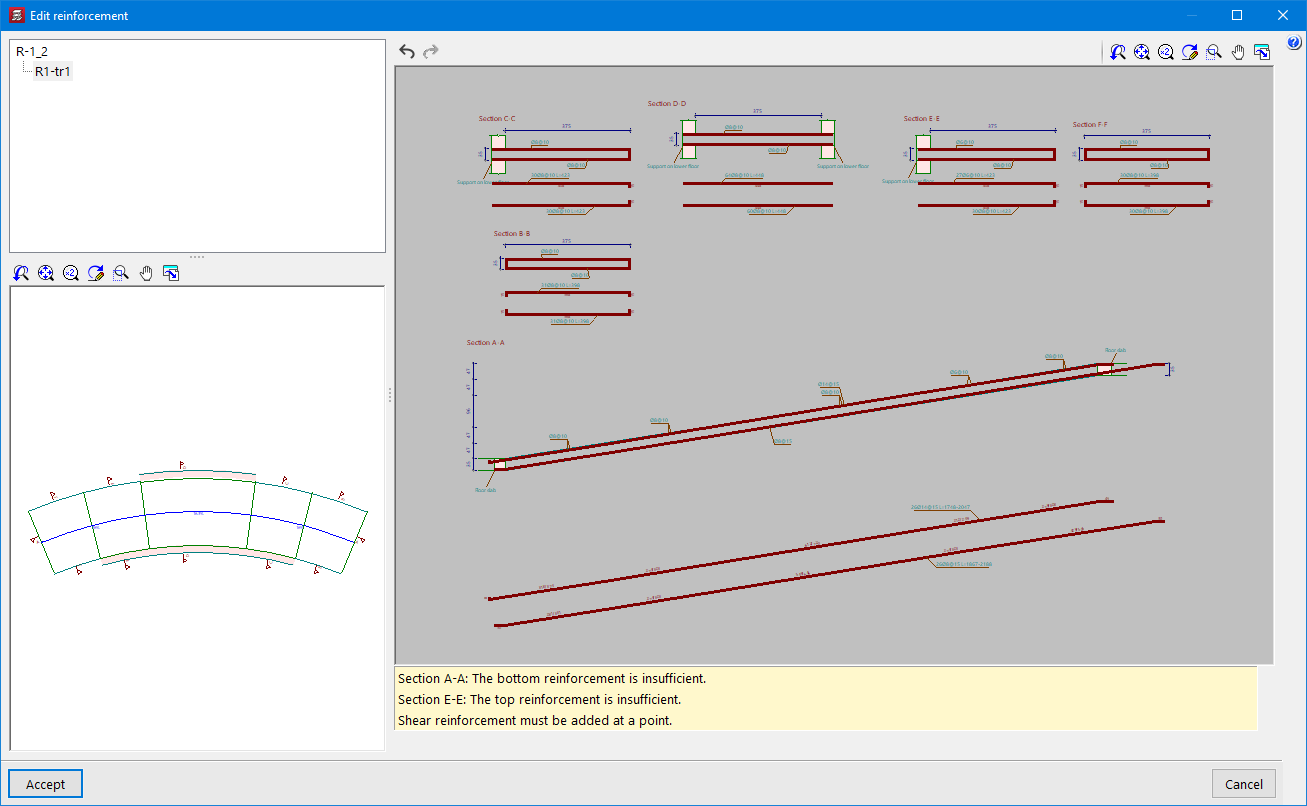
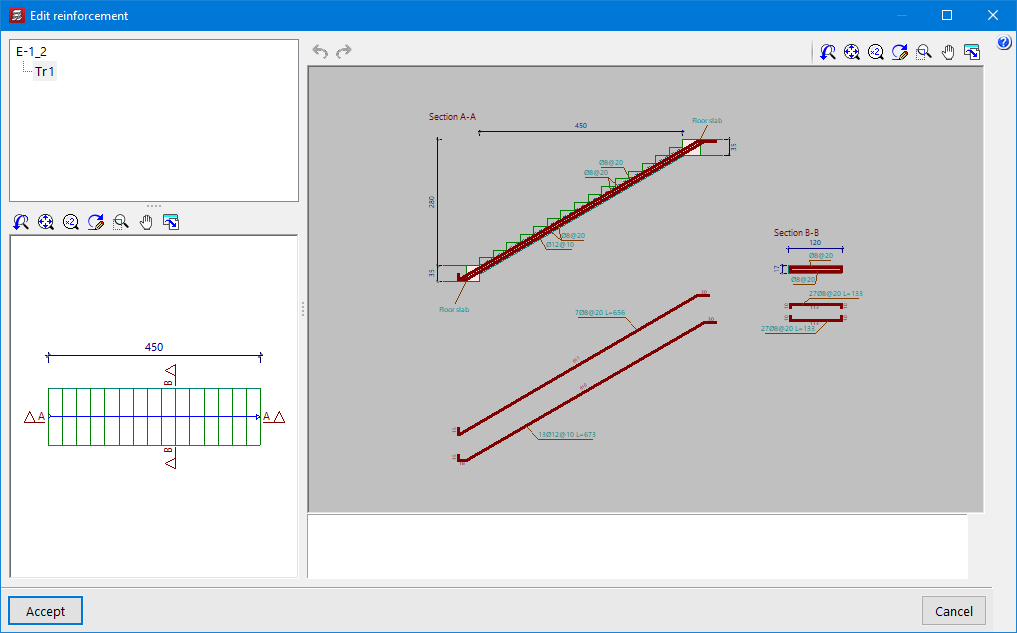
In the "Stairs" and "Ramps" menus, the "Edit reinforcement" option has been implemented. With this option, users can edit the diameter and spacing of the top and bottom reinforcement in each section. Once modified, a check is made to see if the reinforcement provided is sufficient. Should any of the reinforcement not be sufficient, the corresponding warnings are displayed.
- Published on
- 2024.b
Implementation. NB 1225001: 2020 (Bolivia)
“Norma Boliviana del Hormigón Estructural 2020"
Implemented in CYPECAD and CYPE 3D.
- Published on
- 2024.b
Implementation. NSRM-2021 (City of Managua - Nicaragua)
Norma sismorresistente para la ciudad de Managua (2021)
Implemented in CYPECAD and CYPE 3D.
Furthermore, the "Limit drift between floors due to seismic action" has been implemented in CYPECAD for this code. In version 2023.e, this limit was implemented for other seismic codes that were already in the program in that version. More information on the limit drift between floors due to seismic action can be found in this new feature.
- Published on
- 2024.b
Implementation. ANSI/AISC 360-22 (LRFD)
"Specification for Structural Steel Buildings" (2022).
Implemented in:
- CYPECAD and CYPE 3D for analysing and checking rolled and reinforced steel sections.
- CYPE Connect and StruBIM Steel for analysing and checking steel connections.
- Published on
- 2024.b
Improvements in the connection to BIMserver.center
Version 2024.b includes the following improvements and corrections to the connection of applications to the BIMserver.center platform:
- After sharing a contribution, there is a delay before it becomes available in the BIMserver.center project. This could result in another application not having immediate access, even if the export was made from the same computer. Now applications can read contributions from the "File directory stored in local cache" before they are accessible in BIMserver.center.
- It is now possible to export a contribution without an internet connection. When this occurs, a confirmation dialogue box will appear to inform users that if the contribution is exported, it cannot be shared in the BIMserver.center project. The contribution can be read in another application as long as it is on the same computer and linked to the same project. However, for the contribution to be available on the platform, users will need to "Share" it again with an internet connection.
- The uploading process has been improved to allow larger files to be included.
- An error that did not allow users to connect to the platform when the "AppData" system folder was not accessible has been fixed.
- An error that showed the user as logged in when the session had already expired has been fixed.
- The warning messages displayed when there is a problem in the communication with BIMserver.center have been improved.
- Now, when creating a new project, the same default fields are used as in the BIMserver.center website.
- AcouBAT by CYPE, Arquimedes, CYPE 3D, CYPE Architecture, CYPE Connect, CYPE Connect Classic, CYPE Construction Systems, CYPE Cost Estimator, CYPE Gas Supply, CYPE Sewerage, CYPE Water Supply, CYPECAD, CYPEFIRE, CYPEFIRE FDS, CYPEFIRE Hydraulic Systems, CYPEFIRE Pressure Systems, CYPEHVAC, CYPEHVAC Radiant Floor, CYPEHVAC Schematics, CYPELEC, CYPELEC Distribution, CYPELEC Electrical Mechanisms, CYPELEC MULTILINE, CYPELEC Networks, CYPELEC PV Systems, CYPELUX, CYPESOUND, CYPETEL Wireless, CYPETHERM EPlus, CYPETHERM LOADS, CYPEURBAN, IFC Builder, Open BIM Analytical Model, Open BIM Layout, Open BIM Model Checker, Open BIM Quantities, Open BIM Site, Open BIM Switchboard, Plugin Open BIM - Revit, Portal frame generator, StruBIM Box Culverts, StruBIM Cantilever Walls, StruBIM Deep Beams, StruBIM Embedded Walls, StruBIM Shear Walls, StruBIM Steel
- Published on
- 2024.b
Links to the BIMserver.center platform
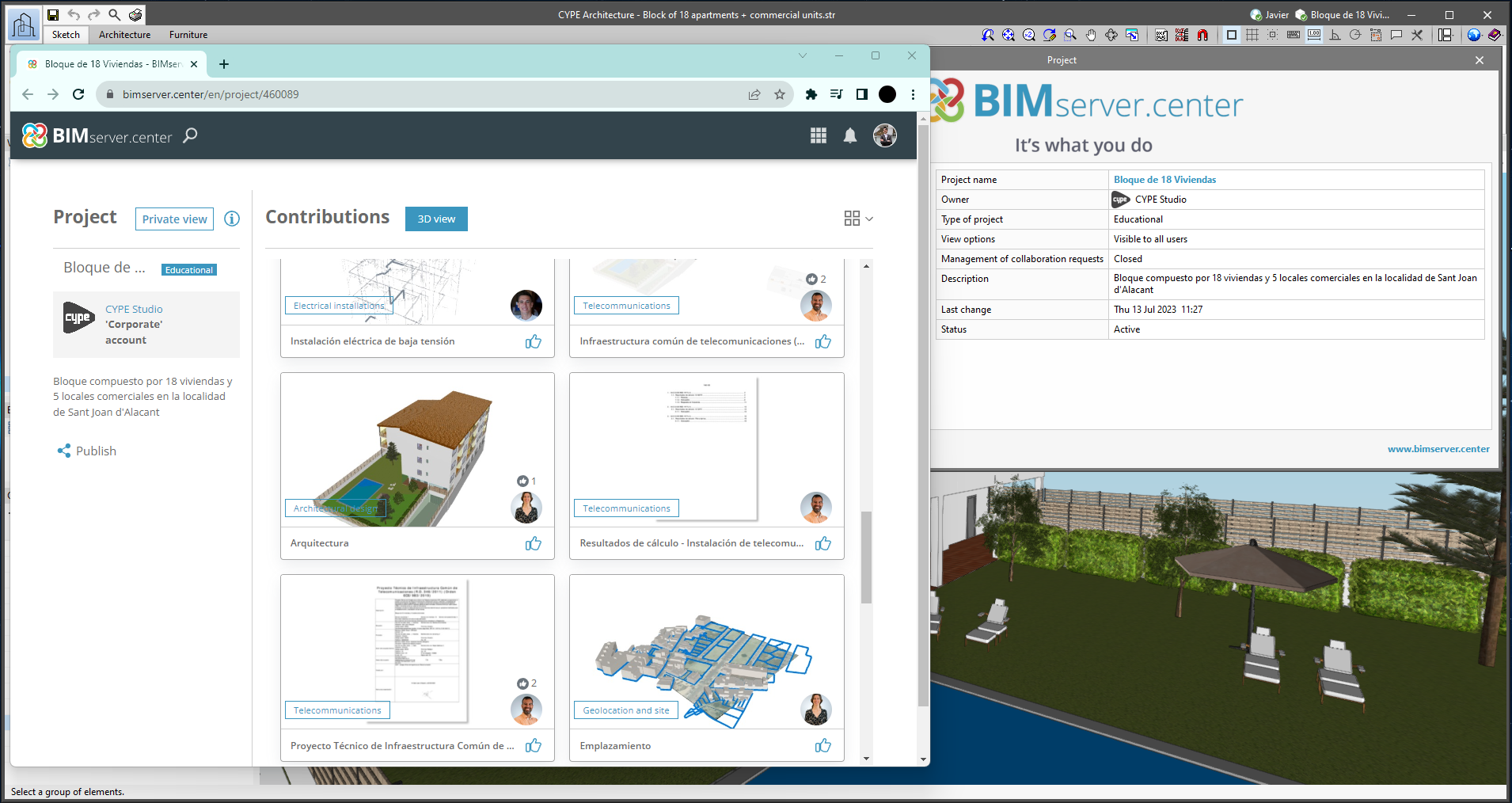
From the BIMserver.center project information window (displayed by clicking on the project name shown in the project information bar - upper right part of the application window) you can access the project page of the BIMserver.center platform via a link that has been inserted in the text indicating the project name.
Likewise, from the information window about the project contributions ("Contributions" option in the project information window), users can access the page of each contribution in the BIMserver.center platform. These links are inserted in the texts indicating the name of each contribution.
- AcouBAT by CYPE, Arquimedes, CYPE 3D, CYPE Architecture, CYPE Connect, CYPE Connect Classic, CYPE Construction Systems, CYPE Cost Estimator, CYPE Gas Supply, CYPE Sewerage, CYPECAD, CYPEFIRE, CYPEFIRE Hydraulic Systems, CYPEFIRE Pressure Systems, CYPEHVAC Radiant Floor, CYPEHVAC Schematics, CYPELEC, CYPELEC Distribution, CYPELEC Electrical Mechanisms, CYPELEC MULTILINE, CYPELEC Networks, CYPELEC PV Systems, CYPELUX, CYPESOUND, CYPETEL Wireless, CYPETHERM EPlus, CYPETHERM LOADS, CYPEURBAN, IFC Builder, Open BIM Analytical Model, Open BIM Layout, Open BIM Model Checker, Open BIM Quantities, Open BIM Site, Open BIM Switchboard, Plugin Open BIM - Revit, Portal frame generator, StruBIM Box Culverts, StruBIM Cantilever Walls, StruBIM Deep Beams, StruBIM Embedded Walls, StruBIM Shear Walls, StruBIM Steel
- Published on
- 2024.b
Notifications on the project status
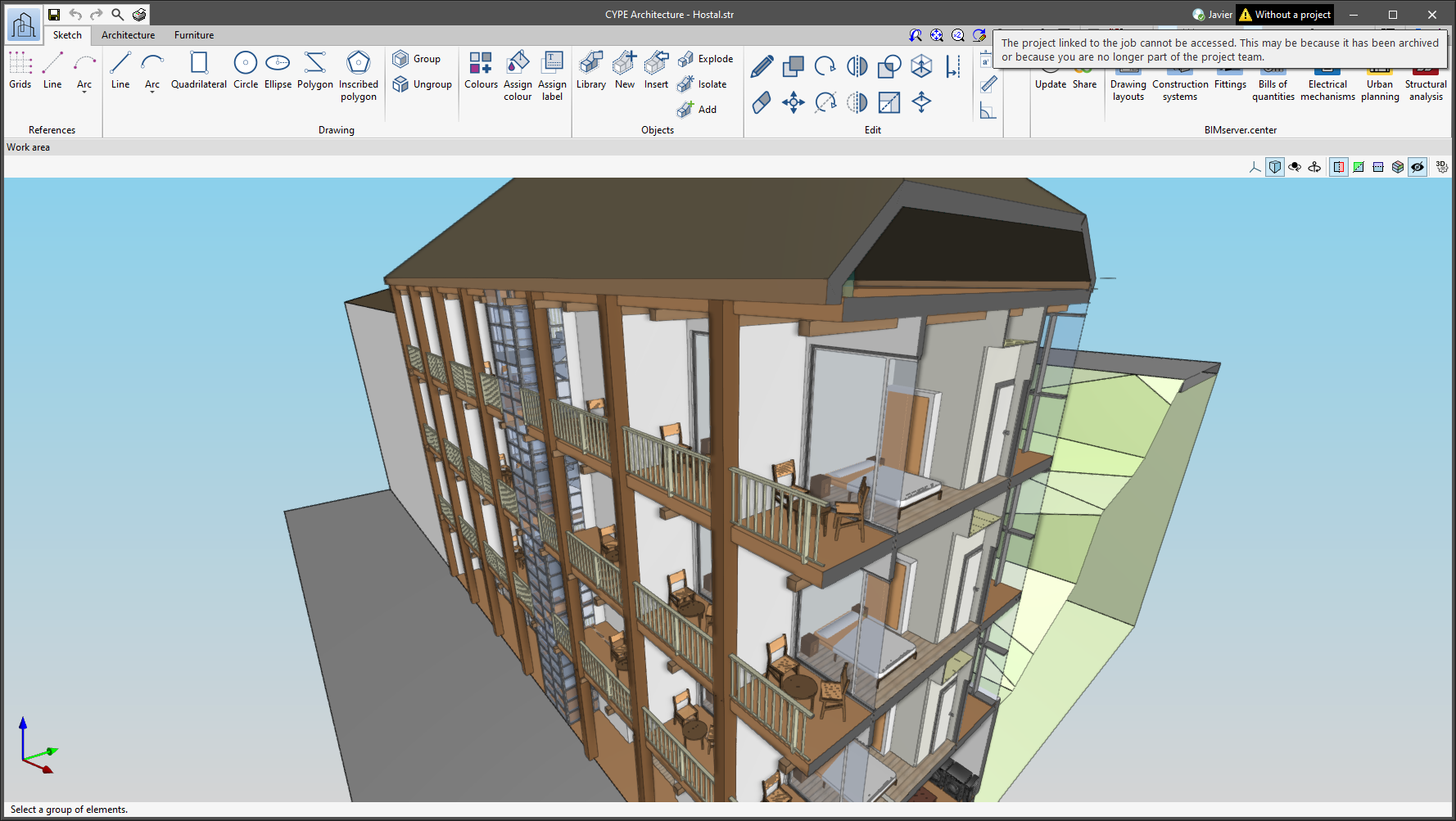
The status information bar of the BIMserver.center project is located at the top right of the window of the programs included in the Open BIM workflow. This bar has been available in the applications since version 2022.e and shows a warning icon when there is a problem with the connection to the project, as well as other things. Now, in version 2024.b, users can obtain more information about the warning by hovering the mouse cursor over the icon.
- AcouBAT by CYPE, Arquimedes, CYPE 3D, CYPE Architecture, CYPE Connect, CYPE Connect Classic, CYPE Construction Systems, CYPE Cost Estimator, CYPE Gas Supply, CYPE Sewerage, CYPE Water Supply, CYPECAD, CYPEFIRE, CYPEFIRE FDS, CYPEFIRE Hydraulic Systems, CYPEFIRE Pressure Systems, CYPEHVAC, CYPEHVAC Radiant Floor, CYPEHVAC Schematics, CYPELEC, CYPELEC Distribution, CYPELEC Electrical Mechanisms, CYPELEC MULTILINE, CYPELEC Networks, CYPELEC PV Systems, CYPELUX, CYPEPLUMBING, CYPESOUND, CYPETEL Wireless, CYPETHERM EPlus, CYPETHERM LOADS, CYPEURBAN, IFC Builder, Open BIM Analytical Model, Open BIM Layout, Open BIM Model Checker, Open BIM Quantities, Open BIM Site, Open BIM Switchboard, Plugin Open BIM - Revit, Portal frame generator, StruBIM Box Culverts, StruBIM Cantilever Walls, StruBIM Deep Beams, StruBIM Embedded Walls, StruBIM Shear Walls, StruBIM Steel
- Published on
- 2024.b
Creating BIMserver.center Corporate projects
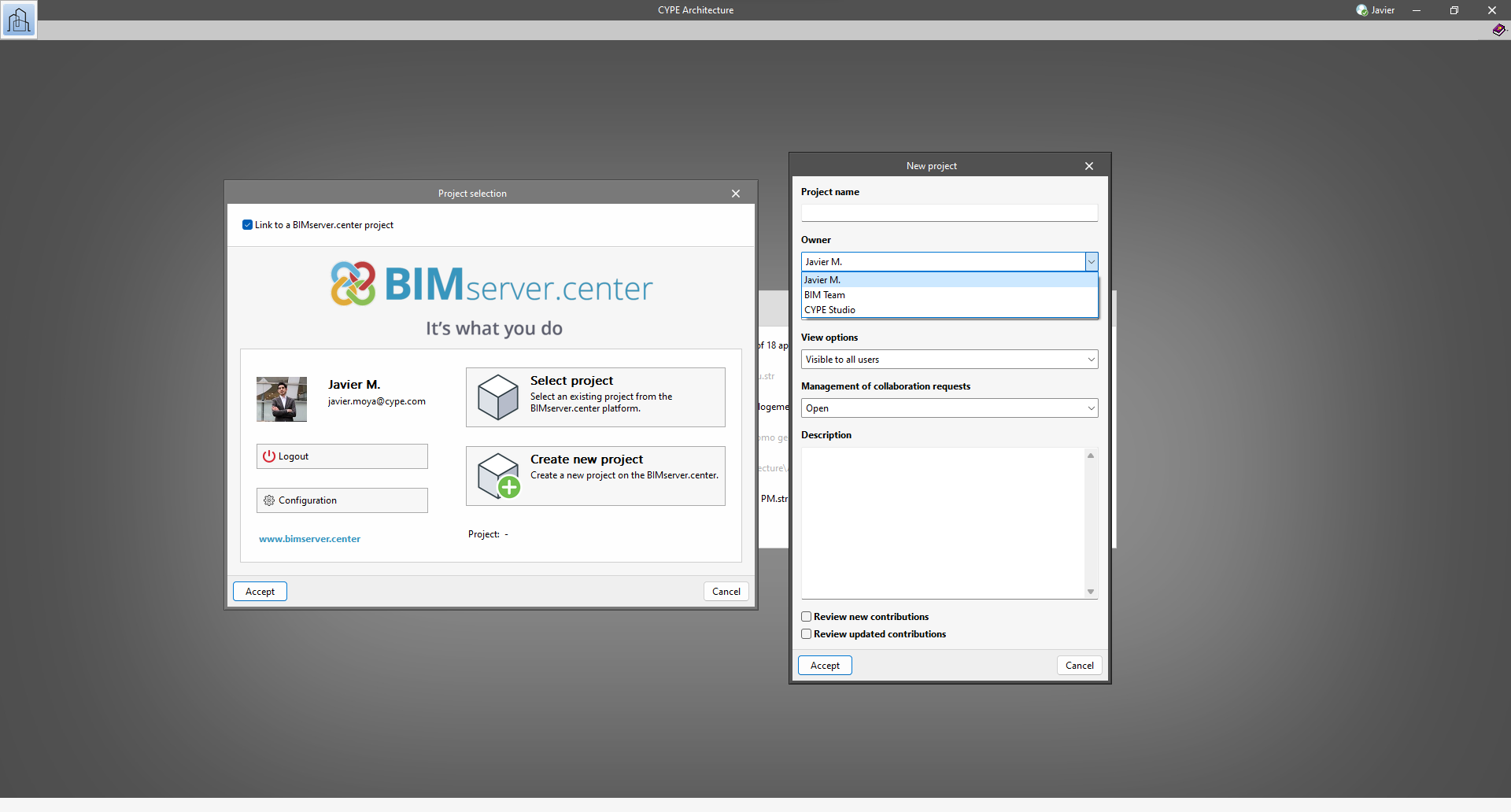
As of version 2024.b, users can create projects associated with a "BIMserver.center Corporate" account from all CYPE applications included in the Open BIM workflow. To do this, the "Owner" field has been added to the window for creating a new project. This is a drop-down menu that includes, as one of the available options, the logged-in BIMserver.center user name along with the "BIMserver.center Corporate" accounts to which it has access. When selecting the user name as the owner, the project will be associated with this personal account, as was the case in previous versions. On the other hand, if a BIMserver.center Corporate account is selected, the project will be associated with that account.
- AcouBAT by CYPE, Arquimedes, CYPE 3D, CYPE Architecture, CYPE Connect, CYPE Connect Classic, CYPE Construction Systems, CYPE Cost Estimator, CYPE Gas Supply, CYPE Sewerage, CYPE Water Supply, CYPECAD, CYPEFIRE, CYPEFIRE FDS, CYPEFIRE Hydraulic Systems, CYPEFIRE Pressure Systems, CYPEHVAC, CYPEHVAC Radiant Floor, CYPEHVAC Schematics, CYPELEC, CYPELEC Distribution, CYPELEC Electrical Mechanisms, CYPELEC MULTILINE, CYPELEC Networks, CYPELEC PV Systems, CYPELUX, CYPEPLUMBING, CYPESOUND, CYPETEL Wireless, CYPETHERM EPlus, CYPETHERM LOADS, CYPEURBAN, IFC Builder, Open BIM Analytical Model, Open BIM Layout, Open BIM Model Checker, Open BIM Quantities, Open BIM Site, Open BIM Switchboard, Plugin Open BIM - Revit, Portal frame generator, StruBIM Box Culverts, StruBIM Cantilever Walls, StruBIM Deep Beams, StruBIM Embedded Walls, StruBIM Shear Walls, StruBIM Steel
- Published on
- 2024.b
Clear cache
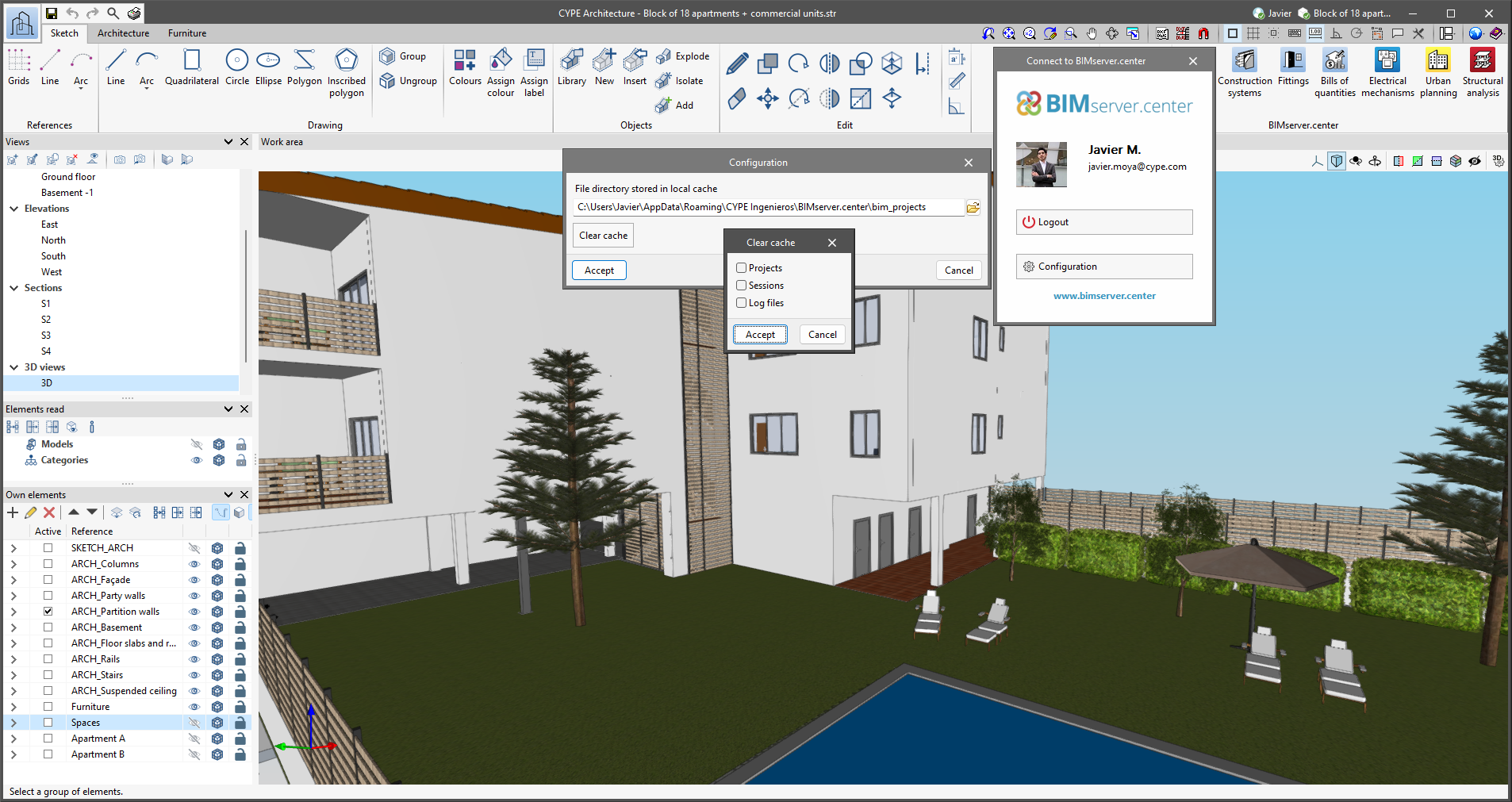
The "Clear cache" button has been added to the CYPE applications included in the Open BIM workflow in the "Configuration" dialogue box that opens with the following sequence of commands: Select any of the options in the "BIMserver.center" tool group > "Configuration" option in the dialogue box that appears. When clicking on "Clear cache", the following options are displayed:
- Projects
Deletes projects, contributions and documents downloaded from the platform that are in the "File directory stored in local cache". - Sessions
Deletes the data of any active sessions. This action will require applications to be re-authorised to access BIMserver.center. - Log files
Deletes transaction logging from applications with BIMserver.center.
- AcouBAT by CYPE, Arquimedes, CYPE 3D, CYPE Architecture, CYPE Connect, CYPE Connect Classic, CYPE Construction Systems, CYPE Cost Estimator, CYPE Gas Supply, CYPE Sewerage, CYPE Water Supply, CYPECAD, CYPEFIRE, CYPEFIRE FDS, CYPEFIRE Hydraulic Systems, CYPEFIRE Pressure Systems, CYPEHVAC, CYPEHVAC Radiant Floor, CYPEHVAC Schematics, CYPELEC, CYPELEC Distribution, CYPELEC Electrical Mechanisms, CYPELEC MULTILINE, CYPELEC Networks, CYPELEC PV Systems, CYPELUX, CYPEPLUMBING, CYPESOUND, CYPETEL Wireless, CYPETHERM EPlus, CYPETHERM LOADS, CYPEURBAN, IFC Builder, Open BIM Analytical Model, Open BIM Layout, Open BIM Model Checker, Open BIM Quantities, Open BIM Site, Open BIM Switchboard, Plugin Open BIM - Revit, Portal frame generator, StruBIM Box Culverts, StruBIM Cantilever Walls, StruBIM Deep Beams, StruBIM Embedded Walls, StruBIM Shear Walls, StruBIM Steel
- Published on
- 2024.b