Main interface
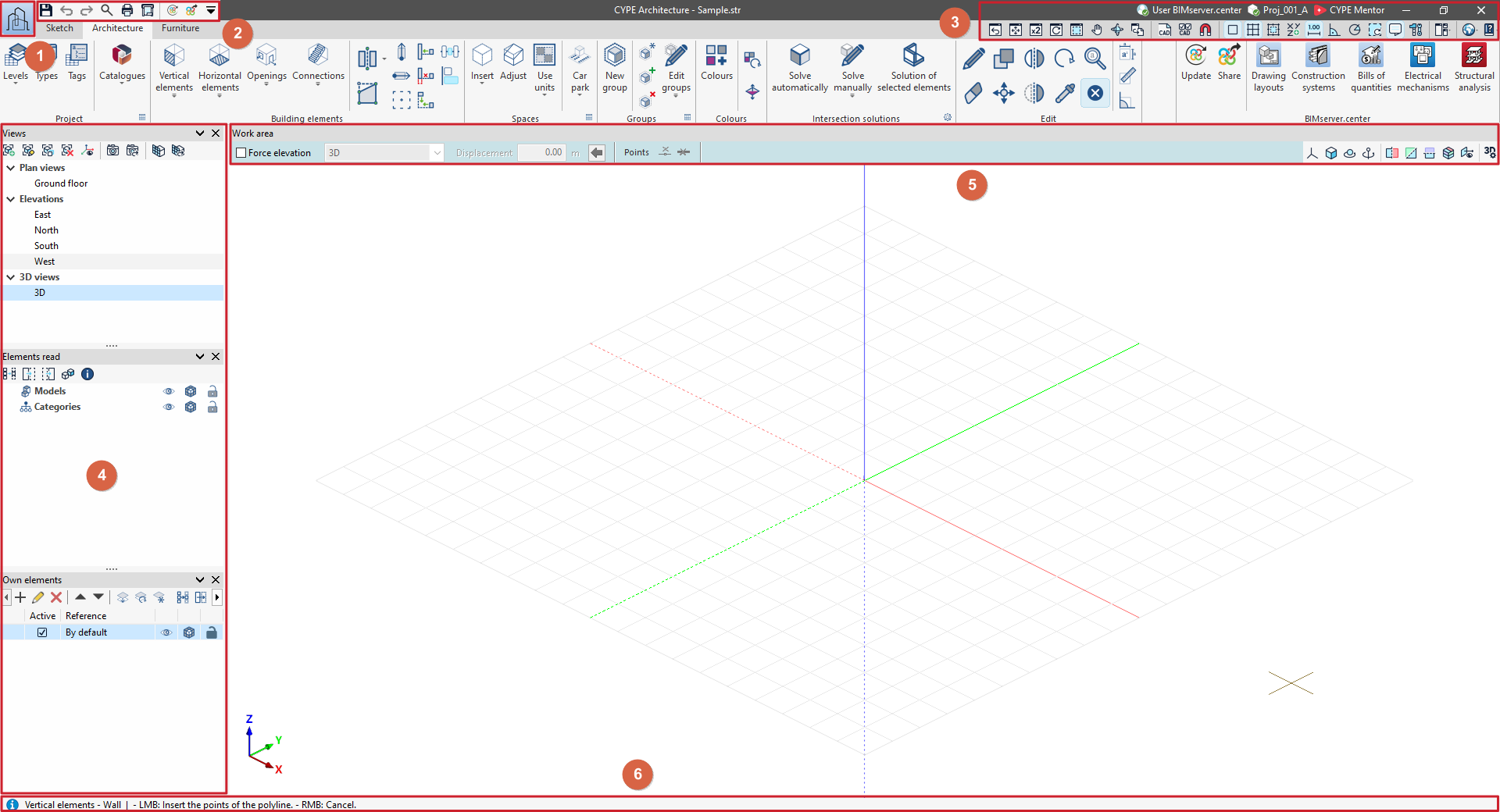
The main interface of CYPE programs is displayed when a project is opened and features various general tools organised into the following areas:
- "File" menu (1)
Create, open or save projects and access the file manager.
- Tools in the top-left corner (2)
Save the file, undo and redo changes, and generate reports and drawings. Also used to search for and quickly access other program features.
- Tools in the top right-hand corner (3)
Change the drawing views, manage templates and their snapshots, activate various tools for inserting elements, control the dockable windows system, access the general configuration options and open the "Help" menu. They also allow you to check the connection to BIMserver.center and access CYPE Mentor.
- Left-hand side panel (4)
By default, this area contains the panels for managing views, levels, read elements and own elements.
- Tools in the "Work area" (5)
The top of the "Work area" window contains options for adding elements to the workspace (on the left) and tools for controlling the visibility of the 3D model (on the right).
- Status bar (6)
This is located at the bottom of the main interface and displays contextual information about what is currently happening in the program.