Installing multiple apps
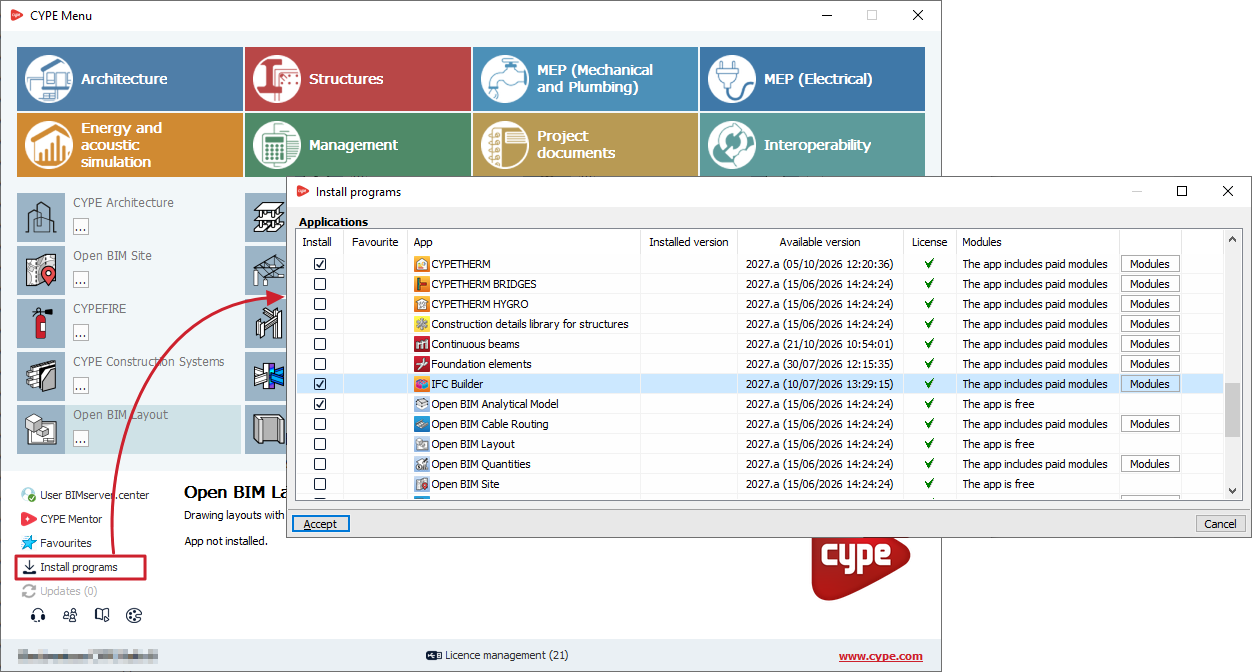
Using the "Install programs" option in the bottom-left-hand corner of the window, CYPE Menu lets you install a specific selection of programs all at once.
To do this, tick the box next to each program, select "Install" in the left-hand column of the pop-up window and confirm.
This window also displays:
- Apps that have been marked as favourites.
- A display of the "Installed version" and the "Available version", along with the date of each.
- Whether a "Licence" is available for it.
- Information on whether "The app is free" or whether "The app includes paid modules".
- A shortcut to view the "Modules" for each app.
By accepting, CYPE Menu will start downloading and installing the selected apps automatically, one at a time.