
Unattended remote installation
CYPE programs can be installed on multiple client machines from a network server without having to respond to the installation prompts at each workstation.
Firstly, you can simply clone or copy the installation from a computer on which the CYPE programs are already installed to another computer on which you wish to install them, using a simple copy-and-paste procedure for folders. To do this, follow the steps indicated in this link.
Secondly, the following options are also available for carrying out an unattended installation of CYPE programs. With the unattended installation of CYPE programs, the CYPE Menu or any of the CYPE programs from the BIMserver.center Store can be installed under the same conditions and with the same responsibilities as the guided installation, on the understanding that all the terms of the license agreement have been read, understood and accepted.
- To do this, you need to download the installation executables by following the steps indicated in this link.
During the download, you must disable the "Install automatically after download" option if you wish to carry out an unassisted installation. Otherwise, the assisted installation will run, which will require you to respond to the questions asked during the installation process from each workstation.
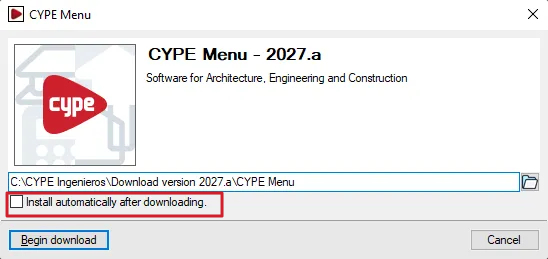
- These files can then be run using the following command and parameters. This allows you to carry out an unassisted installation of the CYPE programs:
“name.exe”{space}drive{space}/unattended{space}/hidden{space}/version_type:
| {space} | Represents a blank space. |
| “name.exe” | This is the name of the file that runs the installation you wish to carry out. It must be entered in quotation marks, as the installation executables for CYPE programs contain spaces. The executable file extension (.exe) must also be included. The default location of this file is: For the CYPE Menu app (available in versions 2025.a and later): C:\CYPE Ingenieros\Download version 20xx.x\CYPE Menu\installation_language\Install CYPE Menu.exe For any BIMserver.center program (any version): C:\CYPE Ingenieros\Download version 20xx.x\programme_name\installation_language\Install programme_name.exe This path can be edited and changed in the dialogue box that appears during the program download process. |
| unit: | This is the drive letter of the client machine’s hard disk (including the ‘:’ character), where you wish to install the program. |
| /unassisted | A mandatory parameter that prevents the installation questions from being displayed on the client machine. |
| /not_visible | An optional parameter that prevents any installation process screens from being displayed on the client machine. |
| /type_version: | Optional parameter that specifies the type of version to be installed. This is only required for versions before 2026.a (excluding 2026.a). The permitted values are: /version_type:professional /version_type:evaluation /version_type:campus /version_type:temporary . If “/version_type:” is omitted, the default value is “/version_type:professional”. |
| Note: |
|---|
| When carrying out an installation on a client machine on the network, it may be advisable to inform the relevant users (via the system used by the network administrator for remote installation) that a process is about to take place during which the machine must not be switched off or disconnected from the network. Furthermore, if the security devices for the CYPE programs you are using are single-user USB dongles, you should advise users of the client machines to remove them from the USB port to which they are connected and only to reinsert them once the installation process has been completed. |




















































