
Uninstalling CYPE software
Uninstalling from the CYPE Menu
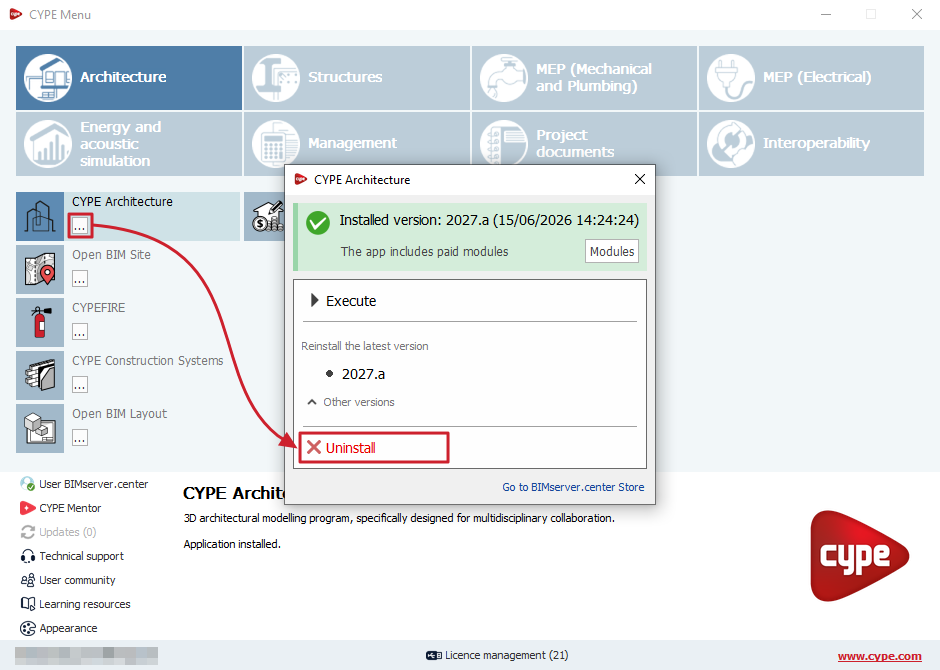
If the program has been installed via CYPE Menu, to uninstall it, open CYPE Menu, click on the options icon next to the program name and, in the pop-up window, select "Uninstall". This will delete the folder “C:\CYPE Ingenieros\Version 20XX\CYPE Menu\app_ID\” corresponding to the program.
Uninstalling using the operating system’s built-in function
You can uninstall CYPE programs using the Windows operating system’s function for removing or uninstalling programs. Depending on which version of Windows you are using, this function can be carried out in different ways. If you are using a recent version of Windows, you can do this via the Windows "Control Panel" by selecting "Programs and Features". Next, locate the program in the list, right-click on the one you wish to uninstall, and select the "Uninstall or change a program" option.
This will cause the operating system to completely remove the selected programme from the computer. If it is currently running, you will need to close the CYPE program you wish to uninstall before proceeding.
Using this function, Windows will delete the following directories or items from the drive where the CYPE programs have been installed:
- The subdirectory "C:\CYPE Ingenieros\Version 20XX\program_name", corresponding to the program and version you have selected for uninstallation.
- The shortcut to the CYPE programs, created automatically by the CYPE program installer, whether it is on the desktop or in the Windows "Start" menu. If the user changes the location or name of this shortcut, it will not be removed when the program is uninstalled.
- If the "Also delete all CYPE program configuration files" option is selected, the user configuration files (subdirectory “C:\Users\username\AppData\Roaming\CYPE Ingenieros\v20XX\"). This option will be disabled by default when you select to uninstall the program via the Windows uninstallation function. We recommend that you do not delete the user configuration files if you expect to need them later. Deleting user configuration files would result in the loss of user-defined program settings across the various CYPE programs installed (such as CYPECAD’s reinforcement tables, the user’s Arquimedes report templates, or the building component materials in building installation calculation programs such as CYPECAD MEP).
| Note: |
|---|
| The remaining subdirectories in "C:\CYPE Ingenieros" (apart from the one mentioned) corresponding to the installation of other versions or other programs not selected during the uninstallation process are not deleted, nor are other subdirectories such as "Projects", "Examples", "Reports" or "DWG Drawings", as CYPE programs save information on projects, examples, reports or generated drawings in these by default. If users would like to delete these subdirectories, they must do so manually and ensure that they have backups of the data they wish to keep. |
Uninstalling manually
If you wish to manually uninstall one or more CYPE programs, simply locate and delete the programs’ installation folders. These folders are named as follows: "C:\CYPE Ingenieros\Version 20XX\program_name" (or, if the program was installed via CYPE Menu, "C:\CYPE Ingenieros\Version 20XX\CYPE Menu\app_ID\").
| Note: |
|---|
| You should not delete the other subfolders within the "CYPE Ingenieros" folder if you want to retain the installation of other versions or other programs, or the project data, examples, output files or generated drawings, which are located in the folders mentioned in the previous point. |




















































