
CYPE Crash Reporter
CYPE Crash Reporter is a tool designed to facilitate communication between the user and the CYPE team, enabling users to report and submit error reports as soon as they occur in the programs, with the aim of notifying the team of the issues and speeding up their resolution.
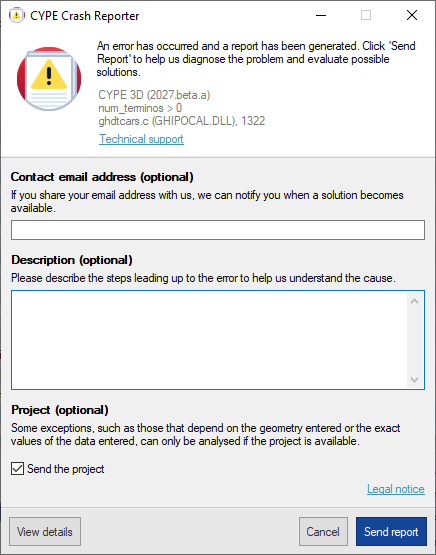
The CYPE Crash Reporter panel opens automatically when an error occurs and allows you to enter the following details to complete the report:
- Contact email address (optional)
In this text field, users can enter their contact email address. This way, the CYPE team can notify users when a solution becomes available. - Description (optional)
In this text field, you can provide details of the steps taken before the error occurred, so that the situation is clearly described, which will help the CYPE team to understand the procedure followed and identify the cause. - Project (optional)
- Send the project (optional)
When the “Send the project” option is selected, CYPE Crash Reporter automatically sends the project to the CYPE team along with the error report.
The project file must be submitted in order to identify certain errors that cannot be reproduced without the project, such as those dependent on the geometry entered or the exact values of the data entered.
Some errors may be difficult to reproduce even when the project is available (for example, if they occur whilst an element is being added); in these cases, having the project where the error occurred significantly increases the chances of identifying and correcting the problem.
- Send the project (optional)
At the bottom of the panel, in addition to the "Legal notice", the following options are displayed:
- View details
Displays technical details about the error, the program, the user and the system. - Cancel
Cancels the sending of the error report. - Send report
Generate and send the error report, and the information provided, to the CYPE team.
| Note: |
|---|
| Reports submitted via CYPE Crash Reporter are sent directly to CYPE’s Development department, not to Technical Support. The aim is to analyse and rectify the problem to prevent it from recurring in future versions of the program, both for the user who reported it and for all other users of the program. However, if you require specific assistance in identifying the cause or would like to find a temporary solution whilst we work on the fix, you can contact Technical Support via the usual channels. The correction of errors is neither an automatic nor an immediate process, and you may need to wait for the release of a new version that includes the corrected errors. For this and other reasons, we recommend keeping your software up to date. CYPE releases updates on an ongoing basis and the error you have encountered may already have been corrected in a more recent version. |




















































